
Known Participant
March 5, 2020
Answered

Use legacy “New Document” interface is grayed out in Photoshop CC 21.1

  • March 5, 2020
  • 8 replies
  • 23203 views

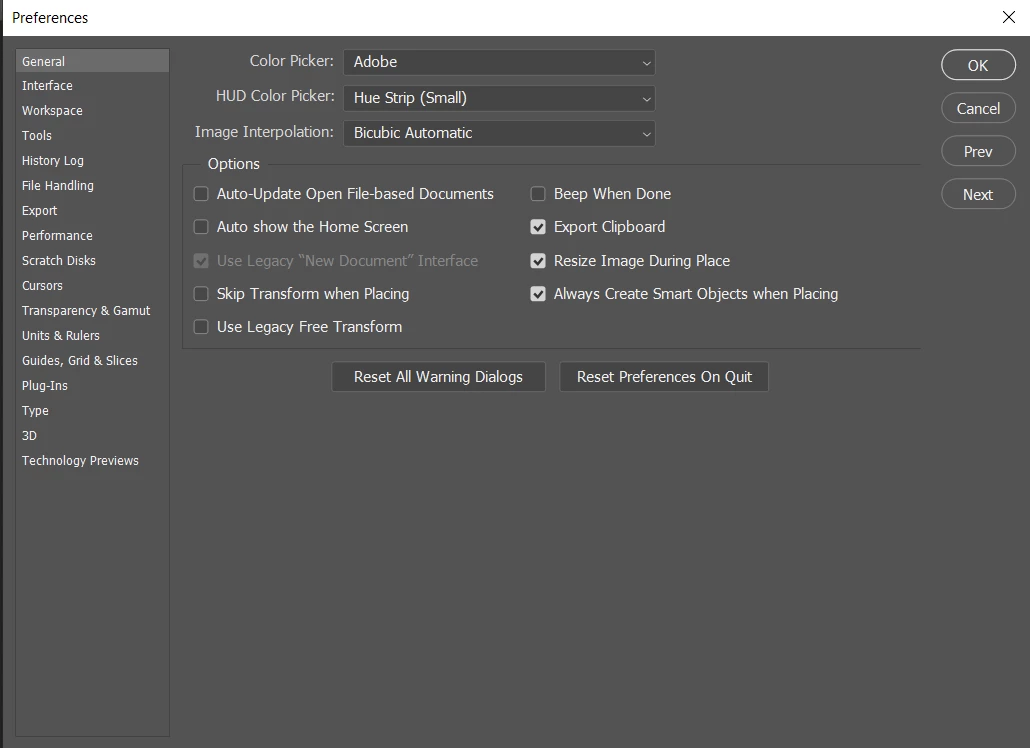
I'm using the latest version of Photoshop and it's been going great so far. But when I open it up it shows the old legacy "new document" interface which drives me crazy. And when I want to un-check it. It's not possible because it's grayed out. Here is the preview:-
 

What I have tried so far.

  1. I installed and re-installed it
  2. Checked and unchecked all the boxes near it (In the general tab only to know if it will be released but no)
  3. And have reset the Preferences (edited)
  4. Have checked the "Load extensions panel" (edited)
  5. Uninstalled and reinstalled Photoshop after cleaning up with the CC cleaner tool (edited)
  6. Added a new user account (admin) to try it but to no avail

Please, what could be the issue? Thanks in advance
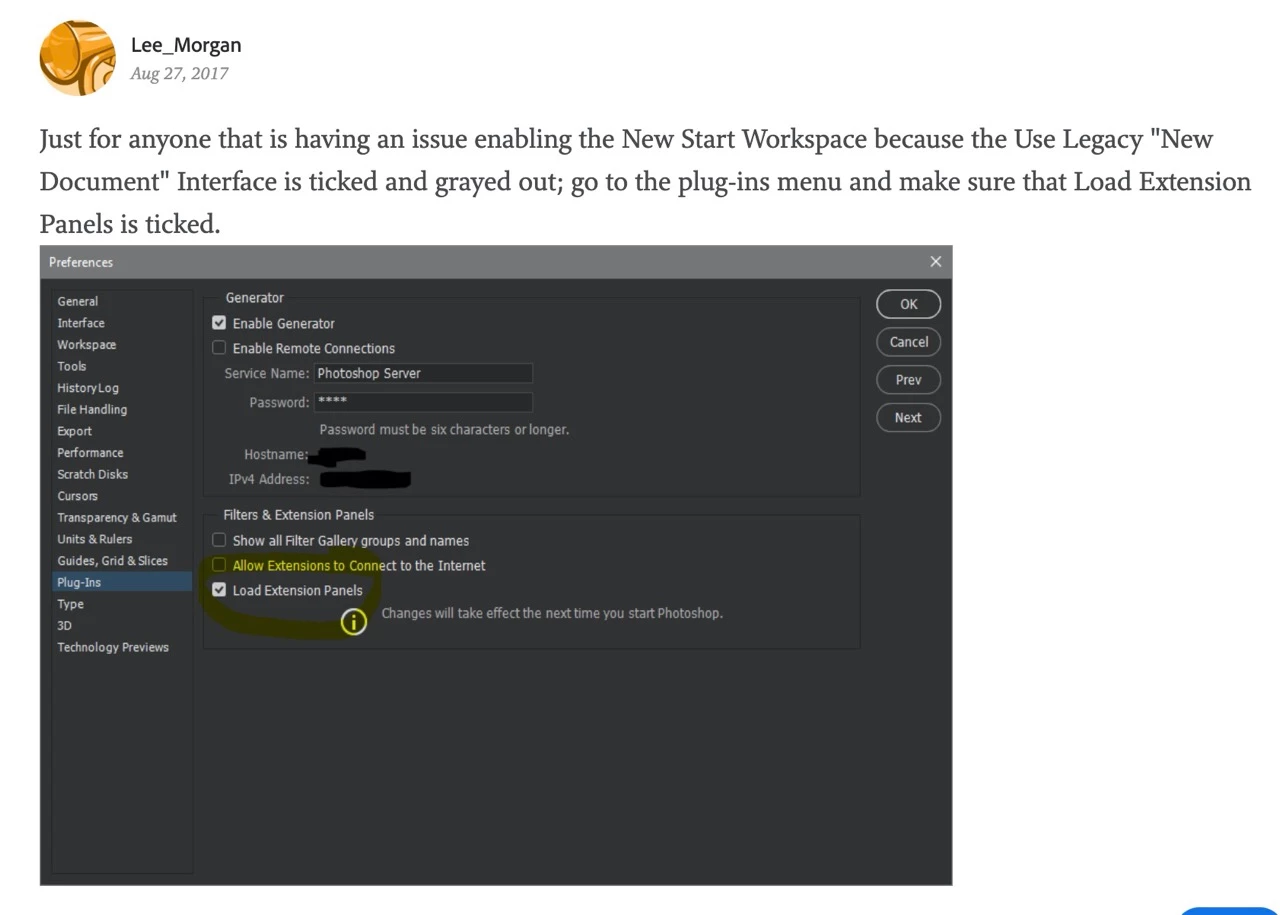
Correct answer igor.artt

Found this answer


8 replies

Participant
February 13, 2023

I know this isn't particularly helpful, but after going through this whole thread I just closed and reopened and now it's back to normal. So if you haven't already, do that, may save you some headache. 

Participant
May 5, 2020

Hi, Just hold the 'shift' key and then double click on the photoshop icon to open it.

Participant
April 8, 2024

Woah Man... It worked for me. Thank you so much 🙂

igor.arttCorrect answer
Participant
March 30, 2020

Found this answer


Known Participant
December 13, 2024

Hello! I did that and it still did not work. What could i do instead?

March 5, 2020

Hi

Can you post your Photoshop system info, in Photoshop go to Help > System Info, hit the copy button and paste the entire thing into this thread.

You could try using this tool to completely removed Photoshop and any remnants left behind then re-install

https://helpx.adobe.com/creative-cloud/kb/cc-cleaner-tool-installation-problems.html

PECourtejoie
Community Expert
Community Expert
March 5, 2020

Hello, yes, I'm wondering about GPU acceleration, and if Photoshop has all privileges 

husseinAAAuthor
Known Participant
March 5, 2020

And does it have? Also any ideas on how to make it work? 

gener7
Community Expert
Community Expert
March 5, 2020

Sorry I'm out of ideas. You can either try googling the problem or start a chat with Customer Care.

husseinAAAuthor
Known Participant
March 5, 2020

Thanks for the suggestions though sorry if I bothered you 🙂 Have a good day/night

gener7
Community Expert
Community Expert
March 5, 2020

Go to the Plug-ins section of Preferences and see that "Load Extension Panels" is checked on. Restart Photoshop.

husseinAAAuthor
Known Participant
March 5, 2020

Sorry, but this didn't work too. Do you know other ways to solve this?


Thank you

gener7
Community Expert
Community Expert
March 5, 2020

Let's try something different and hope that cures it.


With your General Preferences screen open, press the Alt key on your keyboard. The Cancel button under the OK button will change to Reset. Click on that Reset. You may need to restart Photoshop, but anyway give it a go.

husseinAAAuthor
Known Participant
March 5, 2020

Sorry but still the same thing

Is there something else I can do?

Thanks

Derek Cross
Community Expert
Community Expert
March 5, 2020

Try resetting the Photoshop preferences. 

husseinAAAuthor
Known Participant
March 5, 2020

Sorry, but this doesn't work I have tried it and tried it again just now


I have clicked the "Reset Preferences on quit" button and removed the Settings file and clicked Alt+shift+Ctrl when Photoshop is starting up. And still, the issue is there


Any Ideas?


Thanks