


- Home
- Photoshop ecosystem
- Discussions
- using top layer name in save as for web and genera...
- using top layer name in save as for web and genera...
using top layer name in save as for web and generate file name

Copy link to clipboard
Copied
I have a T-Shirt mockup file with 3 or 4 different templates (Style) in 1 PSD file.
I load my design to templates and after resize it (depend on template) and move them to right position, then using Actions for make JPG files for my web-store.
I have 3-4 templates and each template have 6 colors.

At the moment, I made 4 folders (like 3L-1, 3L-2, 3L-3 ,...).
By Using Actions, in each folder, save files by these name "3Wh_.jpg", "3Gr_.jpg", "3Bl_.jpg", "3Mg_.jpg", "3Nb_.jpg" and "3Cl_.jpg" through Save for Web (Legacy). (the alphabets indicate colors like Wh=White)

After this step and making JPG files, then I rename them and add "Design code" and template number to end of all files. (for example: the files for design#13305 will be like these 3Bl_13305-1.jpg, 3Bl_13305-2.jpg & ...)

and as the last step, moving all files to one folder and then go for next design and make JPG files again.
At the end upload pictures.

my question is:
I heard that can do these steps easier in PhotoShop by using script but don't know too much about Java Scripts.
I add a blank layer as top layer and write "Design code" as the layer's name.
I want to use this layer's name in filename when making JPG files by Save for web. (the filename template will be like this 3Wh_LayerName-1.jpg, 3Wh_LayerName-2.jpg , ..., 3Bl_LayerName-4.jpg & .... )
Can anybody help and guide me to do this ?
Thanks
P.S: I'm using PhotoShop CC 20 on Mac system.



Explore related tutorials & articles
 16
Replies
16
16
Replies
16


Copy link to clipboard
Copied
Forums are here to help users. They are not design to be teaching tool to teach one a skill like programming or a language like JavaScript or using Photoshop scripting. You can not expect to a forum to teach you some Photoshop skill like scripting, You can get expect to get help with any problem you have writing a script. You should not expect user here to write a very complex script for you. For only you can design the automated process. Scripting has limitations and its like programming your workflow. That task falls on you.
It is one thing to use Programs that others write like word, Photoshop, Image processor. Its a different thing the write such programs. You need programming skills to write a custom Photoshop Scripts. JavaScript is the best of three supported languages for it is supported on both PC and Mac Photoshop versions. The other choices are for PC or Mac version.
You also need to know and understand Photoshop well how to use it and how it dose things.

Copy link to clipboard
Copied
What you want to do is possible, but a bit ambitious if you're unfamiliar with javascript. I started learning it for pretty much tuh e same reason: to make the repetitive tasks that I had to do easier. Best to start out with small steps and see how things work. Download the variety of SDKs for Photoshop Extendscript. These aren't the easiest things to understand, but we can help with places where you get stuck. If you're not up to writing it yourself, there are people you can hire who will write the script for you.
This is also an excellent book on writing code, easier to understand.
Copy link to clipboard
Copied
I found these:
- ScriptingListener plug-in
- Extendscript Toolkit CC
JJMack also I find an script from you in Re: save as with active layer or TOP layer name in photoshop
it helped me to solve my first step
now I'm changing the name of top layer and then run this script:
// =============================
var docpath = "/Users/bahizad/Downloads/__Moona/123" // == The location that I want save the files
// == Select the top layer if it's not the current layer ==
var idslct = charIDToTypeID( "slct" );
var desc69 = new ActionDescriptor();
var idnull = charIDToTypeID( "null" );
var ref37 = new ActionReference();
var idLyr = charIDToTypeID( "Lyr " );
var idOrdn = charIDToTypeID( "Ordn" );
var idFrnt = charIDToTypeID( "Frnt" );
ref37.putEnumerated( idLyr, idOrdn, idFrnt );
desc69.putReference( idnull, ref37 );
var idMkVs = charIDToTypeID( "MkVs" );
desc69.putBoolean( idMkVs, false );
var idLyrI = charIDToTypeID( "LyrI" );
var list19 = new ActionList();
list19.putInteger( 227 );
desc69.putList( idLyrI, list19 );
executeAction( idslct, desc69, DialogModes.NO );
//=== use top layer's name (current layer) as part of FileName ===
var doc = app.activeDocument;
var activeLayer = doc.activeLayer;
var saveFile = File(docpath + "/" + "3Wh_" + activeLayer.name + "-1" + ".jpg");
therefore "saveFile" is the correct filename that I want to generate.
now if I can find a way (write the script) that my current Action using "saveFile" & "docpath" instead of fixed filename (that I entered when recorded the Action), I guess everything will be done.
here is the script that I got by script listener when run my current Action.
// =======================================================
var idPly = charIDToTypeID( "Ply " );
var desc116 = new ActionDescriptor();
var idnull = charIDToTypeID( "null" );
var ref54 = new ActionReference();
var idActn = charIDToTypeID( "Actn" );
ref54.putName( idActn, "Long 1 - Light" );
var idASet = charIDToTypeID( "ASet" );
ref54.putName( idASet, "DC Preview" );
desc116.putReference( idnull, ref54 );
executeAction( idPly, desc116, DialogModes.NO );
Copy link to clipboard
Copied
The script action you recorded can be used for any action. Put it in a function to just replace the name of the action:
runAction(actionName){
//action manage code here
//replace the action name in line 7 with actionName}
Run the function like this:
runAction('My Action Name')
It's actually a good idea to use scriptListener to record you actions, so they are all in your script, and don't have to actually maintain the link to where your actions are stored. Makes it easier when switching computers.

Copy link to clipboard
Copied
I would suggest that the “obvious” place to start would be using Adobe Bridge’s Batch Rename tool, unless you really wanted to learn scripting.

Even later versions of the Mac OS offer a less flexible batch rename feature directly in the Finder.

Copy link to clipboard
Copied
Thanks everyone that share their idea to help me.
I almost find how to do it.
just have problem by "Save for web" step.
I want to save by these setting:

filename and folder location defined in script.
what script I should use for this purpose?
Copy link to clipboard
Copied
Without having access to your full working script code, it may not be as simple as dropping this DOM code in at the end:
function SaveForWeb(saveFile,jpegQuality) {
var sfwOptions = new ExportOptionsSaveForWeb();
sfwOptions.format = SaveDocumentType.JPEG;
sfwOptions.includeProfile = false;
sfwOptions.interlaced = 0;
sfwOptions.optimized = true;
sfwOptions.quality = jpegQuality(80);
activeDocument.exportDocument(saveFile, ExportType.SAVEFORWEB, sfwOptions);
};
Re: A script for "Save for Web" as .jpg
Looking at the JavaScript Reference Guide, I don’t believe that the SaveForWeb scripting can access the resizing, so if your source images are larger than the 1000px x 1000px indicated in your screenshot extra code would be required for “fit image".
Copy link to clipboard
Copied
And here is some simpler code to drive the FitImage command:
//https://forums.adobe.com/message/3074226#3074226
FitImage(1000,1000); //Resizes to the longest size
function FitImage( inWidth, inHeight ) {
if ( inWidth == undefined || inHeight == undefined ) {
alert( "FitImage requires both Width & Height!");
return;
}
var desc = new ActionDescriptor();
var unitPixels = charIDToTypeID( '#Pxl' );
desc.putUnitDouble( charIDToTypeID( 'Wdth' ), unitPixels, inWidth );
desc.putUnitDouble( charIDToTypeID( 'Hght' ), unitPixels, inHeight );
var runtimeEventID = stringIDToTypeID( "3caa3434-cb67-11d1-bc43-0060b0a13dc4" );
executeAction( runtimeEventID, desc, DialogModes.NO );
}
Copy link to clipboard
Copied
Below is Action Mager code for saving for web. I noticed that you're changing the size of the image in this step; however the code only has the percentage for the size, and not the pixel size. So if your images are of different sizes, you will have to calculate the percentage. Then insert a variable with that percentage on lines 45 and 55 of the script I posted below. One line 17, you insert the file path. And on line 19, you put in the new file name you want.
#target photoshop
var doc = activeDocument;
var newName = 'myNewFile' + doc.activeLayer.name +'.jpg'
var idExpr = charIDToTypeID( "Expr" );
var desc24 = new ActionDescriptor();
var idUsng = charIDToTypeID( "Usng" );
var desc25 = new ActionDescriptor();
var idOp = charIDToTypeID( "Op " );
var idSWOp = charIDToTypeID( "SWOp" );
var idOpSa = charIDToTypeID( "OpSa" );
desc25.putEnumerated( idOp, idSWOp, idOpSa );
var idDIDr = charIDToTypeID( "DIDr" );
desc25.putBoolean( idDIDr, true );
var idIn = charIDToTypeID( "In " );
desc25.putPath( idIn, new File( doc.path ) ); //doc path
var idovFN = charIDToTypeID( "ovFN" );
desc25.putString( idovFN, newName ); //file name
var idFmt = charIDToTypeID( "Fmt " );
var idIRFm = charIDToTypeID( "IRFm" );
var idJPEG = charIDToTypeID( "JPEG" );
desc25.putEnumerated( idFmt, idIRFm, idJPEG );
var idIntr = charIDToTypeID( "Intr" );
desc25.putBoolean( idIntr, false );
var idQlty = charIDToTypeID( "Qlty" );
desc25.putInteger( idQlty, 80 );
var idQChS = charIDToTypeID( "QChS" );
desc25.putInteger( idQChS, 0 );
var idQCUI = charIDToTypeID( "QCUI" );
desc25.putInteger( idQCUI, 0 );
var idQChT = charIDToTypeID( "QChT" );
desc25.putBoolean( idQChT, false );
var idQChV = charIDToTypeID( "QChV" );
desc25.putBoolean( idQChV, false );
var idOptm = charIDToTypeID( "Optm" );
desc25.putBoolean( idOptm, true );
var idPass = charIDToTypeID( "Pass" );
desc25.putInteger( idPass, 1 );
var idblur = charIDToTypeID( "blur" );
desc25.putDouble( idblur, 0.000000 );
var idMtt = charIDToTypeID( "Mtt " );
desc25.putBoolean( idMtt, true );
var idEICC = charIDToTypeID( "EICC" );
desc25.putBoolean( idEICC, false );
var idMttR = charIDToTypeID( "MttR" );
desc25.putInteger( idMttR, 255 );
var idMttG = charIDToTypeID( "MttG" );
desc25.putInteger( idMttG, 255 );
var idMttB = charIDToTypeID( "MttB" );
desc25.putInteger( idMttB, 255 );
var idHScl = charIDToTypeID( "HScl" );
var idPrc = charIDToTypeID( "#Prc" );
desc25.putUnitDouble( idHScl, idPrc, 30.266344 );//sizing horizontal
var idVScl = charIDToTypeID( "VScl" );
var idPrc = charIDToTypeID( "#Prc" );
desc25.putUnitDouble( idVScl, idPrc, 30.276895 );//sizing vertical
var idSHTM = charIDToTypeID( "SHTM" );
desc25.putBoolean( idSHTM, false );
var idSImg = charIDToTypeID( "SImg" );
desc25.putBoolean( idSImg, true );
var idSWsl = charIDToTypeID( "SWsl" );
var idSTsl = charIDToTypeID( "STsl" );
var idSLAl = charIDToTypeID( "SLAl" );
desc25.putEnumerated( idSWsl, idSTsl, idSLAl );
var idSWch = charIDToTypeID( "SWch" );
var idSTch = charIDToTypeID( "STch" );
var idCHsR = charIDToTypeID( "CHsR" );
desc25.putEnumerated( idSWch, idSTch, idCHsR );
var idSWmd = charIDToTypeID( "SWmd" );
var idSTmd = charIDToTypeID( "STmd" );
var idMDCC = charIDToTypeID( "MDCC" );
desc25.putEnumerated( idSWmd, idSTmd, idMDCC );
var idohXH = charIDToTypeID( "ohXH" );
desc25.putBoolean( idohXH, false );
var idohIC = charIDToTypeID( "ohIC" );
desc25.putBoolean( idohIC, true );
var idohAA = charIDToTypeID( "ohAA" );
desc25.putBoolean( idohAA, true );
var idohQA = charIDToTypeID( "ohQA" );
desc25.putBoolean( idohQA, true );
var idohCA = charIDToTypeID( "ohCA" );
desc25.putBoolean( idohCA, false );
var idohIZ = charIDToTypeID( "ohIZ" );
desc25.putBoolean( idohIZ, true );
var idohTC = charIDToTypeID( "ohTC" );
var idSToc = charIDToTypeID( "SToc" );
var idOCzerothree = charIDToTypeID( "OC03" );
desc25.putEnumerated( idohTC, idSToc, idOCzerothree );
var idohAC = charIDToTypeID( "ohAC" );
var idSToc = charIDToTypeID( "SToc" );
var idOCzerothree = charIDToTypeID( "OC03" );
desc25.putEnumerated( idohAC, idSToc, idOCzerothree );
var idohIn = charIDToTypeID( "ohIn" );
desc25.putInteger( idohIn, -1 );
var idohLE = charIDToTypeID( "ohLE" );
var idSTle = charIDToTypeID( "STle" );
var idLEzerothree = charIDToTypeID( "LE03" );
desc25.putEnumerated( idohLE, idSTle, idLEzerothree );
var idohEn = charIDToTypeID( "ohEn" );
var idSTen = charIDToTypeID( "STen" );
var idENzerozero = charIDToTypeID( "EN00" );
desc25.putEnumerated( idohEn, idSTen, idENzerozero );
var idolCS = charIDToTypeID( "olCS" );
desc25.putBoolean( idolCS, false );
var idolEC = charIDToTypeID( "olEC" );
var idSTst = charIDToTypeID( "STst" );
var idSTzerozero = charIDToTypeID( "ST00" );
desc25.putEnumerated( idolEC, idSTst, idSTzerozero );
var idolWH = charIDToTypeID( "olWH" );
var idSTwh = charIDToTypeID( "STwh" );
var idWHzeroone = charIDToTypeID( "WH01" );
desc25.putEnumerated( idolWH, idSTwh, idWHzeroone );
var idolSV = charIDToTypeID( "olSV" );
var idSTsp = charIDToTypeID( "STsp" );
var idSPzerofour = charIDToTypeID( "SP04" );
desc25.putEnumerated( idolSV, idSTsp, idSPzerofour );
var idolSH = charIDToTypeID( "olSH" );
var idSTsp = charIDToTypeID( "STsp" );
var idSPzerofour = charIDToTypeID( "SP04" );
desc25.putEnumerated( idolSH, idSTsp, idSPzerofour );
var idolNC = charIDToTypeID( "olNC" );
var list3 = new ActionList();
var desc26 = new ActionDescriptor();
var idncTp = charIDToTypeID( "ncTp" );
var idSTnc = charIDToTypeID( "STnc" );
var idNCzerozero = charIDToTypeID( "NC00" );
desc26.putEnumerated( idncTp, idSTnc, idNCzerozero );
var idSCnc = charIDToTypeID( "SCnc" );
list3.putObject( idSCnc, desc26 );
var desc27 = new ActionDescriptor();
var idncTp = charIDToTypeID( "ncTp" );
var idSTnc = charIDToTypeID( "STnc" );
var idNConenine = charIDToTypeID( "NC19" );
desc27.putEnumerated( idncTp, idSTnc, idNConenine );
var idSCnc = charIDToTypeID( "SCnc" );
list3.putObject( idSCnc, desc27 );
var desc28 = new ActionDescriptor();
var idncTp = charIDToTypeID( "ncTp" );
var idSTnc = charIDToTypeID( "STnc" );
var idNCtwoeight = charIDToTypeID( "NC28" );
desc28.putEnumerated( idncTp, idSTnc, idNCtwoeight );
var idSCnc = charIDToTypeID( "SCnc" );
list3.putObject( idSCnc, desc28 );
var desc29 = new ActionDescriptor();
var idncTp = charIDToTypeID( "ncTp" );
var idSTnc = charIDToTypeID( "STnc" );
var idNCtwofour = charIDToTypeID( "NC24" );
desc29.putEnumerated( idncTp, idSTnc, idNCtwofour );
var idSCnc = charIDToTypeID( "SCnc" );
list3.putObject( idSCnc, desc29 );
var desc30 = new ActionDescriptor();
var idncTp = charIDToTypeID( "ncTp" );
var idSTnc = charIDToTypeID( "STnc" );
var idNCtwofour = charIDToTypeID( "NC24" );
desc30.putEnumerated( idncTp, idSTnc, idNCtwofour );
var idSCnc = charIDToTypeID( "SCnc" );
list3.putObject( idSCnc, desc30 );
var desc31 = new ActionDescriptor();
var idncTp = charIDToTypeID( "ncTp" );
var idSTnc = charIDToTypeID( "STnc" );
var idNCtwofour = charIDToTypeID( "NC24" );
desc31.putEnumerated( idncTp, idSTnc, idNCtwofour );
var idSCnc = charIDToTypeID( "SCnc" );
list3.putObject( idSCnc, desc31 );
desc25.putList( idolNC, list3 );
var idobIA = charIDToTypeID( "obIA" );
desc25.putBoolean( idobIA, false );
var idobIP = charIDToTypeID( "obIP" );
desc25.putString( idobIP, """""" );
var idobCS = charIDToTypeID( "obCS" );
var idSTcs = charIDToTypeID( "STcs" );
var idCSzeroone = charIDToTypeID( "CS01" );
desc25.putEnumerated( idobCS, idSTcs, idCSzeroone );
var idovNC = charIDToTypeID( "ovNC" );
var list4 = new ActionList();
var desc32 = new ActionDescriptor();
var idncTp = charIDToTypeID( "ncTp" );
var idSTnc = charIDToTypeID( "STnc" );
var idNCzeroone = charIDToTypeID( "NC01" );
desc32.putEnumerated( idncTp, idSTnc, idNCzeroone );
var idSCnc = charIDToTypeID( "SCnc" );
list4.putObject( idSCnc, desc32 );
var desc33 = new ActionDescriptor();
var idncTp = charIDToTypeID( "ncTp" );
var idSTnc = charIDToTypeID( "STnc" );
var idNCtwozero = charIDToTypeID( "NC20" );
desc33.putEnumerated( idncTp, idSTnc, idNCtwozero );
var idSCnc = charIDToTypeID( "SCnc" );
list4.putObject( idSCnc, desc33 );
var desc34 = new ActionDescriptor();
var idncTp = charIDToTypeID( "ncTp" );
var idSTnc = charIDToTypeID( "STnc" );
var idNCzerotwo = charIDToTypeID( "NC02" );
desc34.putEnumerated( idncTp, idSTnc, idNCzerotwo );
var idSCnc = charIDToTypeID( "SCnc" );
list4.putObject( idSCnc, desc34 );
var desc35 = new ActionDescriptor();
var idncTp = charIDToTypeID( "ncTp" );
var idSTnc = charIDToTypeID( "STnc" );
var idNConenine = charIDToTypeID( "NC19" );
desc35.putEnumerated( idncTp, idSTnc, idNConenine );
var idSCnc = charIDToTypeID( "SCnc" );
list4.putObject( idSCnc, desc35 );
var desc36 = new ActionDescriptor();
var idncTp = charIDToTypeID( "ncTp" );
var idSTnc = charIDToTypeID( "STnc" );
var idNCzerosix = charIDToTypeID( "NC06" );
desc36.putEnumerated( idncTp, idSTnc, idNCzerosix );
var idSCnc = charIDToTypeID( "SCnc" );
list4.putObject( idSCnc, desc36 );
var desc37 = new ActionDescriptor();
var idncTp = charIDToTypeID( "ncTp" );
var idSTnc = charIDToTypeID( "STnc" );
var idNCtwofour = charIDToTypeID( "NC24" );
desc37.putEnumerated( idncTp, idSTnc, idNCtwofour );
var idSCnc = charIDToTypeID( "SCnc" );
list4.putObject( idSCnc, desc37 );
var desc38 = new ActionDescriptor();
var idncTp = charIDToTypeID( "ncTp" );
var idSTnc = charIDToTypeID( "STnc" );
var idNCtwofour = charIDToTypeID( "NC24" );
desc38.putEnumerated( idncTp, idSTnc, idNCtwofour );
var idSCnc = charIDToTypeID( "SCnc" );
list4.putObject( idSCnc, desc38 );
var desc39 = new ActionDescriptor();
var idncTp = charIDToTypeID( "ncTp" );
var idSTnc = charIDToTypeID( "STnc" );
var idNCtwofour = charIDToTypeID( "NC24" );
desc39.putEnumerated( idncTp, idSTnc, idNCtwofour );
var idSCnc = charIDToTypeID( "SCnc" );
list4.putObject( idSCnc, desc39 );
var desc40 = new ActionDescriptor();
var idncTp = charIDToTypeID( "ncTp" );
var idSTnc = charIDToTypeID( "STnc" );
var idNCtwotwo = charIDToTypeID( "NC22" );
desc40.putEnumerated( idncTp, idSTnc, idNCtwotwo );
var idSCnc = charIDToTypeID( "SCnc" );
list4.putObject( idSCnc, desc40 );
desc25.putList( idovNC, list4 );
var idovCM = charIDToTypeID( "ovCM" );
desc25.putBoolean( idovCM, false );
var idovCW = charIDToTypeID( "ovCW" );
desc25.putBoolean( idovCW, true );
var idovCU = charIDToTypeID( "ovCU" );
desc25.putBoolean( idovCU, true );
var idovSF = charIDToTypeID( "ovSF" );
desc25.putBoolean( idovSF, true );
var idovCB = charIDToTypeID( "ovCB" );
desc25.putBoolean( idovCB, true );
var idovSN = charIDToTypeID( "ovSN" );
desc25.putString( idovSN, """images""" );
var idSaveForWeb = stringIDToTypeID( "SaveForWeb" );
desc24.putObject( idUsng, idSaveForWeb, desc25 );
executeAction( idExpr, desc24, DialogModes.NO );
Copy link to clipboard
Copied
I would agree with Stephen to use simpler code to size the image.
Copy link to clipboard
Copied
Thank you guys.
let me explain a bit more about what I want to do.
here is my layers
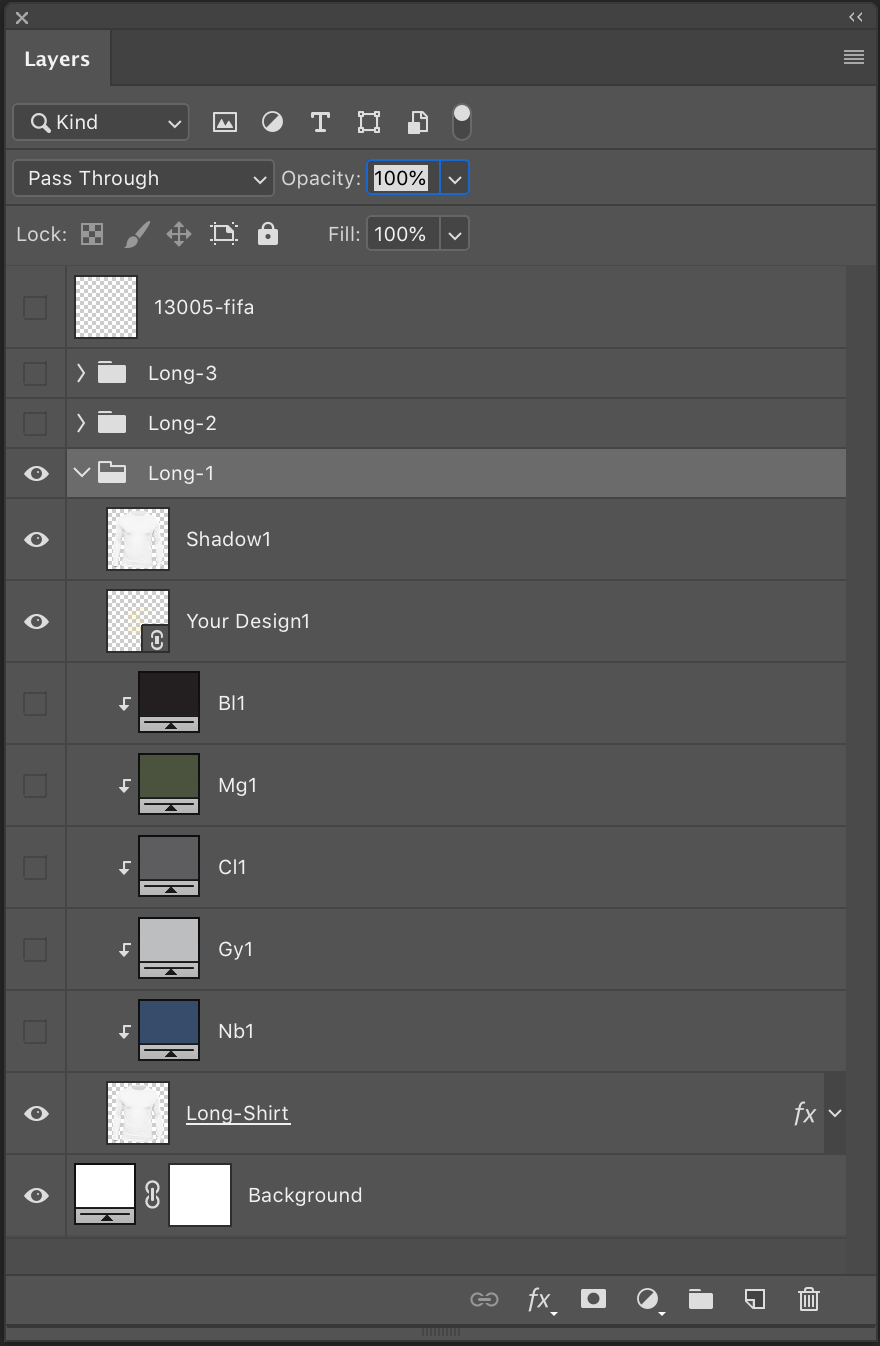
and here is the Action that I made for that
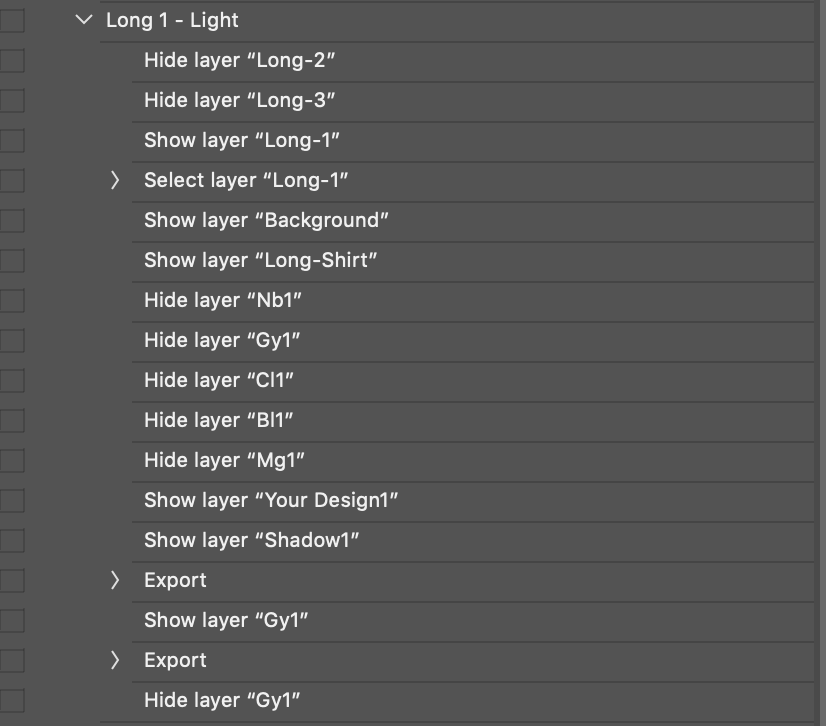
it worked fine and just I needed to use Top layer's name in FileName that exports.
therefore every time that I change the design and Top layer's name, it can make new filename(s) by running the Action.
I couldn't find a way in Photoshop to do it and therefore decide to use Scripts.
Here is my script:
// ============
var doc = app.activeDocument;
var docpath = "/Users/bahizad/Downloads/__Moona/123"; // == inja bayad Folder mahal zakhire file ha dade shavad
/* ============
Select Top Layer and use it's name as DesignName
============== */
var activeLayer = doc.layers[0];
var DesignName = activeLayer.name;
activeLayer.visible=0;
/* ============
Show/Hide groups
============== */
var Long1 = doc.layerSets.getByName("Long-1");
var Long2 = doc.layerSets.getByName("Long-2");
var Long3 = doc.layerSets.getByName("Long-3");
Long1.visible = true;
Long2.visible = 0;
Long3.visible = 0;
/* ============
show the background
============== */
doc.layers[4].visible = true;
/* ============
select group "Long-1" and show/hide neccessary layers
============== */
doc.activeLayer = Long1;
Long1.layers["Long-Shirt"].visible=true;
Long1.layers["Your Design1"].visible=true;
Long1.layers["Shadow1"].visible=true;
Long1.layers["Nb1"].visible=0;
Long1.layers["Gy1"].visible=0;
Long1.layers["Cl1"].visible=0;
Long1.layers["Mg1"].visible=0;
Long1.layers["Bl1"].visible=0;
var FileWh1 = File(docpath + "/3Wh_" + DesignName +"-1.jpg");
var FileGy1 = File(docpath + "/3Gy_" + DesignName +"-1.jpg");
SaveForWeb (FileWh1);
Long1.layers["Gy1"].visible=true;
SaveForWeb (FileGy1);
Long1.layers["Gy1"].visible=0;
function SaveForWeb(saveFile,jpegQuality) {
var sfwOptions = new ExportOptionsSaveForWeb();
sfwOptions.format = SaveDocumentType.JPEG;
sfwOptions.includeProfile = false;
sfwOptions.interlaced = 0;
sfwOptions.optimized = true;
sfwOptions.quality = jpegQuality = 79;
doc.exportDocument(saveFile, ExportType.SAVEFORWEB, sfwOptions);
};
@Stephen_A_Marsh on line 56 in my script, I had problem by " sfwOptions.quality = jpegQuality(80);" and have to change it. I hope my syntax is correct.
Also I tried FitImage but it resize the image (main PSD file) and I have to undo. I'm afraid to save PSD file by mistake.
Is there any other way to just resize the output file of SaveForWeb? (like what PhotoShop do in Save for Web menu)
Also I'm thinking to something else:
- record the script by script Listener when I do Save for Web (Legacy)
- use that script to make Function and just change these 4 parameters : file path, file name, width percentage and height percentage. (my original PSD is square and width and height are equals)
Is a simple way that I can do this?

Copy link to clipboard
Copied
var topLayerName = app.activeDocument.layers[0].name
alert(topLayerName);
Copy link to clipboard
Copied
Thanks Tom, I already solved that step
Now looking to find a way for change the size of the file that make by SaveForWeb without resizing the main PSD
Copy link to clipboard
Copied
I had the syntax wrong as I’m a scripting newb and I was shooting from the hip – glad you worked it out!
From what I understand the standard DOM code does not include resize, so you have to use AM code for that, but then you no longer have the ability to resize using a target pixel size, only % based (which may or may not be an issue).
You could always use history to go back to the original opened file after saving out the renamed save for web jpegs:
app.activeDocument.activeHistoryState = app.activeDocument.historyStates[0];
Or alternatively use the revert menu command:
executeAction( charIDToTypeID('Rvrt'), undefined, DialogModes.NO );
I must be messing something up though as I had to comment out many of your lines to work with a quick test file that did not exactly match yours. I added the fit image code but the saved files are not resized to 1000px, however the source PSD file is resized before reverting back to the first history step.
Copy link to clipboard
Copied
An other way to populate a template is not messing with the actual template document in the first place. That way you can do anything you you want and do not need to revert or change a layer name to know a the name in the save step. You start by duplicating the template document you can name the duplicate with the name you want. The duplicate becomes the current activate document which you you populate and do whatever to and end with a save as and a close. You are back in your template document ready to duplicate and populate the next output image file.
Copy link to clipboard
Copied
If you want to use the sizing is save for web, you can, just add a line of code to find the sizing you want:
#target photoshop
app.preferences.rulerUnits = Units.PIXELS;
var doc = activeDocument;
var newName = 'myNewFile' + doc.activeLayer.name +'.jpg'
var newSize = 1000/doc.width*100//find size percentage
saveWeb (doc.path, newName, newSize)
function saveWeb (fPath,fName,fSize){
var idExpr = charIDToTypeID( "Expr" );
var desc24 = new ActionDescriptor();
var idUsng = charIDToTypeID( "Usng" );
var desc25 = new ActionDescriptor();
var idOp = charIDToTypeID( "Op " );
var idSWOp = charIDToTypeID( "SWOp" );
var idOpSa = charIDToTypeID( "OpSa" );
desc25.putEnumerated( idOp, idSWOp, idOpSa );
var idDIDr = charIDToTypeID( "DIDr" );
desc25.putBoolean( idDIDr, true );
var idIn = charIDToTypeID( "In " );
desc25.putPath( idIn, new File( fPath ) ); //doc path
var idovFN = charIDToTypeID( "ovFN" );
desc25.putString( idovFN, fName ); //file name
var idFmt = charIDToTypeID( "Fmt " );
var idIRFm = charIDToTypeID( "IRFm" );
var idJPEG = charIDToTypeID( "JPEG" );
desc25.putEnumerated( idFmt, idIRFm, idJPEG );
var idIntr = charIDToTypeID( "Intr" );
desc25.putBoolean( idIntr, false );
var idQlty = charIDToTypeID( "Qlty" );
desc25.putInteger( idQlty, 80 );
var idQChS = charIDToTypeID( "QChS" );
desc25.putInteger( idQChS, 0 );
var idQCUI = charIDToTypeID( "QCUI" );
desc25.putInteger( idQCUI, 0 );
var idQChT = charIDToTypeID( "QChT" );
desc25.putBoolean( idQChT, false );
var idQChV = charIDToTypeID( "QChV" );
desc25.putBoolean( idQChV, false );
var idOptm = charIDToTypeID( "Optm" );
desc25.putBoolean( idOptm, true );
var idPass = charIDToTypeID( "Pass" );
desc25.putInteger( idPass, 1 );
var idblur = charIDToTypeID( "blur" );
desc25.putDouble( idblur, 0.000000 );
var idMtt = charIDToTypeID( "Mtt " );
desc25.putBoolean( idMtt, true );
var idEICC = charIDToTypeID( "EICC" );
desc25.putBoolean( idEICC, false );
var idMttR = charIDToTypeID( "MttR" );
desc25.putInteger( idMttR, 255 );
var idMttG = charIDToTypeID( "MttG" );
desc25.putInteger( idMttG, 255 );
var idMttB = charIDToTypeID( "MttB" );
desc25.putInteger( idMttB, 255 );
var idHScl = charIDToTypeID( "HScl" );
var idPrc = charIDToTypeID( "#Prc" );
desc25.putUnitDouble( idHScl, idPrc, fSize );//sizing horizontal
var idVScl = charIDToTypeID( "VScl" );
var idPrc = charIDToTypeID( "#Prc" );
desc25.putUnitDouble( idVScl, idPrc, fSize );//sizing vertical
var idSHTM = charIDToTypeID( "SHTM" );
desc25.putBoolean( idSHTM, false );
var idSImg = charIDToTypeID( "SImg" );
desc25.putBoolean( idSImg, true );
var idSWsl = charIDToTypeID( "SWsl" );
var idSTsl = charIDToTypeID( "STsl" );
var idSLAl = charIDToTypeID( "SLAl" );
desc25.putEnumerated( idSWsl, idSTsl, idSLAl );
var idSWch = charIDToTypeID( "SWch" );
var idSTch = charIDToTypeID( "STch" );
var idCHsR = charIDToTypeID( "CHsR" );
desc25.putEnumerated( idSWch, idSTch, idCHsR );
var idSWmd = charIDToTypeID( "SWmd" );
var idSTmd = charIDToTypeID( "STmd" );
var idMDCC = charIDToTypeID( "MDCC" );
desc25.putEnumerated( idSWmd, idSTmd, idMDCC );
var idohXH = charIDToTypeID( "ohXH" );
desc25.putBoolean( idohXH, false );
var idohIC = charIDToTypeID( "ohIC" );
desc25.putBoolean( idohIC, true );
var idohAA = charIDToTypeID( "ohAA" );
desc25.putBoolean( idohAA, true );
var idohQA = charIDToTypeID( "ohQA" );
desc25.putBoolean( idohQA, true );
var idohCA = charIDToTypeID( "ohCA" );
desc25.putBoolean( idohCA, false );
var idohIZ = charIDToTypeID( "ohIZ" );
desc25.putBoolean( idohIZ, true );
var idohTC = charIDToTypeID( "ohTC" );
var idSToc = charIDToTypeID( "SToc" );
var idOCzerothree = charIDToTypeID( "OC03" );
desc25.putEnumerated( idohTC, idSToc, idOCzerothree );
var idohAC = charIDToTypeID( "ohAC" );
var idSToc = charIDToTypeID( "SToc" );
var idOCzerothree = charIDToTypeID( "OC03" );
desc25.putEnumerated( idohAC, idSToc, idOCzerothree );
var idohIn = charIDToTypeID( "ohIn" );
desc25.putInteger( idohIn, -1 );
var idohLE = charIDToTypeID( "ohLE" );
var idSTle = charIDToTypeID( "STle" );
var idLEzerothree = charIDToTypeID( "LE03" );
desc25.putEnumerated( idohLE, idSTle, idLEzerothree );
var idohEn = charIDToTypeID( "ohEn" );
var idSTen = charIDToTypeID( "STen" );
var idENzerozero = charIDToTypeID( "EN00" );
desc25.putEnumerated( idohEn, idSTen, idENzerozero );
var idolCS = charIDToTypeID( "olCS" );
desc25.putBoolean( idolCS, false );
var idolEC = charIDToTypeID( "olEC" );
var idSTst = charIDToTypeID( "STst" );
var idSTzerozero = charIDToTypeID( "ST00" );
desc25.putEnumerated( idolEC, idSTst, idSTzerozero );
var idolWH = charIDToTypeID( "olWH" );
var idSTwh = charIDToTypeID( "STwh" );
var idWHzeroone = charIDToTypeID( "WH01" );
desc25.putEnumerated( idolWH, idSTwh, idWHzeroone );
var idolSV = charIDToTypeID( "olSV" );
var idSTsp = charIDToTypeID( "STsp" );
var idSPzerofour = charIDToTypeID( "SP04" );
desc25.putEnumerated( idolSV, idSTsp, idSPzerofour );
var idolSH = charIDToTypeID( "olSH" );
var idSTsp = charIDToTypeID( "STsp" );
var idSPzerofour = charIDToTypeID( "SP04" );
desc25.putEnumerated( idolSH, idSTsp, idSPzerofour );
var idolNC = charIDToTypeID( "olNC" );
var list3 = new ActionList();
var desc26 = new ActionDescriptor();
var idncTp = charIDToTypeID( "ncTp" );
var idSTnc = charIDToTypeID( "STnc" );
var idNCzerozero = charIDToTypeID( "NC00" );
desc26.putEnumerated( idncTp, idSTnc, idNCzerozero );
var idSCnc = charIDToTypeID( "SCnc" );
list3.putObject( idSCnc, desc26 );
var desc27 = new ActionDescriptor();
var idncTp = charIDToTypeID( "ncTp" );
var idSTnc = charIDToTypeID( "STnc" );
var idNConenine = charIDToTypeID( "NC19" );
desc27.putEnumerated( idncTp, idSTnc, idNConenine );
var idSCnc = charIDToTypeID( "SCnc" );
list3.putObject( idSCnc, desc27 );
var desc28 = new ActionDescriptor();
var idncTp = charIDToTypeID( "ncTp" );
var idSTnc = charIDToTypeID( "STnc" );
var idNCtwoeight = charIDToTypeID( "NC28" );
desc28.putEnumerated( idncTp, idSTnc, idNCtwoeight );
var idSCnc = charIDToTypeID( "SCnc" );
list3.putObject( idSCnc, desc28 );
var desc29 = new ActionDescriptor();
var idncTp = charIDToTypeID( "ncTp" );
var idSTnc = charIDToTypeID( "STnc" );
var idNCtwofour = charIDToTypeID( "NC24" );
desc29.putEnumerated( idncTp, idSTnc, idNCtwofour );
var idSCnc = charIDToTypeID( "SCnc" );
list3.putObject( idSCnc, desc29 );
var desc30 = new ActionDescriptor();
var idncTp = charIDToTypeID( "ncTp" );
var idSTnc = charIDToTypeID( "STnc" );
var idNCtwofour = charIDToTypeID( "NC24" );
desc30.putEnumerated( idncTp, idSTnc, idNCtwofour );
var idSCnc = charIDToTypeID( "SCnc" );
list3.putObject( idSCnc, desc30 );
var desc31 = new ActionDescriptor();
var idncTp = charIDToTypeID( "ncTp" );
var idSTnc = charIDToTypeID( "STnc" );
var idNCtwofour = charIDToTypeID( "NC24" );
desc31.putEnumerated( idncTp, idSTnc, idNCtwofour );
var idSCnc = charIDToTypeID( "SCnc" );
list3.putObject( idSCnc, desc31 );
desc25.putList( idolNC, list3 );
var idobIA = charIDToTypeID( "obIA" );
desc25.putBoolean( idobIA, false );
var idobIP = charIDToTypeID( "obIP" );
desc25.putString( idobIP, """""" );
var idobCS = charIDToTypeID( "obCS" );
var idSTcs = charIDToTypeID( "STcs" );
var idCSzeroone = charIDToTypeID( "CS01" );
desc25.putEnumerated( idobCS, idSTcs, idCSzeroone );
var idovNC = charIDToTypeID( "ovNC" );
var list4 = new ActionList();
var desc32 = new ActionDescriptor();
var idncTp = charIDToTypeID( "ncTp" );
var idSTnc = charIDToTypeID( "STnc" );
var idNCzeroone = charIDToTypeID( "NC01" );
desc32.putEnumerated( idncTp, idSTnc, idNCzeroone );
var idSCnc = charIDToTypeID( "SCnc" );
list4.putObject( idSCnc, desc32 );
var desc33 = new ActionDescriptor();
var idncTp = charIDToTypeID( "ncTp" );
var idSTnc = charIDToTypeID( "STnc" );
var idNCtwozero = charIDToTypeID( "NC20" );
desc33.putEnumerated( idncTp, idSTnc, idNCtwozero );
var idSCnc = charIDToTypeID( "SCnc" );
list4.putObject( idSCnc, desc33 );
var desc34 = new ActionDescriptor();
var idncTp = charIDToTypeID( "ncTp" );
var idSTnc = charIDToTypeID( "STnc" );
var idNCzerotwo = charIDToTypeID( "NC02" );
desc34.putEnumerated( idncTp, idSTnc, idNCzerotwo );
var idSCnc = charIDToTypeID( "SCnc" );
list4.putObject( idSCnc, desc34 );
var desc35 = new ActionDescriptor();
var idncTp = charIDToTypeID( "ncTp" );
var idSTnc = charIDToTypeID( "STnc" );
var idNConenine = charIDToTypeID( "NC19" );
desc35.putEnumerated( idncTp, idSTnc, idNConenine );
var idSCnc = charIDToTypeID( "SCnc" );
list4.putObject( idSCnc, desc35 );
var desc36 = new ActionDescriptor();
var idncTp = charIDToTypeID( "ncTp" );
var idSTnc = charIDToTypeID( "STnc" );
var idNCzerosix = charIDToTypeID( "NC06" );
desc36.putEnumerated( idncTp, idSTnc, idNCzerosix );
var idSCnc = charIDToTypeID( "SCnc" );
list4.putObject( idSCnc, desc36 );
var desc37 = new ActionDescriptor();
var idncTp = charIDToTypeID( "ncTp" );
var idSTnc = charIDToTypeID( "STnc" );
var idNCtwofour = charIDToTypeID( "NC24" );
desc37.putEnumerated( idncTp, idSTnc, idNCtwofour );
var idSCnc = charIDToTypeID( "SCnc" );
list4.putObject( idSCnc, desc37 );
var desc38 = new ActionDescriptor();
var idncTp = charIDToTypeID( "ncTp" );
var idSTnc = charIDToTypeID( "STnc" );
var idNCtwofour = charIDToTypeID( "NC24" );
desc38.putEnumerated( idncTp, idSTnc, idNCtwofour );
var idSCnc = charIDToTypeID( "SCnc" );
list4.putObject( idSCnc, desc38 );
var desc39 = new ActionDescriptor();
var idncTp = charIDToTypeID( "ncTp" );
var idSTnc = charIDToTypeID( "STnc" );
var idNCtwofour = charIDToTypeID( "NC24" );
desc39.putEnumerated( idncTp, idSTnc, idNCtwofour );
var idSCnc = charIDToTypeID( "SCnc" );
list4.putObject( idSCnc, desc39 );
var desc40 = new ActionDescriptor();
var idncTp = charIDToTypeID( "ncTp" );
var idSTnc = charIDToTypeID( "STnc" );
var idNCtwotwo = charIDToTypeID( "NC22" );
desc40.putEnumerated( idncTp, idSTnc, idNCtwotwo );
var idSCnc = charIDToTypeID( "SCnc" );
list4.putObject( idSCnc, desc40 );
desc25.putList( idovNC, list4 );
var idovCM = charIDToTypeID( "ovCM" );
desc25.putBoolean( idovCM, false );
var idovCW = charIDToTypeID( "ovCW" );
desc25.putBoolean( idovCW, true );
var idovCU = charIDToTypeID( "ovCU" );
desc25.putBoolean( idovCU, true );
var idovSF = charIDToTypeID( "ovSF" );
desc25.putBoolean( idovSF, true );
var idovCB = charIDToTypeID( "ovCB" );
desc25.putBoolean( idovCB, true );
var idovSN = charIDToTypeID( "ovSN" );
desc25.putString( idovSN, """images""" );
var idSaveForWeb = stringIDToTypeID( "SaveForWeb" );
desc24.putObject( idUsng, idSaveForWeb, desc25 );
executeAction( idExpr, desc24, DialogModes.NO );
}


Get ready! An upgraded Adobe Community experience is coming in January.
Learn more
 AdChoices