Known Participant
October 5, 2017
Answered

Vanishing Point Two Point Perspective 3D

  • October 5, 2017
  • 2 replies
  • 1847 views

I'm trying to add 3D models of furniture into a photo of a vacant room. I am able to use the vanishing point filter and match the "current view" to it in 3D for certain photos. It works when the camera is pointed perpendicular to a wall (one point perspective.) But I can't find a way to line up the vanishing points so furniture looks correct on it. Here is an example of the photo I'm trying to use.

https://i.imgur.com/ymlirdo.jpg

Thanks in advance
This topic has been closed for replies.
Correct answer davescm

Hi

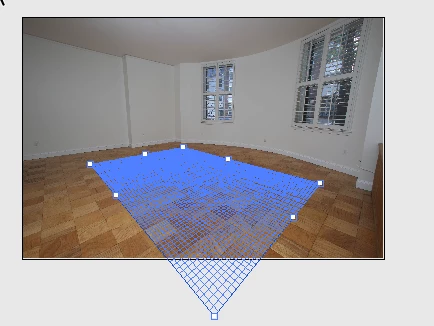
The vanishing point plane does not have to be straight on to work.

In vanishing point just select an area of the floor and layout a plane that matches the tiles

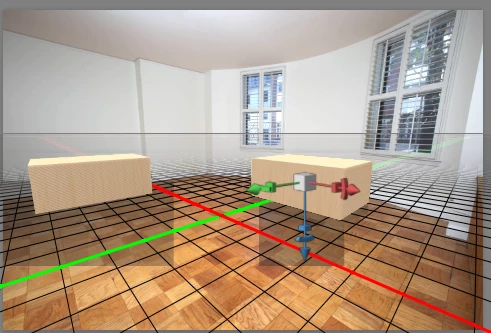
When you take that into Photoshop you may need to adjust the camera FOV.  Normally this is automatic but with the angled plane I found this  step necessary. Just adjust the FOV value to match the "floor" plane with the background (don't move the camera). I needed to make FOV 13mm for your example.

Finally - turn off the opacity of the temp floor material and change scene to solid rather than unlit texture.


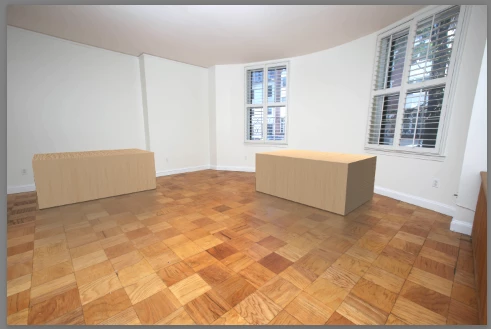
Place your objects

,

Light and render. Rough and ready below but hopefully you get the idea.

Dave

2 replies

davescm
Community Expert
davescmCommunity ExpertCorrect answer
Community Expert
October 5, 2017

Hi

The vanishing point plane does not have to be straight on to work.

In vanishing point just select an area of the floor and layout a plane that matches the tiles

When you take that into Photoshop you may need to adjust the camera FOV.  Normally this is automatic but with the angled plane I found this  step necessary. Just adjust the FOV value to match the "floor" plane with the background (don't move the camera). I needed to make FOV 13mm for your example.

Finally - turn off the opacity of the temp floor material and change scene to solid rather than unlit texture.


Place your objects

,

Light and render. Rough and ready below but hopefully you get the idea.

Dave

Known Participant
October 6, 2017

Thank you Dave!

You're right 13mm works best. Which is very curious because the photo was taken at 16mm.

Mylenium
Legend
October 5, 2017

There is no such thing as a two-point perspective in real life. Two-point is merely a drawing technique - a camera always has only a single focal point. In your case the killer is the extreme wide/ fisheye lens effect, so unless you start to unwarp your image, use better lenses or use a more sophisticated 3D tool that can deal with this stuff, this won't work.

Mylenium

Known Participant
October 6, 2017

Thanks for your reply but there is a work around. You can change the FOV to match the mm of the wide angle lens and also use lens correction to fix any barrel distortion in the image.

Also there totally is two point perspective in real life