
Participant
September 1, 2017
Question

Video frames in timeline not aligned to chosen FPS

  • September 1, 2017
  • 2 replies
  • 2538 views

I'm working on an animation in Photoshop. Currently, I have a small looping animation that I created for testing. The animation has six frames, and the FPS of my timeline is set to 12. This would indicate to me that I would always have exactly 12 frames in every second of the timeline, but this doesn't appear to be the case:
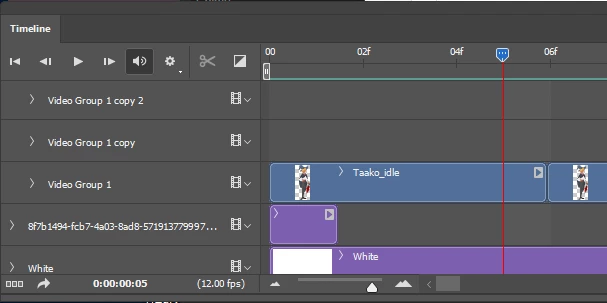
If you look closely, the "06f" marker is slightly after the video layer ends. This problem compounds itself when I attempt to loop the animation by duplicating the video layer within a group:
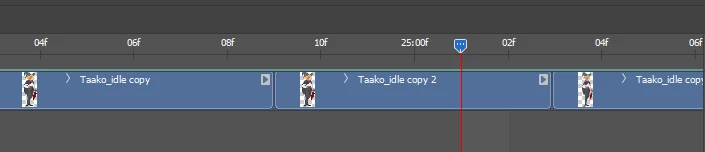
After 25 seconds of looping, the entire looping animation has phase shifted so that the middle of the animation falls on each second, instead of the animation ending at each second.

I'm trying to synchronize this animation to music, so the desync is very noticeable as the song progresses. I'm not sure what I'm doing wrong or why the frames aren't occurring as expected - can anyone help?

Let me know if I can provide any additional details!

    This topic has been closed for replies.

    2 replies

    Participating Frequently
    August 7, 2021

    I am dealing with timeline alignment issues as well. Some animations in the file line up frame-acurate, but one in particular just WILL NOT snap to the frame tick-mark. It's very aggravating. And the answer posted 'how to change frame rates in Photoshop' is no help. I konw how to change frame rates. That's not the problem.

    August 28, 2021

    I think I got it. In the timeline menu at the top right (three stacked horizontal bars) there is a move and trim option. If you set the playhead where you want, click the animation and, then click move start to playhead it will fix the problem. 

    Mohit Goyal
    Community Manager
    Community Manager
    September 29, 2017

    Hi itspladd,

    Please refer the below link for the related discussion and check the offered solutions.

    How do you set the frame rate for a frame animation?

    How to Change FPS in Photoshop Animation | Techwalla.com

    Regards,

    Mohit

    Participant
    May 27, 2020

    I'm having the same issue on a job. This response is useless.