Exit
  • Global community
    • Language:
      • Deutsch
      • English
      • Español
      • Français
      • Português
  • 日本語コミュニティ
  • 한국 커뮤니티
0

View Target Path issue

Community Beginner ,
Jan 02, 2018 Jan 02, 2018

I've researched and it seems this was an issue back in CS5 & CS6, but I'm running CC 19.0 and running into it again. Every time I open a new file, View>Show>Target Path turns back on. I almost never want this function on. Is this a bug? or is there a way to keep this from turning back on every time I open an new file?

Thanks!

1.5K
Translate
Report
Community guidelines
Be kind and respectful, give credit to the original source of content, and search for duplicates before posting. Learn more
community guidelines
Adobe
Community Expert ,
Jan 02, 2018 Jan 02, 2018

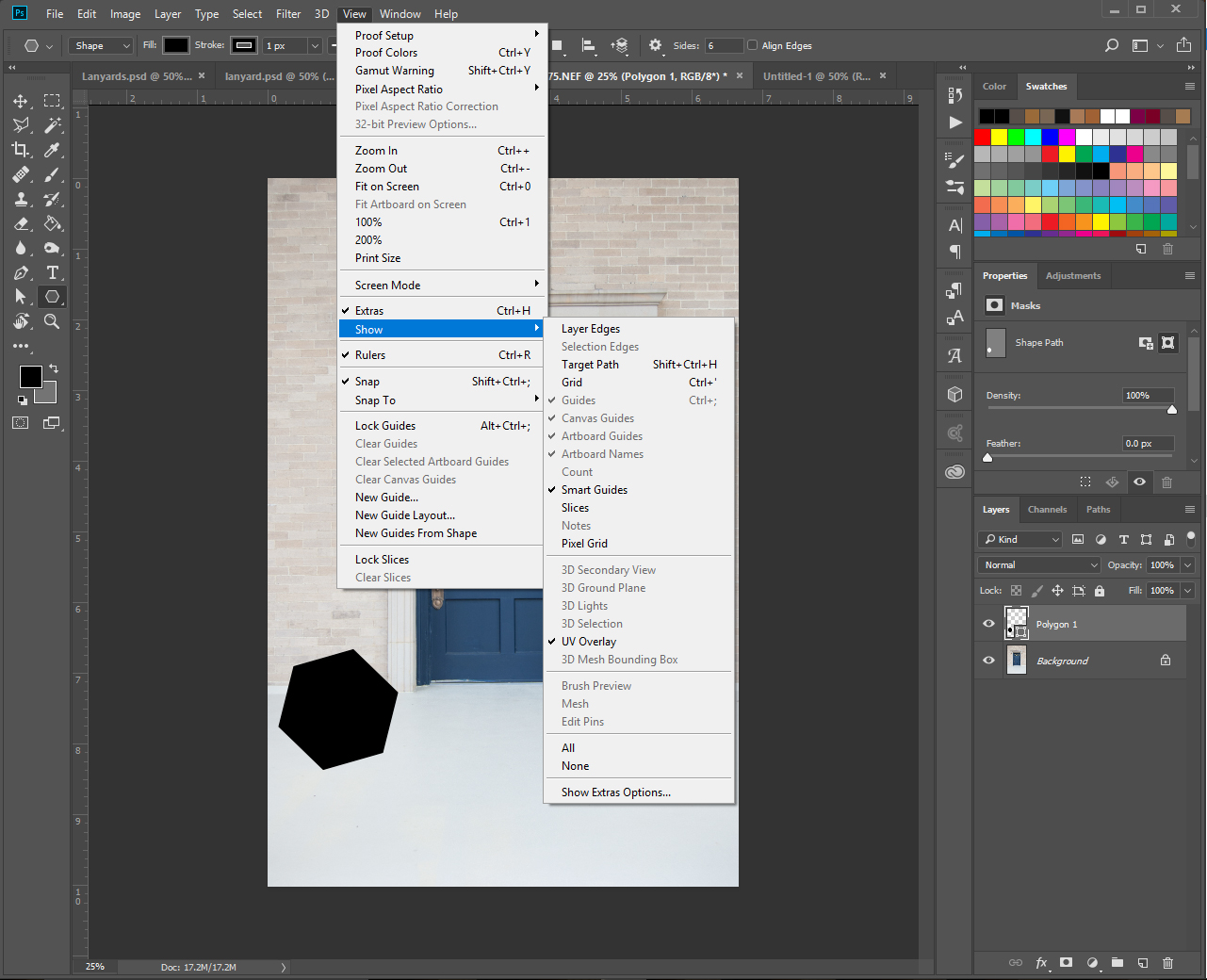
Make sure you have the latest Display device driver installed for your display adapted. View>Show>Target Path is a toggle the shows and hides the current active path shortcut Ctrl+Shift+H. here is what I see on my Windows 10 CC 2018 system.

Capture.jpg

JJMack
Translate
Report
Community guidelines
Be kind and respectful, give credit to the original source of content, and search for duplicates before posting. Learn more
community guidelines
Community Beginner ,
Jan 03, 2018 Jan 03, 2018

Thanks! I am seeing the same thing, however, when I toggle it off, it toggles back on whenever I open a new file. It‘s essentially acting as a file setting instead of a program-wide setting. Hope that makes sense.

I will I’ll look into my driver, but that seems like it won’t be it. It’s not a video/visual issue, but a functional one. It displays correctly, but toggles incorrectly.

Thanks again!

Translate
Report
Community guidelines
Be kind and respectful, give credit to the original source of content, and search for duplicates before posting. Learn more
community guidelines
Community Beginner ,
Jan 04, 2018 Jan 04, 2018
LATEST

Latest drivers are updated and photoshop is up to date. That wasn't the issue. I've actually discovered that it's not only when I open a new file, it's whever I even create a new shape, it reverts back. Here's what's happening:

Whenever I open a file, View>Show>Target Path is grayed out

ss-1.jpg

until I create a shape, which is when it toggles to the on position.ss-2.jpg

I then deselect it

ss-3.jpg

I create a new shape

ss-4.jpg

and view>show>target path is back to toggled back on. (this happens every time a create a new shape)

ss-5.jpg

Any thoughts on this?

Translate
Report
Community guidelines
Be kind and respectful, give credit to the original source of content, and search for duplicates before posting. Learn more
community guidelines