August 9, 2017
Answered

Weird background color and I can't see my text while typing.

  • August 9, 2017
  • 1 reply
  • 3103 views

[Moderator moved from unrelated  Forum comments​ forum to Photoshop for Beginners .]

Hello!

I've been having annoying troubles with my photoshop. I'd like to solve them, but I don't know how.

First, my background color isn't white, its yellow and I can't set it to white. You can see it here: http://prntscr.com/g6jczv

Secondary, when I am using text tool, when I type, I can't see the text, I see it only after I've typed it and choosed another tool such as Move Tool or any else and clicked on the place where the text should be at. That's really annoying and I would be really happy if someone could help me, thanks!

This topic has been closed for replies.
Correct answer Per Berntsen

How to do that?


Before resetting preferences, try resetting the type tool.

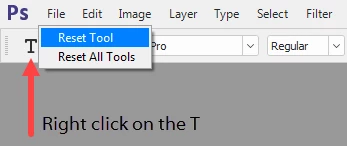
Right click the T in the options bar, and choose Reset tool.

If that doesn't help, reset the preferences.

Go to Edit > Preferences > General, and click the button that says Reset Preferences on Quit.

Then restart Photoshop.

As for the problem with white displaying as yellow - does that happen with all images, for instance when you open a photo?

1 reply

Nancy OShea
Community Expert
Community Expert
August 9, 2017

Have you calibrated the colors in your monitor yet?  

Go to File > New ... and create a custom document with the settings shown below.  Select White for your Background.

Text color should be the opposite of your background color.  Otherwise you won't see it.  Also the text size must be of adequate size.  See screenshot.

Does that help you?

Nancy O'Shea— Product User & Community Expert
August 10, 2017

No, it didn't.  It's still yellow. And still ,while I am typing, I don't see the text. http://prntscr.com/g6pvjk

And once I click on the move tool and click on the text place, then I can see it. http://prntscr.com/g6pwf0

Derek Cross
Community Expert
Community Expert
August 10, 2017

Try trashing your Photoshop preferences.