

schroef
Inspiring
December 24, 2019
Answered

What is small circle on textframe from shape?

  • December 24, 2019
  • 3 replies
  • 1279 views

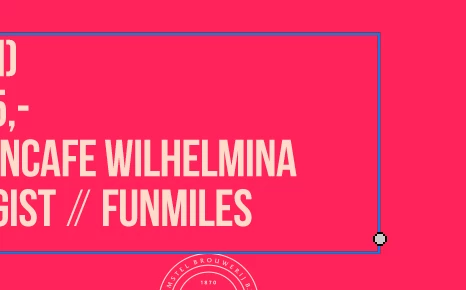
I was wondering what this small circle is on a text frame when its converted from a shape. If you draw a rectangle with the shape tool and fill it with text, the text frame gets the form of that shape.


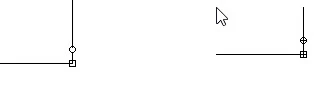
However compared to a regular rectangle frame, this frame now show a small circle in the bottom right. I cant really remember or find what its for. First i thoughts its like Indesign and you can round the corners, but i dont get any interaction with it. At least not with all i tried ???

Not sure what this UI part should do actually?
This topic has been closed for replies.
Correct answer davescm

Whilst using the text tool to type, the circle will be empty if the text fits in the frame. If the text has gone over the frame (i.e. there is some hidden text outside) it will have a + inside


3 replies

jane-e
Community Expert
Community Expert
December 25, 2019

“First i thoughts its like Indesign and you can round the corners”


Hi

The rounded corner icon in InDesign is the yellow square in the upper right of the frame. Both InDesign and Illustrator have an out port in the lower left that allows you to thread text into another frame. Photoshop is an image editor with limited support for text.


~Jane


schroef
schroefAuthor
Inspiring
January 14, 2020

Yes i know all of this, i was just mentioning the tiny warning photoshop shows. Its really hardly visible, especially on retina screens.

WOuld be nice if PS also got interactive rounding corners. I mean it does have the properties already up until you transform it wrong. So why not add that yellow square as well 🙂

schroef
schroefAuthor
Inspiring
December 24, 2019

I was thinking it was something like that, its super tiny! I think Indesign and Illustrator do a better Job.

Thanks for clarifying it!

schroef
schroefAuthor
Inspiring
December 24, 2019

What is actually weird, is that on a regular text frame we hardly see that plus sign. Its embedded inside the corner points. When you make a frame from a shape, it shows the small dot sort if like indesign and illustrator. 

That method is way more clear. Not sure why they add in a corner point???

davescm
Community Expert
davescmCommunity ExpertCorrect answer
Community Expert
December 24, 2019

Whilst using the text tool to type, the circle will be empty if the text fits in the frame. If the text has gone over the frame (i.e. there is some hidden text outside) it will have a + inside