

Question
What's the quickest way to tone dow/remove outline around image after using magic wand?
I'm fairly new to Photoshop, so apologies if this is a dumb question.
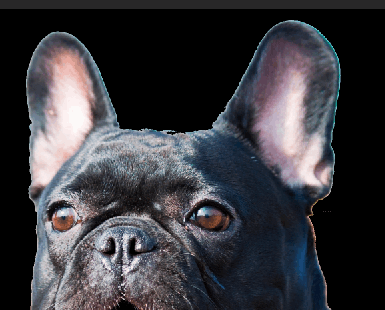
I've used the magic wand to remove an unwanted background from a photo. It worked well, however I'm left with a very vivid outline around the dog now that I'd like to get rid of or tone down in the easiest possible way. Of course I can brush it away manually, but I need to do this with a lot of images I would prefer a faster way to do it. It doesn't matter if the result isn't 100% perfect since I'm going apply a lot of other effects to the photo afterwards which drown out smaller imperfections. However, the way it currently looks in the image below is not good enough. Any tips would be very welcome 
 AdChoices