TomL9233
Participant
April 28, 2018
Answered

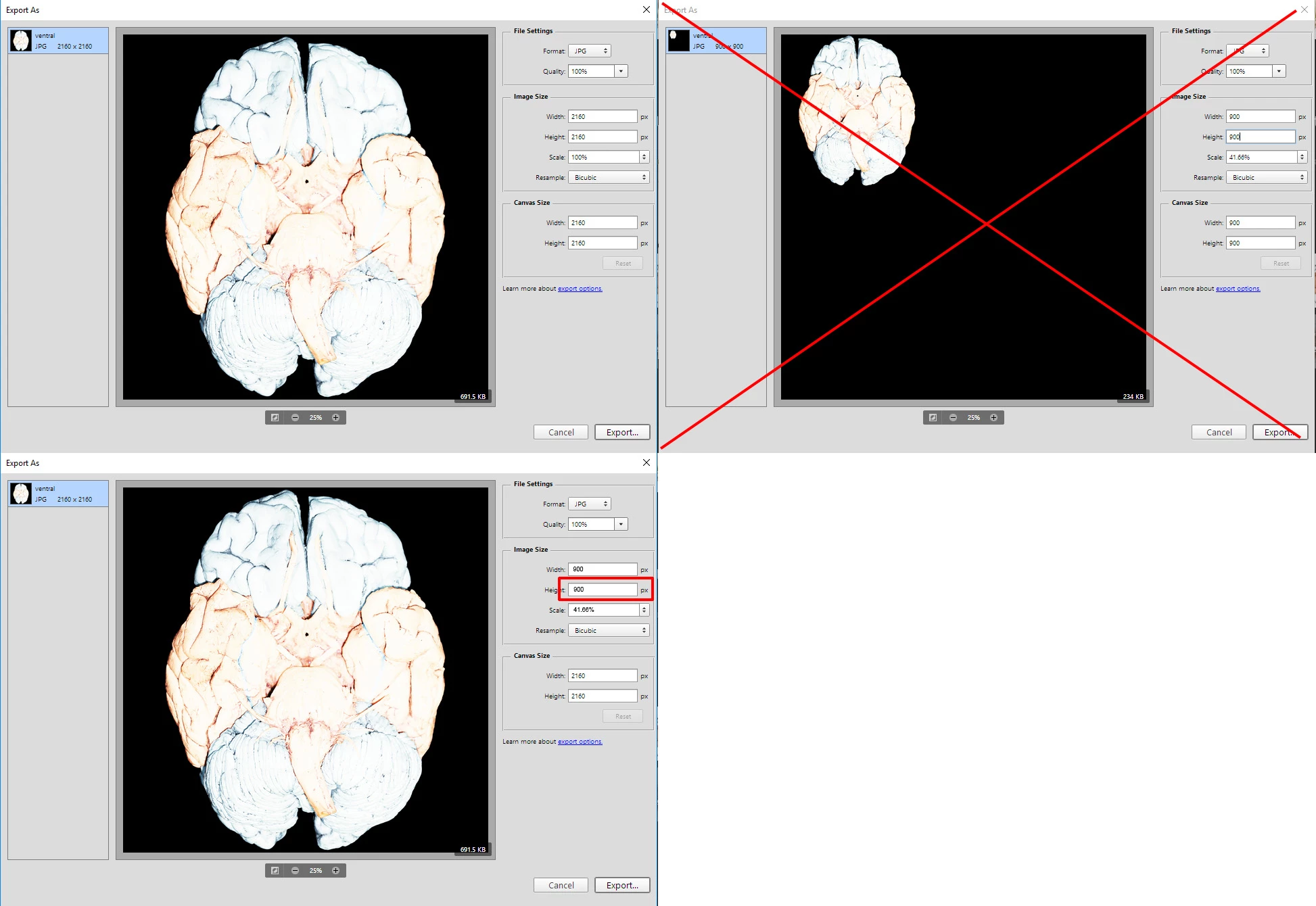
When exporting, image shrinks into corner when scaled

  • April 28, 2018
  • 1 reply
  • 711 views

When I go to export an image in Photoshop, I go to scale it down, but the image shrinks into the upper-right corner rather than maintaining either its margins or its position within the final image. I'm not sure what I'm doing wrong.

This topic has been closed for replies.
Correct answer JJMack

Try resetting all tools and your Photoshop Preferences The export capture where you show you changes the size or percentage  in the dialog do not add up.  The canvas size should not change nor should the lefts side thumbnail or Preview.  If you have the export as you show in the Screen capture 3.  If you change the Image size height to 900 you should see the Width change to 900 and the percentage change to 41.66%

1 reply

JJMack
Community Expert
JJMackCommunity ExpertCorrect answer
Community Expert
April 28, 2018

Try resetting all tools and your Photoshop Preferences The export capture where you show you changes the size or percentage  in the dialog do not add up.  The canvas size should not change nor should the lefts side thumbnail or Preview.  If you have the export as you show in the Screen capture 3.  If you change the Image size height to 900 you should see the Width change to 900 and the percentage change to 41.66%

JJMack