Participant
October 14, 2018
Answered

White halo around text in Photoshop with transparent background

  • October 14, 2018
  • 3 replies
  • 5360 views

There is a white halo around my type and line when I save it as a transparent png.  There is no halo in Photoshop. 

    This topic has been closed for replies.
    Correct answer Mike_Gondek10189183

    Can we see your settings how you made the .png, and how you composited against the background.

    In CC2018 I used file >> export >> export as

    then opened the .png and pasted in a background (of lovely Naperthrill which I am familiar with living in Homer Glen)

    What version are you using? Maybe you  did a save for web with matte set to the default of white. Change that to none.
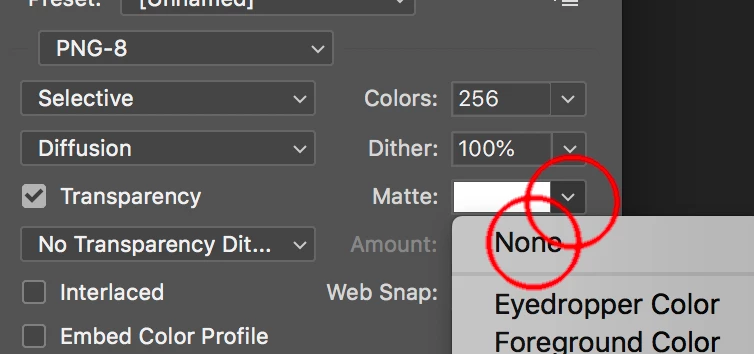
    The purpose of matte is to help put the background color into mostly the diagonal  pixels that are aliasing to give you a crisp edge.

    3 replies

    kstreelAuthor
    Participant
    October 23, 2018

    Here is the link to the psd.  I do have layer effects, but they are the same color as the text

    Mike_Gondek10189183
    Community Expert
    Mike_Gondek10189183Community ExpertCorrect answer
    Community Expert
    October 23, 2018

    Can we see your settings how you made the .png, and how you composited against the background.

    In CC2018 I used file >> export >> export as

    then opened the .png and pasted in a background (of lovely Naperthrill which I am familiar with living in Homer Glen)

    What version are you using? Maybe you  did a save for web with matte set to the default of white. Change that to none.

    The purpose of matte is to help put the background color into mostly the diagonal  pixels that are aliasing to give you a crisp edge.

    kstreelAuthor
    Participant
    October 24, 2018

    That is exactly what I did--the matte was set. Thank you!!

    JJMack
    Community Expert
    Community Expert
    October 14, 2018

    The document you saved the png from was the text a text layer or was it a pixel layer or extracted from a image.    Text layers are vector graphic layers there should be no white outline unless you add a layer style or convert the text layer to a shape layer and add a stroke. In Photoshop were you viewing you image zoomed to 100% actual image pixel to see if you could see the white.  On a transparent checker board the white is not easy to see, add a Black fill layer below the text layer you should see the white in Photoshop then. Post you png lets use see it in Photoshop, Better Upload your layer file and post a link to it.

    JJMack
    kstreelAuthor
    Participant
    October 24, 2018

    Thank you.  I didn't have the matte set to none. 

    Mike_Gondek10189183
    Community Expert
    Community Expert
    October 24, 2018

    For my part you are welcome.

    Muqqarib Hassan
    Inspiring
    October 14, 2018

    Hi, I think You used a white stroke on your text layer thats why its showing you.

    Can you show us a psd file screenshot ?

    Thanks.

    Muqqarib Hassan
    Inspiring
    October 14, 2018
