Participant
April 5, 2020
Answered

Why 2 versions of Photoshop

  • April 5, 2020
  • 5 replies
  • 19779 views

I have a computer based [not cloud based] subscription to Photoshop and Lightroom.  When the cloud update program on my computer updates Photoshop, it shows that TWO versions of Photoshop are on my computer and are being updated.  Why is this?  Should anything be done about it?  If so, what should be done?  How should it be done?
    This topic has been closed for replies.
    Correct answer Nancy OShea

    Evidently, you have 2 separate versions of Photoshop CC installed side-by-side, the previous version (20x) and the latest version (21x). 


    If you don't need both, uninstall the previous one from your Creative Cloud Desktop App. 

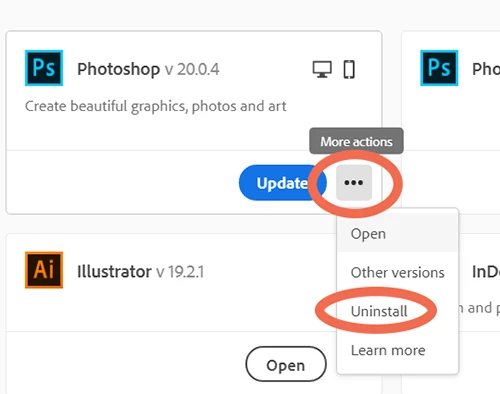
    Click the 3 dots icon next to Photoshop and select Uninstall from the drop-list.  See screenshot.


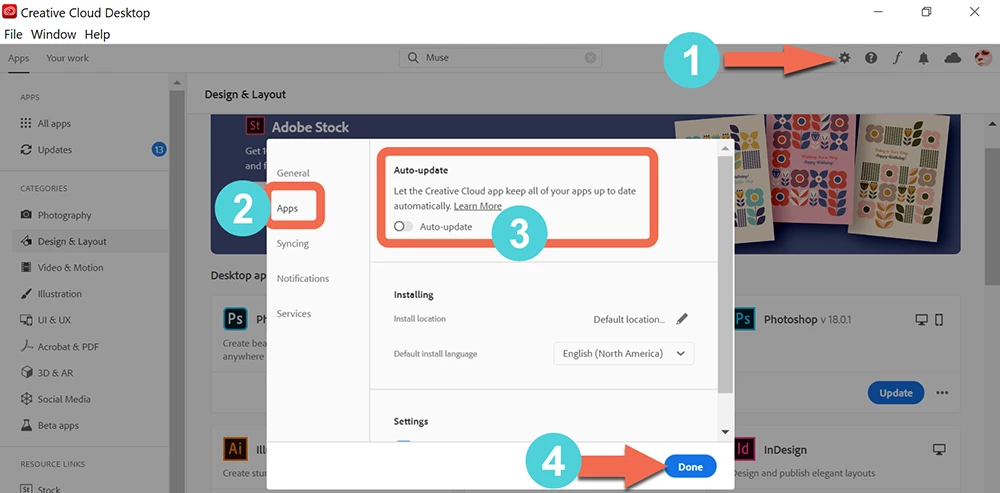
    If you don't like automatic updates, turn them off in your Creative Cloud Desktop settings. See screenshot.


    Post back if you need more help.


    5 replies

    richardg27078025
    Participant
    January 23, 2022

    I have the same issue. I have noticed on my Creative Cloud screen that I now have Photoshop version 23.1.1 and version 22.5.5. I have always allowed Creative Cloud to automatically update my Adobe programmes and I have never requested a download of another version of the programme. I have subscribed to Adobe CC for around 4 years. It seems to me that the update routine that takes place when another version is sent out by Adobe, doesn't always delete the previous version. Otherwise, why would I have two versions of the same software on my computer and why would it still continue to be updated by Adobe? Surely this needs to be investigated by Adobe?

    As suggested in this thread, I am now deleting the earlier version.

    Legend
    January 23, 2022

    It's your choice whether the updates delete the old version, or delete it. Unless you are desperately short of space, I'd suggest keeping it. What would you do if the new version didn't work properly on your video card? Or if a function had been removed? Or you couldn't find something you need? Busy people can't afford to waste time finding old downloads - having the old version ready to roll can save a job.

    richardg27078025
    Participant
    January 23, 2022

    Like most pc users, I don't have the space to fill up my hard drive with hundreds of old versions of programmes, although I do take the point if the new version didn't work properly. However - reading the replies again, I keep seeing "Its your choice to keep thd old version...." but nobody has said that there is an option in Creative Cloud Preferences that enable you to keep or remove the older version of Photoshop and Bridge! I have just found in Preferences that there is an option to tick "Remove Older Versions". Why didn't someone say that in their reply, rather than just saying "Its your choice.......". Simple - problem solved......thanks.....!

    Inspiring
    April 17, 2020

    I have a follow on question to this.  I also have 20.0.9 and 21.1.2 on my computer.  Is one of these what is known as "Classic?"  If so which one as I want to be using Classic addition at this time.  

    Nancy OShea
    Community Expert
    Community Expert
    April 17, 2020

    Photoshop 20 and 21 are the 2 latest releases of Photoshop CC.  Don't confuse Photoshop with Lightroom.

    Lightroom has 2 versions.  Lightroom CC and Lightroom Classic for desktop.


    Nancy O'Shea— Product User & Community Expert
    TiglathAuthor
    Participant
    April 18, 2020
    The question, therefore, is: Should I have both versions? I have already taken steps, via the cloud updater, to delete the lower numbered one. What should I do now?
    Sent from Mail for Windows 10
    Nancy OShea
    Community Expert
    Community Expert
    April 5, 2020

    There's no such thing as "Cloud-based" Photoshop.  Creative Cloud software is downloaded and installed on your computer hard drive the same as it always has.  The only difference is the payment and distribution model. You pay monthly or annually now.  And when you stop paying, the software stops working.


    You obviously have more on your hard drive than you realize.  Use your operating system to remove non-essential programs.


    ===========
    Beware of fake Adobe reps who may contact you privately offering to sell you software or take control of your computer. It's a scam, run away!


    Nancy O'Shea— Product User & Community Expert
    TiglathAuthor
    Participant
    April 6, 2020
    Thanks for the response.  I do not know all of the magic words or I could communicate better, if it is ok to say it that way.  Only one hard drive.  Several days ago, the updating program showed 20.0.8 being updated to 20.0.9 AND 21.1 also being updated.  Both have been updated since.  Also, the updater program was changed so that it works automatically – which means that I am not as aware of what it is doing.  I am, however, confused about the two version numbers and do not know what this means.


    Sent from Mail for Windows 10
    Nancy OShea
    Community Expert
    Nancy OSheaCommunity ExpertCorrect answer
    Community Expert
    April 6, 2020

    Evidently, you have 2 separate versions of Photoshop CC installed side-by-side, the previous version (20x) and the latest version (21x). 


    If you don't need both, uninstall the previous one from your Creative Cloud Desktop App. 

    Click the 3 dots icon next to Photoshop and select Uninstall from the drop-list.  See screenshot.


    If you don't like automatic updates, turn them off in your Creative Cloud Desktop settings. See screenshot.


    Post back if you need more help.


    Nancy O'Shea— Product User & Community Expert
    Peru Bob
    Community Expert
    Community Expert
    April 5, 2020

    I've moved this from the poorly named Community Help forum (which is the forum for issues using the forums) to the Get Started forum.

    Peru Bob
    Community Expert
    Community Expert
    April 5, 2020

    You may have more than one version of CC programs installed, ie: Photoshop 2019 and Photoshop 2020.