Jason Burnett
Inspiring
January 20, 2018
Answered

Why did the brush selector change?

  • January 20, 2018
  • 10 replies
  • 8833 views

I am trying to erase the edge of a photograph that I pasted on a new layer. I want the edge to be rough so it blends with the layer behind it. I click the eraser tool like I have for 20 years and then go to the canvas where I right-click my mouse and select a brush from the list of available brushes. Only now what happens is that as I select the rough-edged brush (for the eraser tool), suddenly the brush tool is selected and I am painting on my image. I have done this several times and it is really a pain. How do I convert my paint brushes for use across the board like they used to be? How can I make sure that all of my brushes are available for every brush-like tool (smudge, erase, pattern/clone, etc.)?

And who made this choice? Why would you choose to voluntarily limit someone's functionality? What possible benefit is there to this new way of working with Photoshop?
    Correct answer Trevor.Dennis

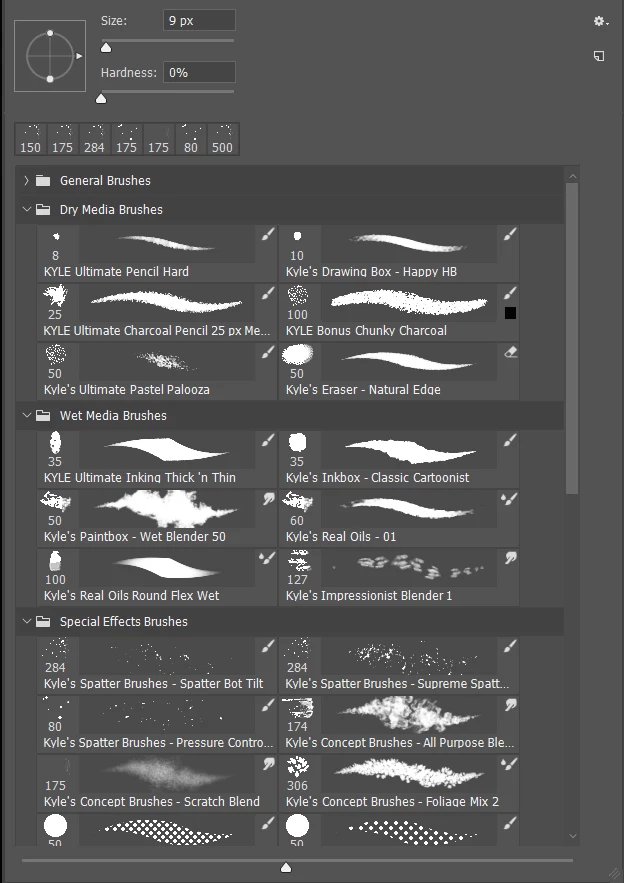
    I'm sorry, but I was literally about to leave the house when I posted my quick reply.  What has changed is that brush management can now save tool presets along with brush presets.  But if you turn on all the brush preview options, you can see if a particular preset has a tool preset.  In the example below, we can see a couple of Smudge tools, and Eraser, and some Mixer brush presets.

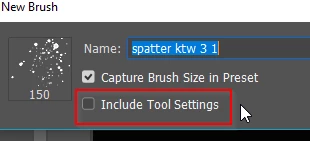
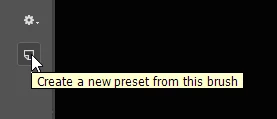
    The workaround is to select the preset, and click on make new preset, and save it making sure Include Tool Settings is unchecked. You can then use that preset with any tool.  Or select a preset that does not have a tool preset attached, as they are obviously optimized for that tool.

    But please check the video I posted back up the thread.  The new brush management system is a huge improvement, and has some great, and long awaited, features.

    10 replies

    Participating Frequently
    January 24, 2024

    i agree really annoying 

    c.pfaffenbichler
    Community Expert
    Community Expert
    January 24, 2024

    Please elaborate on what the problem is and post screenshots with the pertinent Panels (Toolbar, Brushes, Layers, Options Bar, …) visible to illustrate. 

    Participant
    January 22, 2023

    I now have more than an hour to add to a project simply b/c I want to use the "chalk brush" (that I had used previously on this project). But now I discover that that same "brush" is a g-d smudge tool.  If I could right click on the smudge tool preset icon and simply change it to a bruch I could be on my way to finishing a project (that again now has so much more additional time!) where's my  compensation. a BRUSH is a BRUSH, not an eraser, not a finger tip, not a g-d sponge.

    Participant
    November 9, 2022

    You are absolutely correct. If you are using a tool and select a brush for it then why does it automatically change the brush and it's not even easy to change back.  I have been using Photoshop for years and this is really one of the most annoying and infuriating change.  It need to be changed back.  Whoever made the decision to make this changes is completely out of touch.

    Participant
    December 18, 2020

    Any update on this? This is an embarassing decision the part of the UX engineers and PMs. Can we escalate this to actually be fixed? Another long time Photoshop user here.

    Participant
    July 21, 2021

    Hoping for an update on this. Please go back to how things were. 


    The new workflow really does not make sense.

    December 22, 2019

    Yes, this is a dirty trick Adobe is playing on us. Please put the brush back to the way they were for the past 20 plus years. I am in my late sixties and thought I was having a brain malfunction. Not fair to do that to the senior users, especially without a warning red flag or something like that. I've alway been an advocate for change but surly not in this case.

    Participating Frequently
    May 17, 2020

    Two posts in one day here but I just ran into this as well. People. Please. What are you doing. You're on a tool, you want to select a brush for that tool. Love this, "in three easy steps, duplicate a brush, rename it etc..."  NO.  Have tool selected, select brush pattern. Absurd.

    Participant
    February 1, 2018

    I just encountered this for the first time and was about to go insane. This is the stupidest thing Adobe has ever done. It's AWFUL. Just AWFUL. Thank you for posting a thread that is 100% exactly what I am experiencing. Ugh.

    Participant
    February 1, 2018

    This could be a mistake, but after I go through and save the preset out as a non tool-specific brush, I am deleting the preset brush. Screw that.

    Jason Burnett
    Inspiring
    January 30, 2018

    How is this a benefit in any way? It seems punitive and limiting and for what possible benefit?

    Here's the deal, I have the paintbrush tool selected when I open the Brush panel, what do I expect to see? BRUSHES FOR THE TOOL I AM USING. Period. End of story. That's how it has always been and that's how it should be.

    If I wanted the smudge tool, I would have selected the smudge tool before showing the brushes pallet.

    If some developer with more brains than sense about him/her insisted that this was an improvement (that you could select the tool you want, then have to hover over the brushes pallet for about 1/2 hour finding which brushes would work with your chosen tool) they could have at least filter the brush results to show ONLY the brushes and presets that work with the tool selected. Maybe, then you could select other brushes as an OPTION from the options menu on the pallet.

    Why would there be any reason to make my tool selector something completely new? Every time I use Photoshop now, after having used it since 1988, I pick a brush and have to go back and forth between the Brushes pallet (which you could at least change the name of it to what it really is: Tool Present Selector) and the tool pallet. Now I have yet another reason to go back to CS6--this sucks.

    If you want to create a new way of doing tool selection, it should at least be an option setting FIRST. Then do some analysis of how many people use the NEW setting and after a year or six months, depending on adoption rates, THEN YOU MAKE IT THE DEFAULT.

    Why is Adobe development so painfully unaware of common sense protocol for modifying software that people have used half of their adult lives. The developers were likely still wearing diapers when I started using this program--what makes them think that they are qualified to make sweeping changes to the most basic  aspect of tool selection, yet they still refuse to account for the fact that you can more easily choose to extend a 3D object by 500 times the size of your document than you can by 5 pixels. Somebody is simply not making good decisions about priorities with Photoshop and other Adobe products.

    If I were in charge at Adobe, I'd fire the product manager and hire someone who understands how to implement changes better. This is outrageous and disrespectful and Adobe should be ashamed.

    barbara_a7746676
    Community Expert
    Community Expert
    January 30, 2018

    As Trevor.Dennis mentioned there have been many useful enhancements to the brushes.

    However, I agree that the unexpected brush tool change when selecting a brush is not one of them. For now, all we can do is post a request. There are enough users opposed to this particular change that hopefully Adobe will consider revising the brush behavior.

    Feature Request/Bug Report Form

    Trevor.Dennis
    Community Expert
    Trevor.DennisCommunity ExpertCorrect answer
    Community Expert
    January 20, 2018

    I'm sorry, but I was literally about to leave the house when I posted my quick reply.  What has changed is that brush management can now save tool presets along with brush presets.  But if you turn on all the brush preview options, you can see if a particular preset has a tool preset.  In the example below, we can see a couple of Smudge tools, and Eraser, and some Mixer brush presets.

    The workaround is to select the preset, and click on make new preset, and save it making sure Include Tool Settings is unchecked. You can then use that preset with any tool.  Or select a preset that does not have a tool preset attached, as they are obviously optimized for that tool.

    But please check the video I posted back up the thread.  The new brush management system is a huge improvement, and has some great, and long awaited, features.

    barbara_a7746676
    Community Expert
    Community Expert
    January 20, 2018

    If you select a brush from the list of recently used brushes at the top of the Brushes panel, the tool can change. If you hover your cursor over a recently use brush, a tool tip will display the tool that is associated with it.

    This is a deliberate change that Adobe decided to make and it has upset a lot of users.

    Trevor.Dennis
    Community Expert
    Community Expert
    January 20, 2018