Inspiring
February 24, 2020
Answered

Why does my colour change look unrealistic and how to fix it?

  • February 24, 2020
  • 5 replies
  • 2354 views

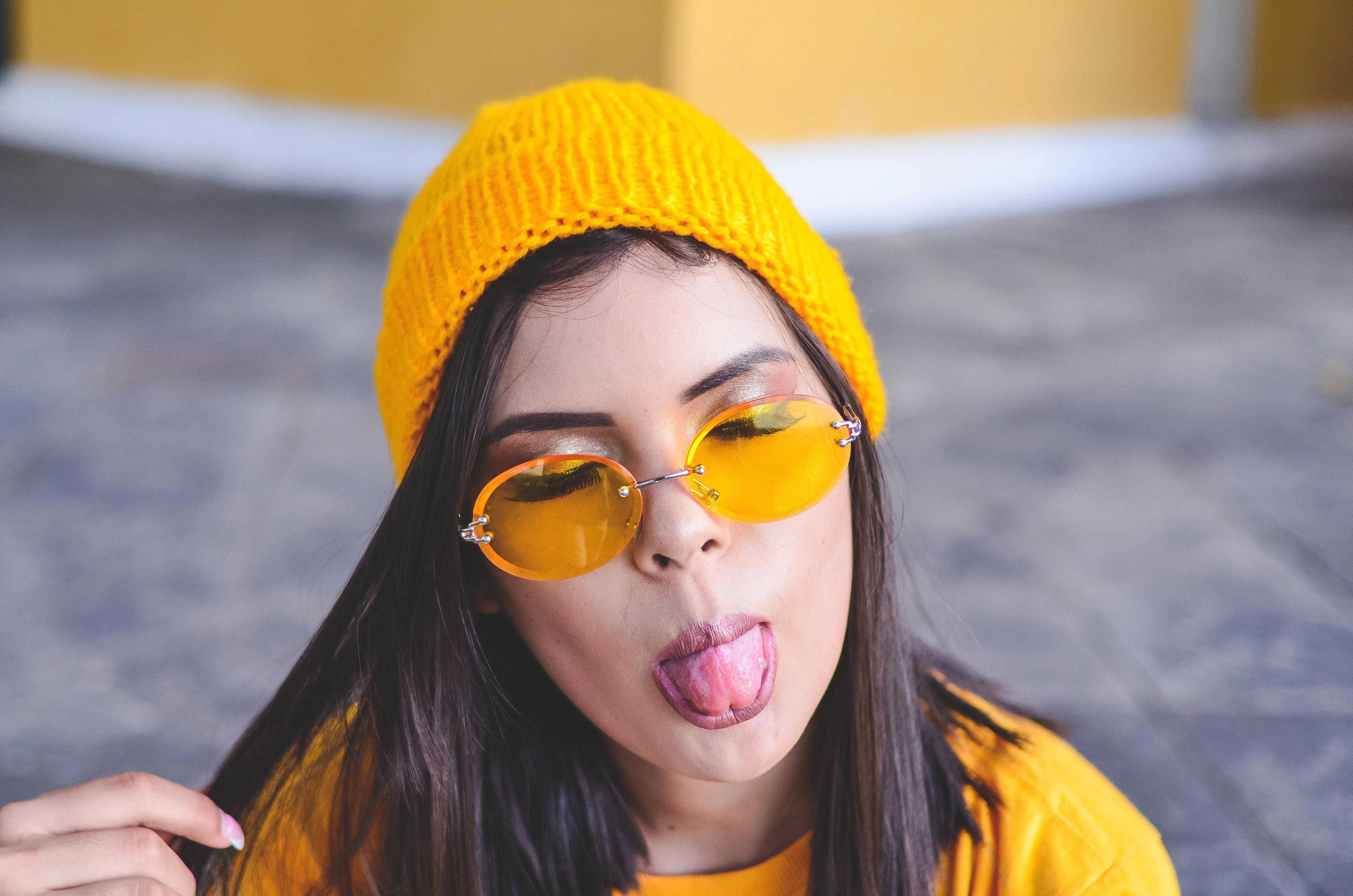
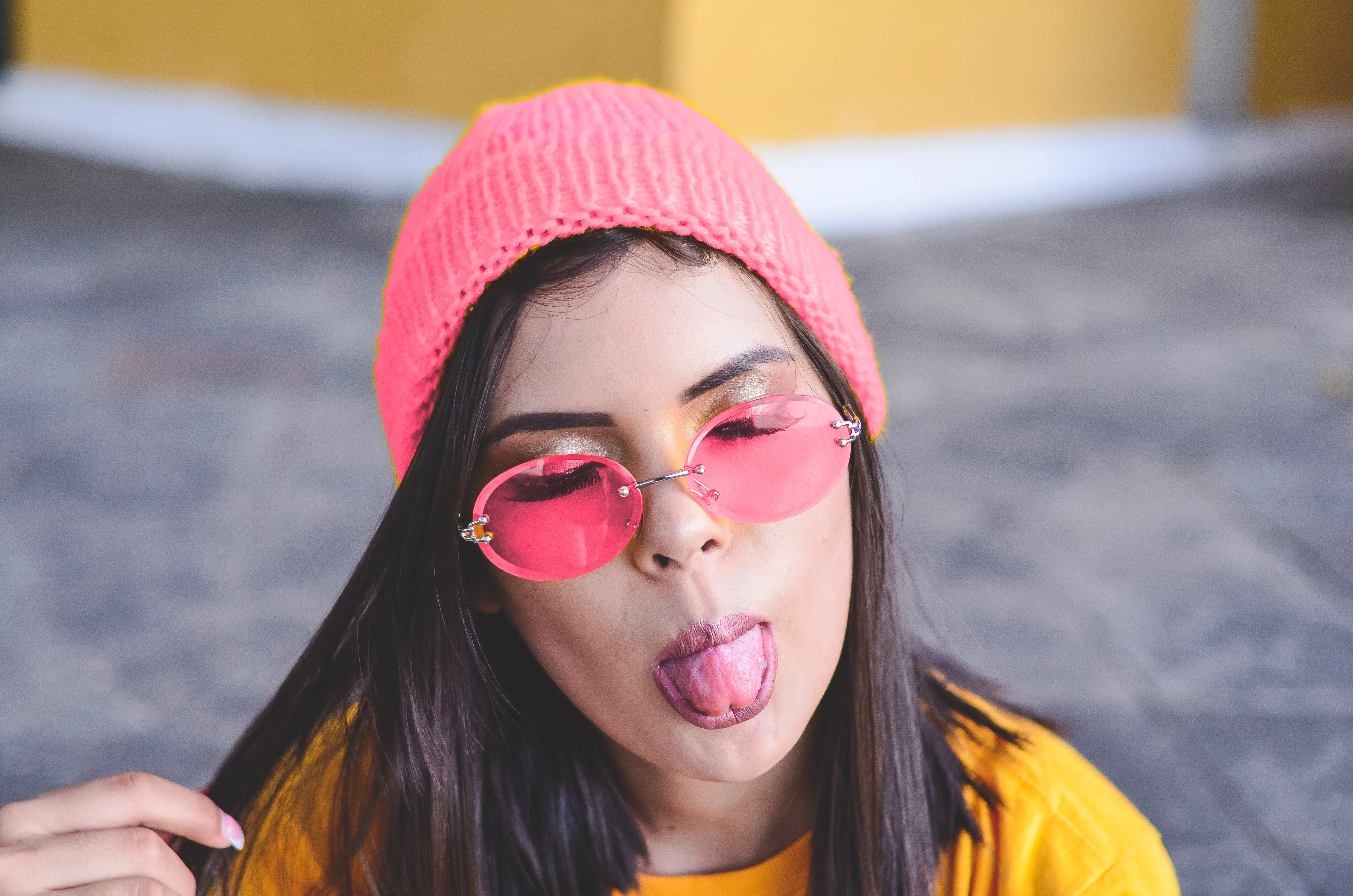
I have changed the hat and glasses in the image from yellow to pink.

For some reason the resulting colour looks bit glary/harsh and unrealistic.

I have tried playng around with hue and vibrance etc but with no better end results.


(Sorry for the poor selection, it is just for the purpose of practice.)


This topic has been closed for replies.
Correct answer jennyk15025640

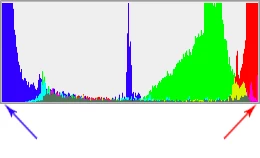
This is clipping:

That's information lost, usually translating to lost texture and detail. It looks flat and dead. The saturation is too high for the color space you're working in (sRGB in this case). The original color can't be reproduced in sRGB, and it clips. Once clipped, it's gone and can't be recovered, only at best repaired.


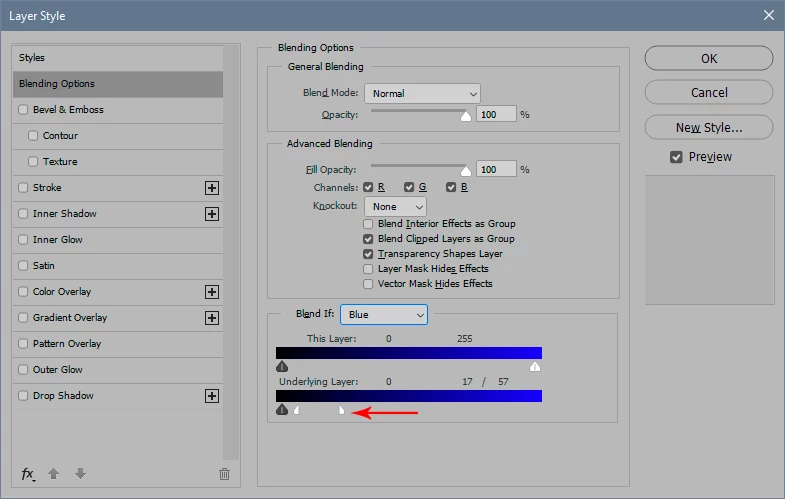
To target highlights and/or shadows, use for instance the Blend If sliders in an adjustment layer:
 

This isn't supposed to be easy. In fact that's my whole point - it's not nearly as easy as people think. There isn't a recipe. Photoshop provides all the tools you need, and more - but you have to use your own eyes. This isn't a shortcoming in Photoshop. It's the complexity of nature.


Of course, you can just go ahead and substitute the color, but as you correctly observed yourself, it doesn't look credible unless you also make some adjustments to the contrast range and saturation.


Thanks alot for your help.

5 replies

Myra Ferguson
Community Expert
Community Expert
February 25, 2020

Here's how I would change the color for the beanie:


  1. Make a new layer just for the color
  2. Use the Object Selection Tool to select the beanie
  3. Go to Select > Expand to enlarge the selection (I did it by 2 pixels)
  4. Go to Select > Modify > Feather to soften the edge of the selection (I set it 2 pixels)
  5. Select the pink color you want to use and go to Edit > Fill and set Contents to Foreground
  6. In the Layers panel, change the Blend mode from Normal to Hue
  7. Use the Eraser tool and/or Blur tool on the color layer to touch up the edges
  8. (Optional) or touch up the edges by adding a Layer Mask (with the color layer selected, click the 3rd icon from the left at the bottom of the Layers panel or go to Layer > Layer Mask > Reveal All) and using a brush to apply black where you don't want the color to show and white where you want the color to show


Additionally, if you wanted to have more control over the color, saturation, and brightness, you could add an adjustment layer that's clipped to just the color layer. To add this adjustment layer


  1. Click the 4th icon at the bottom of the Layer
  2. Select Hue/Saturation...
  3. In the Properties for Hue/Saturation, click the Colorize button
  4. To clip it to just the color layer (in other words make the adjustment only apply to the color layer), hover your cursor between the Hue/Saturation layer and the color layer and Alt (PC)/Option (macOS) + click (you'll see the cursor change to an arrow on a right angle and when you click, it'll put that arrow to the left of the Hue/Saturation layer.


Now you can use the sliders to make changes.


Inspiring
March 12, 2020

Thanks so much Myra for your help!

I learnt a lot from what you wrote.


I think I have done something wrong along one of the steps though as somehow everything tuned to a coral colour?


Prior to the colorize button, I made it this shade of pink.

Nicer shade of pink I think, but still unatural, harsh and glary looking somehow.

And like the colour somehow isn't "infused" into the fibres of clothing like they are in real life clothing (I hope that makes sense!).


If you wouldn't mind helping with these questions?


Step 8:

Painting black works for me but with white doesn't. Is this because I am trying to paint outside of the areas of my (poor) selection to fix it and this cannot be done?


Adjustment layer Step 3:

When I click colorise the image turned like a "sepia red effect".


Step 4: When I clip it it turned the coral colour mentioned above.


Inspiring
March 12, 2020

For example, in this (stock photo) the colour of the beanie looks natural and without the "funny effect".

Is there any way to achieve results like this?

Clients wll be very exacting and expect natural results for the most part.


Legend
February 24, 2020

The bottom image is brighter and less contrasty. I'd do more work on this.

Inspiring
February 25, 2020

Work in which way please?

Legend
February 25, 2020

I just told you what I see.

D Fosse
Community Expert
Community Expert
February 24, 2020

Most people have this idea that substituting a color should be a breeze. But in reality it's a complex optical phenomenon. That has nothing to do with Photoshop, just reality.

D Fosse
Community Expert
Community Expert
February 24, 2020

Yes, that's one thing (very obvious around her nose).


But there's another thing, and this is something most people discover the hard way. Colors have different inherent brightness, and different inherent contrast ranges. At the same saturation level, red is a darker color than yellow. So you need to remap the whole contrast range. You can't just substitute the color alone


You also need to reduce the saturation in the shadows and highlights compared to the mid-tones where the saturation is strongest.


Actually the original yellow image is a bit unrealistic too, because the yellow color is quite severely clipped. The blue channel is clipped at the low end, and the red channel at the high end. This is why the shadows have an orange tint and the highlights look flat, crushed and dead.

Inspiring
February 25, 2020

I agree that the original yellow image beanie looked quite unrealistic too.


If you don't mind, what does "because... quite severely clipped. The blue channel is clipped at the low end, and the red channel at the high end. This is why the shadows have an orange tint and the highlights look ........" mean please?


How do you reduce the saturation in the shadows and highlights alone?

D Fosse
Community Expert
Community Expert
February 25, 2020

This is clipping:

That's information lost, usually translating to lost texture and detail. It looks flat and dead. The saturation is too high for the color space you're working in (sRGB in this case). The original color can't be reproduced in sRGB, and it clips. Once clipped, it's gone and can't be recovered, only at best repaired.


To target highlights and/or shadows, use for instance the Blend If sliders in an adjustment layer:


This isn't supposed to be easy. In fact that's my whole point - it's not nearly as easy as people think. There isn't a recipe. Photoshop provides all the tools you need, and more - but you have to use your own eyes. This isn't a shortcoming in Photoshop. It's the complexity of nature.


Of course, you can just go ahead and substitute the color, but as you correctly observed yourself, it doesn't look credible unless you also make some adjustments to the contrast range and saturation.


Myra Ferguson
Community Expert
Community Expert
February 24, 2020

You could get a more realistic look if you add a very feathered selection around the edges of the sunglasses and apply the color there, too. The original lenses have cast yellow by the eyes and nose.

Inspiring
February 24, 2020

Thanks. My concern is also for the beanie. Somehow the colour looks too "glary"and not how it would look irl.