Participating Frequently
January 16, 2019
Answered

Why has Content aware "fill" been replaced with Content aware "scale"?

  • January 16, 2019
  • 4 replies
  • 17367 views

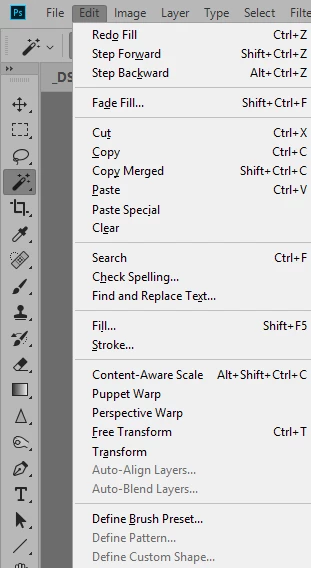
Have there been any recent updates that changed where CA Fill used to be in the Edit drop down menu?  The spot is now replaced with Content-Aware Scale.  I can't seem to find the Fill feature anymore.

    This topic has been closed for replies.
    Correct answer Semaphoric

    Look in Edit > Menus; Menu for: "Application Menus", Set: "Photoshop Defaults".

    Expand the Edit menu by clicking on the '>' by it, and scroll down until you get to  Content Aware Fill, between Fill and Content Aware Scale, and make sure the visibility is set (with the eyeball icon).

    4 replies

    John Waller
    Community Expert
    Community Expert
    January 16, 2019

    where CA Fill used to be in the Edit drop down menu?  The spot is now replaced with Content-Aware Scale.

    For the record, it has not been replaced by Content-Aware Scale.

    In your screenshot, Content-Aware Fill is not visible where it should be: above Content-Aware Scale and under Fill... and Stroke...

    Try Semaphoric's solution in this thread:

    JJMack
    Community Expert
    Community Expert
    January 16, 2019

    Windows dialog differs

    JJMack
    Semaphoric
    Community Expert
    Community Expert
    January 16, 2019

    JJ, you have the Keyboard Shortcuts tab selected, not the Menus tab.

    Jeff Arola
    Community Expert
    Community Expert
    January 16, 2019

    What version of photoshop are you using?

    You need photoshop cc 2019 or aka version 20.0....

    In photoshop go to Help>System Info and the top line is the photoshop version.

    Semaphoric
    Community Expert
    SemaphoricCommunity ExpertCorrect answer
    Community Expert
    January 16, 2019

    Look in Edit > Menus; Menu for: "Application Menus", Set: "Photoshop Defaults".

    Expand the Edit menu by clicking on the '>' by it, and scroll down until you get to  Content Aware Fill, between Fill and Content Aware Scale, and make sure the visibility is set (with the eyeball icon).

    Community Expert
    January 16, 2019

    Seems like a Photoshop question, moving it to Photoshop forum.

    -Manan