
ForeverAflame
Participant
October 13, 2018
Answered

Windows Taskbar won't appear if Photoshop is foreground

  • October 13, 2018
  • 5 replies
  • 13550 views

I have "Automatically hide the taskbar in desktop mode" selected in my Windows settings.

When most programs are the foreground (active) program, the taskbar appears when my cursor is near the bottom of the screen and hides itself when the cursor is anywhere else. However, when Photoshop is the foreground program, the taskbar never appears, no matter where my cursor is.

I would like to solve this problem. I would like the taskbar to appear at the bottom of the screen when my cursor is at the bottom of the screen and when Photoshop is in the foreground—the same functionality as with every other program.

(Turning off "Automatically hide the taskbar in desktop mode" is not a solution.)

Windows 1803 17134.345

Photoshop 19.1.6
This topic has been closed for replies.
Correct answer gener7

I do appreciate the suggestion, but unfortunately it doesn't behave that way for me. Whether I've clicked to maximize Photoshop or it's in some other window mode (free-resized, pinned to a corner or a side, etc), the taskbar does not appear.

Is it possible that, for the developers, this is Working As Intended?


No, the Taskbar indeed autohides and shows if I place my trackpad cursor at the bottom. If I manually expand Ps to the edges it doesn't work.

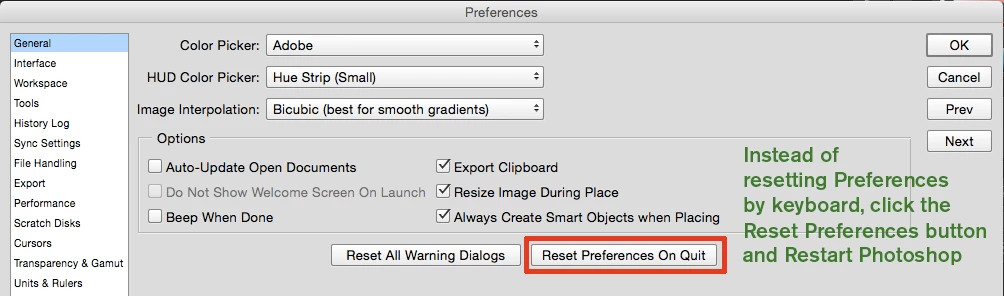
Would you like to try and reset prefs?

5 replies

Jeff Arola
Community Expert
Community Expert
April 18, 2023
dav_id22
Participant
March 13, 2023

True, in the bottom left where zoom % and res are displayed, bar appears "cut" and not fitted to the full wxh screen settings....only a recent issues after a few updates....tried resetting preferences and taskbar behavioural settings and nothing worked. Anyone know the issue?


Known Participant
April 18, 2023

Same problem here.

Participant
July 24, 2021

Automatically hide the taskbar issue in desktop mode is a complicated problem. Before fixing the issue you have to find the culprit and then fix it. You may check the below source to find reasons and their solutions.

How to Fix Windows 10 Taskbar Not Auto Hiding

Trevor.Dennis
Community Expert
Community Expert
October 14, 2018

I have the same problem, but the thing is, I don't  remember if it is a new thing.  I suspect it is though, so is probably related to a Windows

10 update like 1803. I use Windows key + Tab to tile the open applications, and move  the mouse to the bottom of the screen which causes the Task Bar to pop up.    Not  ideal, so I'll  be following this thread to see if a better solution comes to light. 

We tend to count every mouse click, and every inch of cursor movement, striving for more efficient workflows, so stuff like this makes a difference.

gener7
Community Expert
Community Expert
October 14, 2018

I tried duplicating the problem on my Windows 10 Dell and I was able to.

Look to the left of the X (close program) box in Photoshop.

If you see a single (Maximize) box, click on it. You will then see two overlapping boxes. The Taskbar should then pop up in the Maximize mode.

What happens if I go into the Restore mode (overlapping boxes) and drag each side of Photoshop to fill the screen, that's when the Taskbar won't pop up. Somehow that blocks the Taskbar.

So if you see a single box, click on it and try again.

Trevor.Dennis
Community Expert
Community Expert
October 14, 2018

Gene, this is the sort of issue that Noel would have had the definitive answer to.

I think Noel lives near Lake Okeechobee.  Is that anywhere  near where that terrible weather hit?   I've got a Windows 10 issue where I keep typing double spaces between  words.  Not  every time, but more than enough to be annoying.  That's another thing Noel would have had a fix for.   I have asked him to start posting again, but he won't have a bar of  it.

gener7
Community Expert
Community Expert
October 14, 2018

First thanks for including the exact version numbers for your OS and Photoshop. It does save us a lot of time.

I have the same Windows 10 and Photoshop software on my older Dell laptop and so far no problems with the Autohide.

That is not to say updates can throw off settings and cause it not to respond, so here's some troubleshooting steps to try:

How to Fix the Windows Taskbar When It Refuses to Auto-Hide Correctly