Participant
May 29, 2017
Answered

Wrong colors on monitor

  • May 29, 2017
  • 1 reply
  • 3068 views

Hi!

I have a problem with PS showing colors differently  than they appear in OS viewer programs and Rendering programme like Cinema 4D.

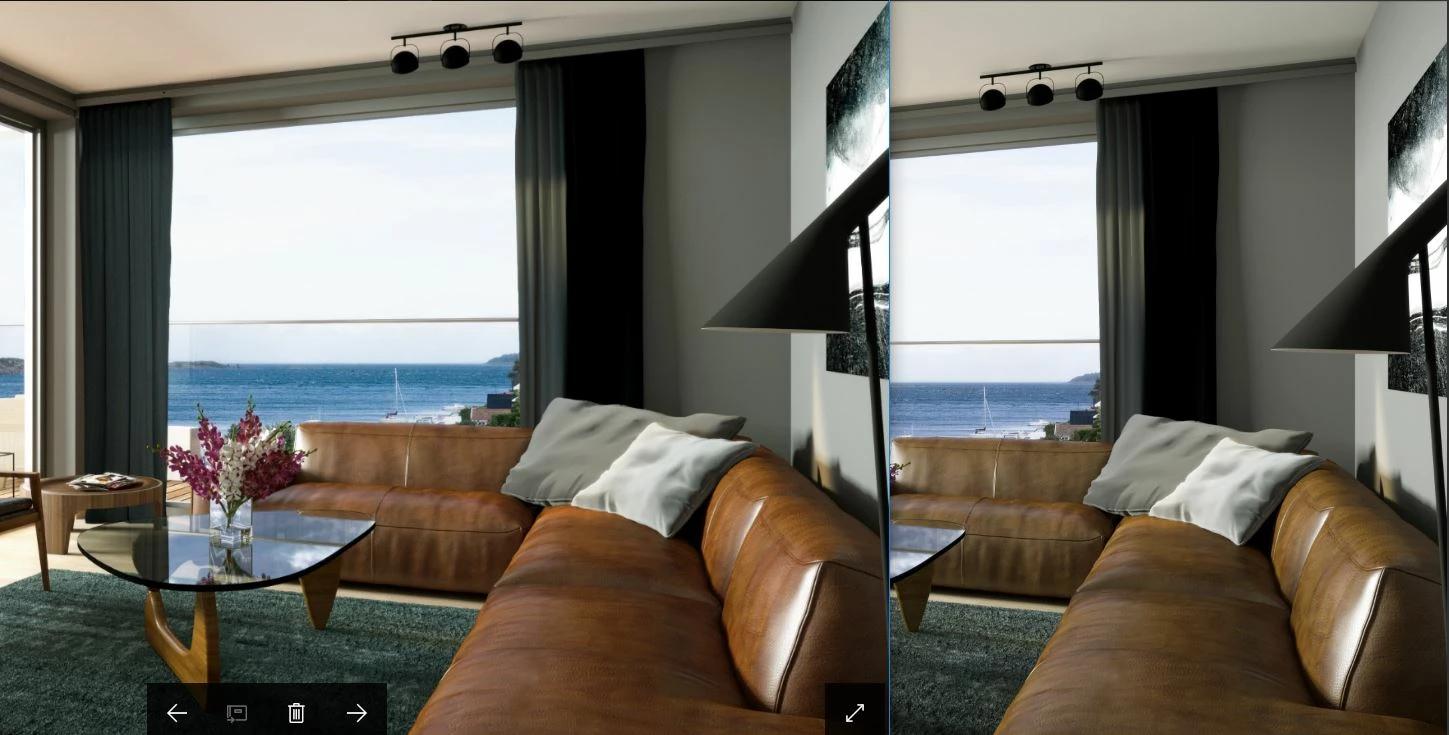
My workaround so far has been to activate proof colors: monitor, wich seems to show the colors correctly. But this is not an ideal working situation... See attached file: Left shows image in OS viewer, right side is what i get when opening file in PS. I have reasently moved from mac to windows, and have never had this problem before. I now have windows 10, I have reset and reinstalled PS with no effect. I now use Europe General Purpose 3 color settings. I have a monitor: BenQ 27" SW2700PT, set to standard colors. Please help

    This topic has been closed for replies.
    Correct answer c.pfaffenbichler

    Photoshop is Color Managed, if you compare it to applications that are not then the problems are not Adobe’s making.

    If an image does not have an Embedded Colour Profile Photoshop will use its RGB (or CMYK) Working Space to interpret the image.

    1 reply

    c.pfaffenbichler
    Community Expert
    c.pfaffenbichlerCommunity ExpertCorrect answer
    Community Expert
    May 29, 2017

    Photoshop is Color Managed, if you compare it to applications that are not then the problems are not Adobe’s making.

    If an image does not have an Embedded Colour Profile Photoshop will use its RGB (or CMYK) Working Space to interpret the image.

    Participant
    May 29, 2017

    Thank you for the answer! It seams that the image shows up more or less  the same way in all other programs than Photoshop (Adobe). So it would be nice to set PS up so it at least gets close to displaying the image as would in e.g. the web browser, which in this case is the main target. As seen in the attached file the difference is quite huge.

    c.pfaffenbichler
    Community Expert
    Community Expert
    May 29, 2017

    I disagree; the other applications disregarding Colour Management would not seem to be a good reason to expect Photoshop to do the same.

    If those other applications disregard the embedded profile (hopefully you do embed the color profile in the images) and simply pass the RGB values along to the display that does not provide you with a meaningful preview of how the images may appear on other computers and screens.

    As for which browsers and other applications are in fact Colour Managed (not necessarily by default) I could not tell you but you could do some research.

    Color managed browsers

    Re: Color Management

    How to export for non-color-managing browsers?