
goldenbeautys
Participant
January 27, 2018
Answered

Your Tool Options Bar Will Be Clipped

  • January 27, 2018
  • 3 replies
  • 6566 views

Ever since the latest update to Photoshop CC I have encountered this error every time I open the program.

"Your tool options bar will be clipped because your monitor scale factor is too large.  Reduce your monitor settings to a lower scale, or drag Photoshop to a larger monitor."

I own a Dell Inspiron 7573

No Windows updates I need as I last checked a few minutes ago

I have update my graphics card, as well as other drivers.

My scale is set to 100%

Screen resolution is 1152 x 864

Just in case the suggestions or questions for these come up, they are all things I have checked on. Any help/solution would be great, thank you. Hope everyone is having a wonderful day! <3.
    This topic has been closed for replies.
    Correct answer JJMack

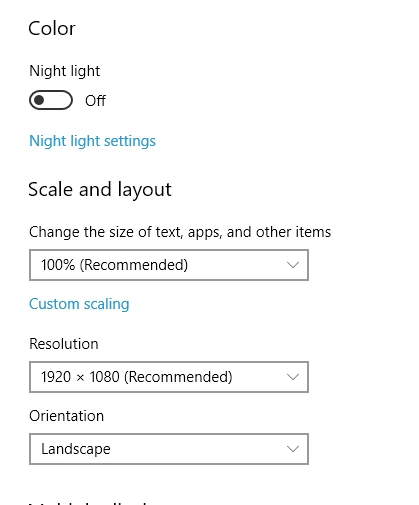
    Is it your windows display scaling setting you are referring too? CC UI Scaling setting 100% does nothing in CC 2018.1 the preference setting should have been removed from Photoshop IMO.  Windows Display settings.  From what I see on Dell site your display should be 1920x1080 a 1K display did you change your Windows setting off recommended 1920x1080 to 1152x864

    You may want to set the scaling to 125%  make the UI like a 1536x864 display

    Scaling   set to 125% and resolution set to 1152x864 would be like a UI display 922x691 Photoshop UI would not fit in that display size

    3 replies

    goldenbeautys
    Participant
    January 28, 2018

    Thank you for your help JJ! It seems to be the solution, though I hope Adobe can fix that soon because this is usually my standard size and it worked in Adobe in the past. I have bad eyes, so the setting is best for me. Hopefully Adobe can get it back to where it was. But it seems to be the answer for now, so thank you so much. It was very helpful! Hope you have a wonderful day! .

    JJMack
    Community Expert
    Community Expert
    January 28, 2018

    It not a Problem you just made bad settings.    Adobe UI scaling now woks well now with Windows 10.   I do not know if the UI Scale preference setting serve any function on Windows 7, Windows 8,1 and Mac systems.  If it does not IMO is should be removed from Photoshop preferences.

    JJMack
    Thwizzit
    Participant
    November 11, 2020

    I seem to be having this same issue with Photoshop ELEMENTS. The window is too large for my Desktop and can't get the cursor low enough to make it smaller to access the Tool Options. I'm at the highest monitor resolution setting so I make it any higher. Not sure how, why or when this happened but really need to access those tools.


    Any way to fix this?


    JJMack
    Community Expert
    JJMackCommunity ExpertCorrect answer
    Community Expert
    January 27, 2018

    Is it your windows display scaling setting you are referring too? CC UI Scaling setting 100% does nothing in CC 2018.1 the preference setting should have been removed from Photoshop IMO.  Windows Display settings.  From what I see on Dell site your display should be 1920x1080 a 1K display did you change your Windows setting off recommended 1920x1080 to 1152x864

    You may want to set the scaling to 125%  make the UI like a 1536x864 display

    Scaling   set to 125% and resolution set to 1152x864 would be like a UI display 922x691 Photoshop UI would not fit in that display size

    JJMack
    Trevor.Dennis
    Community Expert
    Community Expert
    January 27, 2018

    I would say that you have nailed it JJ. 

    Ares Hovhannesyan
    Community Expert
    Community Expert
    January 27, 2018

    Try to change UI Scaling "Auto" value to 100 or 200. from preferences.

    This discussion can be also helpful Photoshop CC scaling broken on high DPI windows laptop