
Participant
August 5, 2021
Question

Cannot install Premiere elements 2019

  • August 5, 2021
  • 2 replies
  • 3089 views

Hello


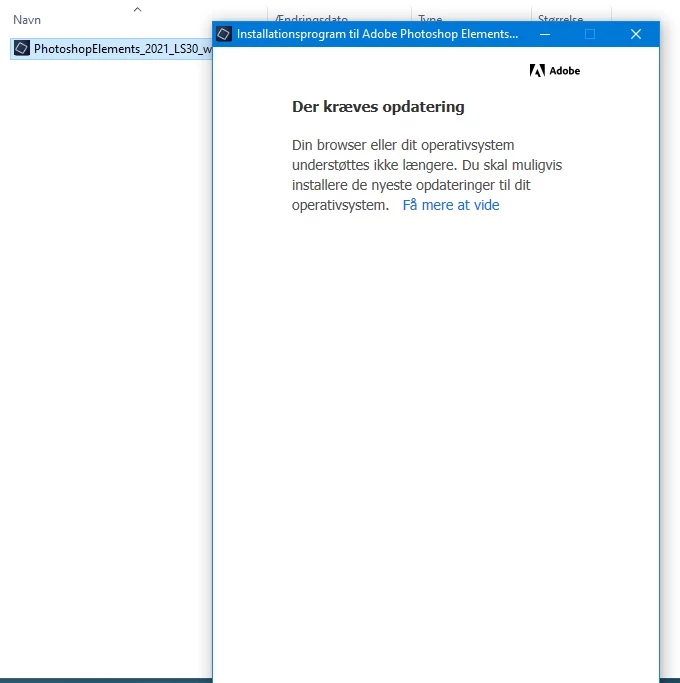
When i start the install, i get an error message telling me the operating system is not supported and/or my browser is not up to date. I have the a fully updated version of windows 10 x64, latest internet explorer 11, Edge.


Any ideas ?

Thanks in advance.

Anders
This topic has been closed for replies.

2 replies

anopeAuthor
Participant
August 31, 2021

Fixed it by disabling the internet connection, doh ^^

Ann Bens
Community Expert
Community Expert
August 5, 2021

Internet explorer is no longer supported.

Use a different browser such as Firefox.

Participant
August 5, 2021

I use Firefox as default browser and I encounter the very same error. New PC HP Z1 G8 with latest W10 updates... so the issue must be elsewhere. Maybe PE 2019 installation cannot recognize newest W10 versions ?

Participant
August 12, 2021

Can you install 2021 trial?


As for my side, I can install the 2021 trial version without any glitch.

Once the 2021 trial version installed, I was able to install the 2019 version ! Apparently, this has something to do with Adobe Creative Cloud version... Once the 2021 version installed, former installer version using CC are unlocked.

Therefore, for simplifying end users (customers) job, maybe someone at Adobe could rebundle the installer for PE 2019, in order to match the latest IE and W10 versions. This would save a lot of time to your customers and keep them happy -hopefully.