Exit
  • Global community
    • Language:
      • Deutsch
      • English
      • Español
      • Français
      • Português
  • 日本語コミュニティ
  • 한국 커뮤니티
1

Copy, Paste and then change text in Text Animation

Participant ,
Oct 30, 2019 Oct 30, 2019

I have created a text animation and I'd like to copy and paste it several times to do a comparison.  All I want to do is change the number from #1 to #2 to #3 etc.  But each time I change the # in a pasted clip it changes it in the original copied clip.  Is there a way to change the # in the copied clip without it changing the original?  How do you do it?  


Thanks for any help you can give me.

TOPICS
Error or problem , Tips and tricks
570
Translate
Report
Community guidelines
Be kind and respectful, give credit to the original source of content, and search for duplicates before posting. Learn more
community guidelines
Community Expert ,
Oct 30, 2019 Oct 30, 2019


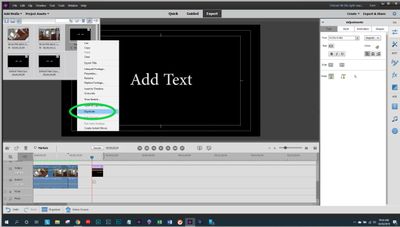
Only within Assets can you duplicate titles for text changes.  Then, change the text (and title) and put the new version on the timeline.  


Capture.JPG

Translate
Report
Community guidelines
Be kind and respectful, give credit to the original source of content, and search for duplicates before posting. Learn more
community guidelines
Participant ,
Oct 30, 2019 Oct 30, 2019

Thanks for your reply, but I must be doing something wrong.  Your image came out really small on the response, even when I click on it, but I think you are telling me to "duplicate" the "Asset" or title.  However, That gives me a copy without any of the animation and what I really want is the animation and be able to change the title within the animation.  What am I missing in your response?

Thanks again, for trying to help.

Translate
Report
Community guidelines
Be kind and respectful, give credit to the original source of content, and search for duplicates before posting. Learn more
community guidelines
Community Expert ,
Oct 30, 2019 Oct 30, 2019
LATEST

Your image came out really small on the response"

-Click on the image.

-Right click on the new image and choose "Open image in new tab."

-Open the new tab.  It will be larger.

Translate
Report
Community guidelines
Be kind and respectful, give credit to the original source of content, and search for duplicates before posting. Learn more
community guidelines