

Turn on suggestions
Auto-suggest helps you quickly narrow down your search results by suggesting possible matches as you type.

Exit
- Home
- Premiere Elements
- Discussions
- delete Voice and Narration tracks
- delete Voice and Narration tracks
0
delete Voice and Narration tracks

New Here
,
/t5/premiere-elements-discussions/delete-voice-and-narration-tracks/td-p/10821709
Dec 26, 2019
Dec 26, 2019
Copy link to clipboard
Copied
Is there a way to remove these two tracks? Thanks
TOPICS
Tips and tricks

Community guidelines
Be kind and respectful, give credit to the original source of content, and search for duplicates before posting.
Learn more

 5
Replies
5
5
Replies
5


Community Expert
,
/t5/premiere-elements-discussions/delete-voice-and-narration-tracks/m-p/10821734#M27170
Dec 26, 2019
Dec 26, 2019
Copy link to clipboard
Copied
Remove them, hide them or delete what is on them?
Community guidelines
Be kind and respectful, give credit to the original source of content, and search for duplicates before posting.
Learn more
milly_molly_muffin_eater
AUTHOR
New Here
,
/t5/premiere-elements-discussions/delete-voice-and-narration-tracks/m-p/10821800#M27173
Dec 26, 2019
Dec 26, 2019
Copy link to clipboard
Copied
Remove them totally . . . thanks.
Community guidelines
Be kind and respectful, give credit to the original source of content, and search for duplicates before posting.
Learn more
milly_molly_muffin_eater
AUTHOR
New Here
,
/t5/premiere-elements-discussions/delete-voice-and-narration-tracks/m-p/10821850#M27175
Dec 26, 2019
Dec 26, 2019
Copy link to clipboard
Copied
Hide them I mean.
Community guidelines
Be kind and respectful, give credit to the original source of content, and search for duplicates before posting.
Learn more
Community Expert
,
/t5/premiere-elements-discussions/delete-voice-and-narration-tracks/m-p/10822276#M27181
Dec 27, 2019
Dec 27, 2019
Copy link to clipboard
Copied
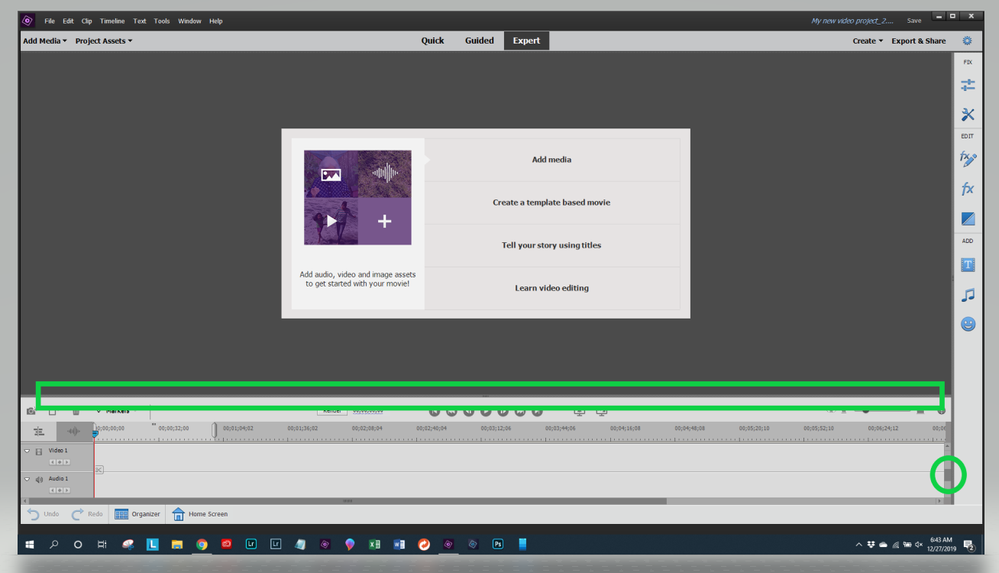
You can control the size of the timeline window. Grab the bar inside the long box with your mouse and move it up or down. Then you can scroll the content by grabbing the slider inside the small circle. The result is you can see just Video 1 and Audio 1.
Community guidelines
Be kind and respectful, give credit to the original source of content, and search for duplicates before posting.
Learn more
milly_molly_muffin_eater
AUTHOR
New Here
,
LATEST
/t5/premiere-elements-discussions/delete-voice-and-narration-tracks/m-p/10823029#M27187
Dec 27, 2019
Dec 27, 2019
Copy link to clipboard
Copied
much appreciated
Community guidelines
Be kind and respectful, give credit to the original source of content, and search for duplicates before posting.
Learn more

Resources
Get Started

Troubleshooting
Knowledge Base Articles
Copyright © 2024 Adobe. All rights reserved.
 AdChoices