
Known Participant
March 13, 2019
Question

Deleting empty room between clips

  • March 13, 2019
  • 1 reply
  • 299 views

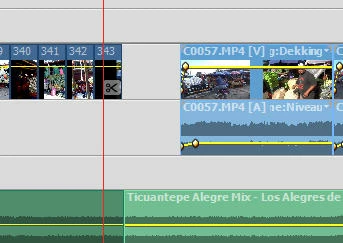
Sometimes I feel the need after finishing my film to delete some pictures. The problem is, that I can't close the empty room after it, because i have an audio clip in it., see the example. But I need the audio clip, because I calculated exactly where the audio clip must start and finish. How can I fix this?

    This topic has been closed for replies.

    1 reply

    nidhibhushan_23
    Adobe Employee
    Adobe Employee
    March 13, 2019

    Hello,

    This is a very common scenario while editing. Usually, editors first decide the complete music track to be used in movie and later decide which video should go with which audio segment. But in this case, below are few things that you might want to try out:

    • Changing duration of previous clips so that there is no gap in the end. For eg., changing speed
    • Adding any other picture in between to fill up the space
    • Trim the ends of second audio (in your screenshot) to match video above and delete gap

    Let me know it answers your question.

    Known Participant
    March 13, 2019

    Most of the times it when I am not satisfied about some pictures of I want the pictures on another place in the film.Adding other pictures is also no solution.

    I always make a mix between pictures and clips and though the whole film I use music. So if I delete the end of one piece of audio a new problem will exist  with the next audio clip. So I can't change the start of the audio clip, but at the end of that clip I can fade out. So what I search for is to move the audioclip to the empty place.

    Ann Bens
    Community Expert
    Community Expert
    March 13, 2019

    Is this an option

    Clips untouched.

    Gap gone and unchanged audio superimposed.