Known Participant
July 15, 2019
Question

Display driver not compatible anymore

  • July 15, 2019
  • 3 replies
  • 1859 views

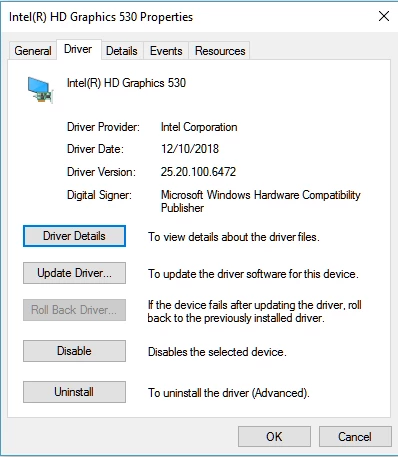
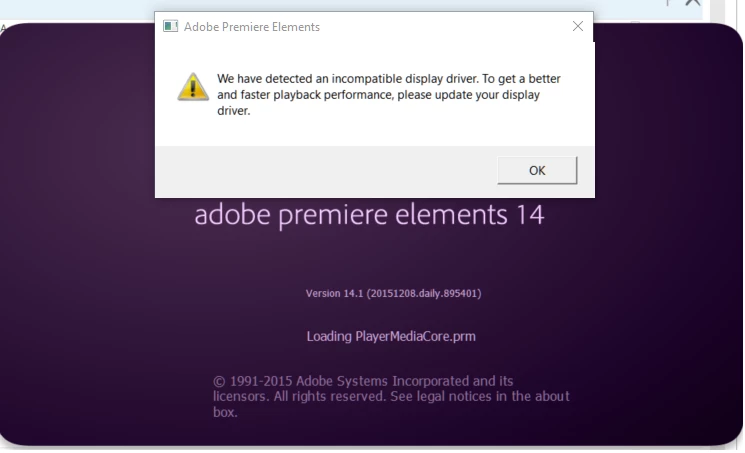
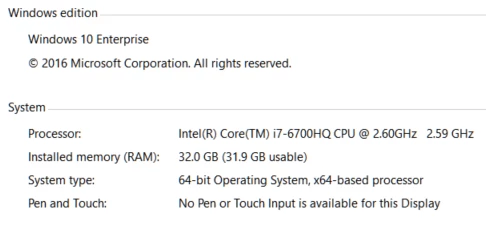
I had no issues till a couple of days ago but now when I try to launch APE 14 it says that my video driver is not compatible it just exits. I haven't changed anything on my laptop, its the same video card and driver that was in there by default.
Thanks

Tahir

This topic has been closed for replies.

3 replies

Sahil.Chawla
Adobe Employee
Adobe Employee
July 15, 2019

Moved to Premiere Elements

Nancy OShea
Community Expert
Community Expert
July 15, 2019

If you received a Windows update recently, your drivers are probably different than they were before the update.   See link below related to the 1903 update.

Latest Windows update messed up graphics card driver (GTX - Microsoft Community

Go to your video card manufacturer's website for the latest graphics drivers.  Of if those don't work, you may need to revert to previous drivers.

Nancy O'Shea— Product User & Community Expert
Known Participant
July 15, 2019

updating the Display drivers (sp94579.exe) didn't help. I installed this from Intel's support site. Basically I already have the latest driver. I have HP's support assistant running on my laptop and that too does not find any updates for my drivers. I am now going to email "adobesystems24x7@gmail.com" for assistance.

Shivangi_Gupta
Community Manager
Community Manager
July 16, 2019

An update on this...so I uninstalled my HD 530 Display driver and APE 14 started to work but obviously my display wasn't work at its optimum level and then I had to reinstall the latest HD 530 driver and now APE 14 is again NOT working.


Hi there,

This does not sound ideal. Updating GPU drivers to the latest version should not affect the application.

  • Have you tried reinstalling Premiere Elements?
  • Do you have multiple GPU installed on your computer?

Let me know. Meanwhile, I'll research the issue at my end.

Thanks,

Shivangi

Peru Bob
Community Expert
Community Expert
July 15, 2019

A Windows 10 update may have installed a bad driver. Go directly to the Intel site and check what drivers are available:

Support for Intel® HD Graphics 530