
Participant
March 18, 2017
Answered

Elements 15 Export & Share window is missing options

  • March 18, 2017
  • 1 reply
  • 256 views

I have edited a video in Premier Elements and I'm ready to export it. When I go to "Export & Share" I can select all my preferences but I don't have an option to actually EXPORT, or save, it anywhere. From what I've seen in tutorials, I seem to be missing a section of the window that should let me pick a file location and save/export, but I can't resize or change the window.

Here is what it looks like:
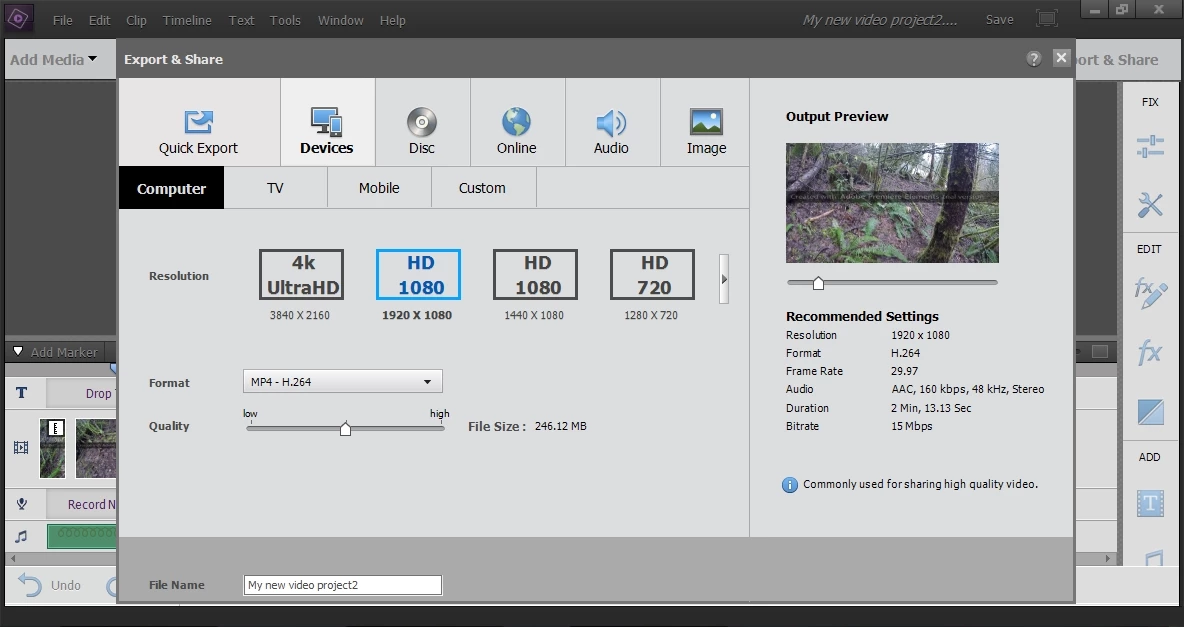
As you can see the box ends after "File Name" and I don't have any way to finish the export. Can someone tell me how to fix this or work around it?

Thank you!

    This topic has been closed for replies.
    Correct answer Steve Grisetti

    What operating system do you have? With what graphics card? What processor do you have with how much RAM and what is the resolution of your monitor?

    I've not seen this before. I assume you've tried uninstalling/reinstalling.

    EDIT

    Actually, now that I look at it more closely, it really looks like your monitor resolution is way too low.

    1 reply

    Steve GrisettiCorrect answer
    Legend
    March 19, 2017

    What operating system do you have? With what graphics card? What processor do you have with how much RAM and what is the resolution of your monitor?

    I've not seen this before. I assume you've tried uninstalling/reinstalling.

    EDIT

    Actually, now that I look at it more closely, it really looks like your monitor resolution is way too low.

    Participant
    March 19, 2017

    Thank you! I suspected my resolution and tried messing around with it a little, but not enough. I got it to work. I have my PC plugged into a TV for most use and it screws with the resolution.. I just unplugged it and there were the options. I really appreciate the reply!