



Question
Horrible Performance of Premiere Elements 2022
It started from Premiere Elements 2021.
Ever since the Premiere Elements team is trying to implement hardware acceleration in the Windows version to compete with it's rivals, the performance is falling down!
This is my PC
OS Name	Microsoft Windows 10 Pro for Workstations
Version	10.0.19043 Build 19043
OS Manufacturer	Microsoft Corporation
System Manufacturer	ASUSTeK COMPUTER INC.
System Model	MINIPC PA90
System Type	x64-based PC
System SKU
Processor	Intel(R) Core(TM) i9-9900K CPU @ 3.60GHz, 3600 Mhz, 8 Core(s), 16 Logical Processor(s)
BaseBoard Manufacturer	ASUSTeK COMPUTER INC.
BaseBoard Product	PA90
BaseBoard Version	Rev 1.xx
Platform Role	Desktop
Hardware Abstraction Layer	Version = "10.0.19041.1151"
Installed Physical Memory (RAM)	32.0 GB
Total Physical Memory	31.9 GB
Available Physical Memory	20.2 GB
Total Virtual Memory	36.6 GB
Available Virtual Memory	19.8 GB
This is my graphics
Name	NVIDIA Quadro P4000
PNP Device ID	PCI\VEN_10DE&DEV_1BB1&SUBSYS_11A310DE&REV_A1\4&24013786&0&0008
Adapter Type	Quadro P4000, NVIDIA compatible
Adapter Description	NVIDIA Quadro P4000
Adapter RAM	(1,048,576) bytes
Installed Drivers	C:\Windows\System32\DriverStore\FileRepository\nv_dispwi.inf_amd64_f0cb49b1daad3c6b\nvldumdx.dll,C:\Windows\System32\DriverStore\FileRepository\nv_dispwi.inf_amd64_f0cb49b1daad3c6b\nvldumdx.dll,C:\Windows\System32\DriverStore\FileRepository\nv_dispwi.inf_amd64_f0cb49b1daad3c6b\nvldumdx.dll,C:\Windows\System32\DriverStore\FileRepository\nv_dispwi.inf_amd64_f0cb49b1daad3c6b\nvldumdx.dll
Driver Version	30.0.14.7111
INF File	oem2.inf (Section046 section)
Colour Planes	Not Available
Colour Table Entries	4294967296
Resolution	2560 x 1440 x 59 hertz
Bits/Pixel	32
Name	Intel(R) UHD Graphics 630
PNP Device ID	PCI\VEN_8086&DEV_3E98&SUBSYS_877F1043&REV_00\3&11583659&0&10
Adapter Type	Intel(R) UHD Graphics Family, Intel Corporation compatible
Adapter Description	Intel(R) UHD Graphics 630
Adapter RAM	1.00 GB (1,073,741,824 bytes)
Installed Drivers	C:\Windows\System32\DriverStore\FileRepository\iigd_dch.inf_amd64_a086f01cc7be643a\igdumdim64.dll,C:\Windows\System32\DriverStore\FileRepository\iigd_dch.inf_amd64_a086f01cc7be643a\igd10iumd64.dll,C:\Windows\System32\DriverStore\FileRepository\iigd_dch.inf_amd64_a086f01cc7be643a\igd10iumd64.dll,C:\Windows\System32\DriverStore\FileRepository\iigd_dch.inf_amd64_a086f01cc7be643a\igd12umd64.dll
Driver Version	27.20.100.8681
INF File	oem40.inf (iCFL_w10_DS section)
Colour Planes	Not Available
Colour Table Entries	4294967296
Resolution	2560 x 1440 x 59 hertz
Bits/Pixel	32
Driver	C:\WINDOWS\SYSTEM32\DRIVERSTORE\FILEREPOSITORY\IIGD_DCH.INF_AMD64_A086F01CC7BE643A\IGDKMD64.SYS (27.20.100.8681, 25.82 MB (27,076,848 bytes), 19/7/2021 7:46 pm)
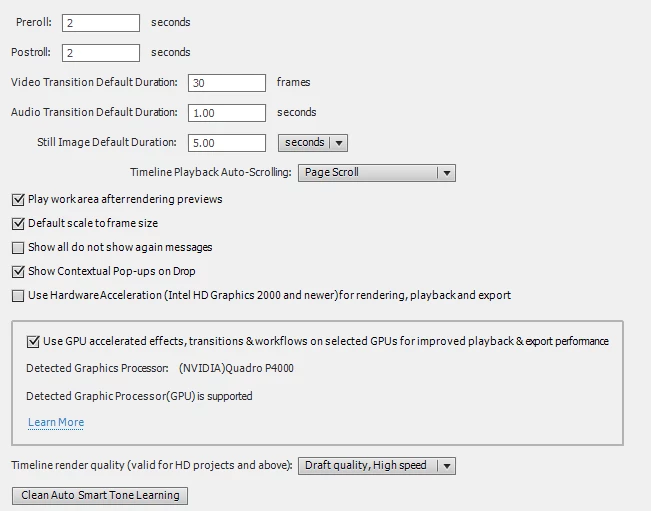
I also have managed to hack PE2022 to make use of my NVIDIA Quadro P4000
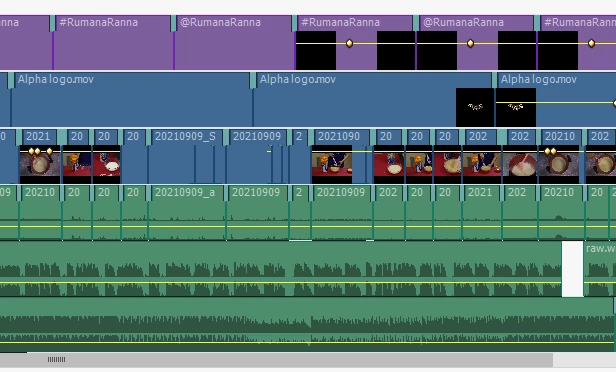
I have opened a 2021 project and my God! How bad an application can perform!! It cannot even play the timeline. Once you start planning, you cannot pause as the system becomes unresponsive to the controls!!
Not sure what Adobe has been doing, they are improving and planning to kill it!!
I would really love to get a refund and hope they will really make some improvement someday.
 AdChoices