
Participating Frequently
October 18, 2022
Answered

Imported MP4 video ok, but audio plays at 2x speed

  • October 18, 2022
  • 2 replies
  • 2350 views

I shoot video using Akaso v50x and transfer to my laptop as MP4.  Video plays fine in Windows Media Player.  When I import into Premiere Elements 2022, the audio now is 2x speed, while the video is fine.  Sounds like the chipmunks!  If I unlink audio and video, then set audio Time Stretch to 50%, the audio plays correctly, but I have to manually move the video track and eyeball it to match up with the audio.  And of course, the audio track now needs to be trimmed becuase it is 2x longer than it should be, the second half of the track being silence.  Is this a bug?  Am I importing wrong?  Is there a better workaround than what I have described?

Windows 11

12th Gen i7

64-bit OS
This topic has been closed for replies.
Correct answer Ann Bens

Thank you, and apologies for not knowing the correct terminology.  I am using an Akaso V50X camera.  I do not know if it is a Gopro clone. There does not appear to be an audio setting besides "Audio Record" on/off and "External Microphone" on/off.  I've taken video with both internal and external mics, and there doesn't appear to be any difference with the issue at hand.  There are Encoding choices of h.265 and h.264, and many choices for Resolution. 

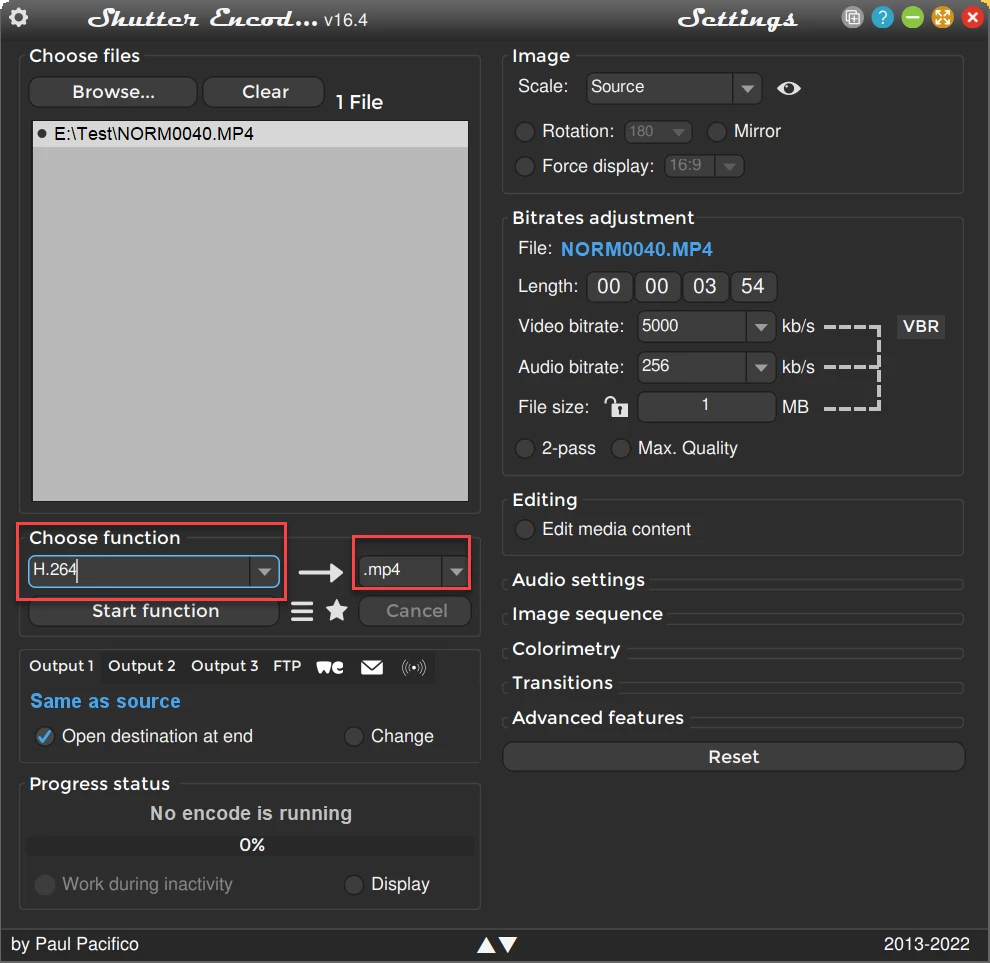
I've downloaded the Shutter Encoder, but I do not understand your recommendation to convert files to mp4.  The files are already mp4, are they not?  Besides, on the "Choose Function" dropdown in Shutter Encoder, there is not an mp4 option.  There are options for Sound Conversions.  Do I choose one of those?  Or perhaps "Replace Audio?"


mp4 is just an extension (wrapper, container)

H.264 is the codec


The idea is to re-encode the file.

2 replies

Ann Bens
Community Expert
Community Expert
October 18, 2022

Make sure Default Input in the Audio Hardware in the Preferences is set to No Input.

ClintM71Author
Participating Frequently
October 18, 2022

I tried that with no success.

Legend
October 19, 2022

I'm not sure Premiere Elements can edit HEVC H.265 4k video.

There's nothing about the audio codec that would cause a problem.

Adobe Employee
October 18, 2022

Hi,

   Can you provide details of the video you are trying to edit. 
Size (in GB)
Length (in Mins)

Resolution
and all other possible video details 

ClintM71Author
Participating Frequently
October 18, 2022

It was just a test shot to play around with the camera and Adobe.  I'm new to creating content.

454MB

1 minute 43sec length

1080p

Ann Bens
Community Expert
Community Expert
October 18, 2022