
Participant
November 23, 2016
Answered

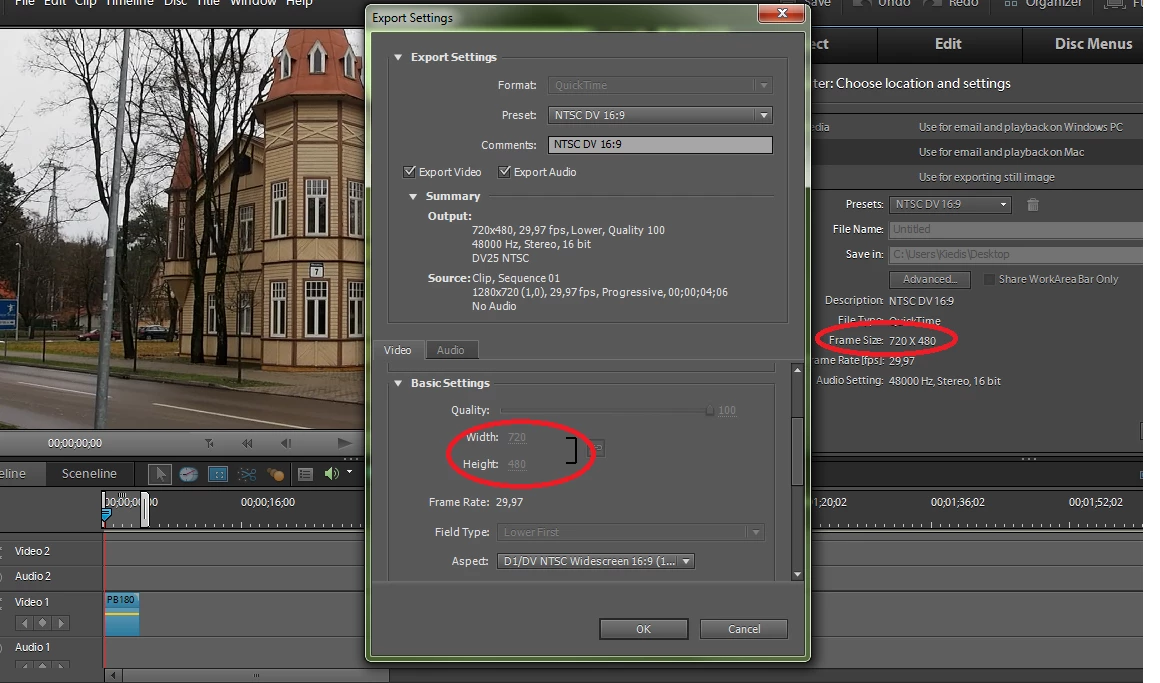
.MOV is rendered only in 720x480 frame, I need 1280x720 (version 10)

  • November 23, 2016
  • 1 reply
  • 211 views

Hi,

I want to render video in .mov format but all the presets in Premiere Elements 10 are set to 720x480 frame and in Advanced settings I am not allowed to increase frame size. And I cannot find any way to create my own QuickTime preset there. Is there any fix for this? What's the use of a low quality output like 720x480 anyway?

Thank you
    This topic has been closed for replies.
    Correct answer Steve Grisetti

    You are using a very old version of Premiere Elements with a very limited number of MOV output options.

    Since version 11, the number of Quicktime output options, resolutions and codecs available has greatly increased.

    1 reply

    Steve GrisettiCorrect answer
    Legend
    November 23, 2016

    You are using a very old version of Premiere Elements with a very limited number of MOV output options.

    Since version 11, the number of Quicktime output options, resolutions and codecs available has greatly increased.