
Known Participant
November 30, 2018
Answered

Newbie: how to only produce an export in UK PAL ?

  • November 30, 2018
  • 1 reply
  • 1926 views

Hi,
As a newbie with Premiere Elements 2019 in the UK, I think I am making a basic mistake and I would like to clarify if I am going wrong.

I know that there is a lot of existing Adobe info out there, but I'm asking specifically because I want to avoid a mistake and need to be sure.

I want to export a result for use in the UK.   I am UK based.

Could someone please check my questions - relating to my Premiere Elements 2019 product

EXPORTING

If I produce a project, my understanding is that PRE2019 will automatically default the intial project to be a UK setting, being based automatically by PRE2019 on my UK location at program installation time.

Therefore, I assume that if I do a simple export of a finished MP4 file (e.g. example.mp4) for either computer or TV use using the presets of this project,  then it will also be appropriate for the UK - but maybe not other regions such as the USA. In other words the export will work best on UK PAL systems and not NTSC. Is that correct?

I do not know whether exporting to a DVD using the preset 576 or 480 will result in exactly the same result - i.e. the DVD will work best (or only) on UK PAL systems.

I havent bought a DVD for years, and now with these new HD TV's (e.g. 2016-2018) I do not know whether the region thing is still an issue. and whether relevent any more for my exports either as a DVD or MP4.

I would welcome someone straightening me out.

I would like to follow up with a supplementary question regarding exporting to an MP4 using presets and maybe also the Custom settings of the PRE2019 product which is why I wanted to be specific about my UK location.  But this post is me asking for confirmation of some basics in case I'm mistraken.

Thanks

Pete
    This topic has been closed for replies.
    Correct answer Ann Bens

    Thank you Ann.

    Thank you for dealing with my query so fully.

    Very much appreciated.

    Two quick comments.

    1.     How did you determine the setting from the MediaIInfo?

    2.     As I understand it, you can't change the basic characteristics of a project once you start.

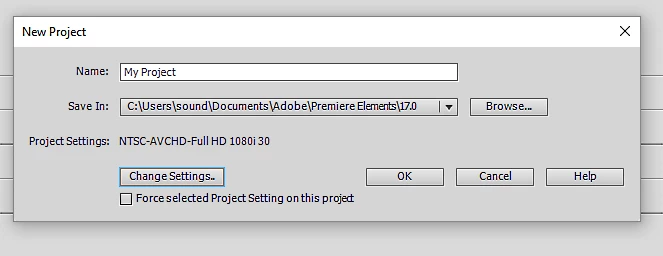
           Just thought I'd conclude by saying I still am surprised that if I simply choose to start a new project, then I get the NTSC option coming up by default even before starting anything. So it seems I will have to change it every time I start a new project.  This is even after following up another suggestion that vthe solution was to reinstall Premiere Elements.

            Heres a screenshot:

    Again,thanks

    Pete


    Once you started a project you cannot change the settings.

    You need to start over:

    Press the Change Settings button as show in your last screenshot.

    You can also start a new project by dragging the first correct clip into the timeline, but you still need to check if the settings are correct.

    Mediainfo tells me its avchd, 1920x1080, 25 fps and interlaced.

    1 reply

    Community Expert
    November 30, 2018

    Reading this page should answer your questions:  Adjust project settings and presets for Adobe Premiere Elements

    What should happen is that your project setting will be established when you put your first PAL video on the timeline.  Once that is done your output will be to PAL standards.  Alternately, you can manual force project settings from the New Project screen.

    Do keep in mind that DVDs are old "standard definition" for tube TVs.  They will not look good on new TVs.  The move is to distribute high quality on USB Flash drives, SD cards, YouTube, Vimeo, DropBox, etc.  The newest 2019 version of Premiere Elements has eliminated DVD production on Mac computers.  Blu-Ray production is gone for both Mac and PC computers. 

    Known Participant
    November 30, 2018

    Thank you whsprague, much appreciated.

    My confusion was aroused when I spotted a seemingly NTSC preset appear when getting the hang of exporting.

    As you can see, in my default project, the standard preset for HD1080 1920x1080 shows the preset frame rate of 29.97, which I thought might indicate it is for an NTSC region?

    Does this mean I have to create a Custom setting to 25 or 50 fps to make it appropriate for UK  PAL? If so, does this mean somehow I have created a non UK project?  Could you straighten me out please?

    Thank  you again.

    Pete

    Ann Bens
    Community Expert
    Community Expert
    December 2, 2018

    Apologies for my misunderstanding.

    I am still doing things for the first time, like MediaInfo mentioned before the earlier post, and if I still have not 'got it right' please let me know.  I appreciate your patience and help Ann.

    Pete

    Here is the Tree output of the original  01403.MTS clip in AVCHD\BDMV\STREAM copied from the camera.

    General

    ID                                       : 1 (0x1)

    Complete name                            : D:\CAMCORDER\AVCHD\BDMV\STREAM\01403.MTS

    Format                                   : BDAV

    Format/Info                              : Blu-ray Video

    File size                                : 2.54 GiB

    Duration                                 : 1 h 8 min

    Overall bit rate mode                    : Variable

    Overall bit rate                         : 5 322 kb/s

    Maximum Overall bit rate                 : 18.0 Mb/s

    Recorded date                            : 2018-11-03 13:58:10+00:00

    Video

    ID                                       : 4113 (0x1011)

    Menu ID                                  : 1 (0x1)

    Format                                   : AVC

    Format/Info                              : Advanced Video Codec

    Format profile                           : High@L4

    Format settings                          : CABAC / 4 Ref Frames

    Format settings, CABAC                   : Yes

    Format settings, RefFrames               : 4 frames

    Format settings, GOP                     : M=3, N=12

    Codec ID                                 : 27

    Duration                                 : 1 h 8 min

    Bit rate mode                            : Variable

    Bit rate                                 : 4 845 kb/s

    Maximum bit rate                         : 16.8 Mb/s

    Width                                    : 1 920 pixels

    Height                                   : 1 080 pixels

    Display aspect ratio                     : 16:9

    Frame rate                               : 25.000 FPS

    Color space                              : YUV

    Chroma subsampling                       : 4:2:0

    Bit depth                                : 8 bits

    Scan type                                : Interlaced

    Scan type, store method                  : Separated fields

    Scan order                               : Top Field First

    Bits/(Pixel*Frame)                       : 0.093

    Stream size                              : 2.31 GiB (91%)

    Audio

    ID                                       : 4352 (0x1100)

    Menu ID                                  : 1 (0x1)

    Format                                   : AC-3

    Format/Info                              : Audio Coding 3

    Commercial name                          : Dolby Digital

    Codec ID                                 : 129

    Duration                                 : 1 h 8 min

    Bit rate mode                            : Constant

    Bit rate                                 : 256 kb/s

    Channel(s)                               : 2 channels

    Channel layout                           : L R

    Sampling rate                            : 48.0 kHz

    Frame rate                               : 31.250 FPS (1536 SPF)

    Bit depth                                : 16 bits

    Compression mode                         : Lossy

    Delay relative to video                  : -80 ms

    Stream size                              : 125 MiB (5%)

    Service kind                             : Complete Main

    Text

    ID                                       : 4608 (0x1200)

    Menu ID                                  : 1 (0x1)

    Format                                   : PGS

    Codec ID                                 : 144

    Duration                                 : 1 h 8 min

    Delay relative to video                  : -80 ms


    Got it.

    This is what you need to set up: