
Participant
November 13, 2017
Answered

No sound in Premiere Elements 15 after Windows Update

  • November 13, 2017
  • 3 replies
  • 3523 views

Windows just automatically updated and now it seems that I can no longer hear the sounds or Music when editing my videos in Premiere Elements 15. Is there a way to fix this? I loaded older video edits and they didn't play either. (Yes, I had the sound on, both in the program as well as with the computer).

Thank you.
This topic has been closed for replies.
Correct answer Bill Sprague

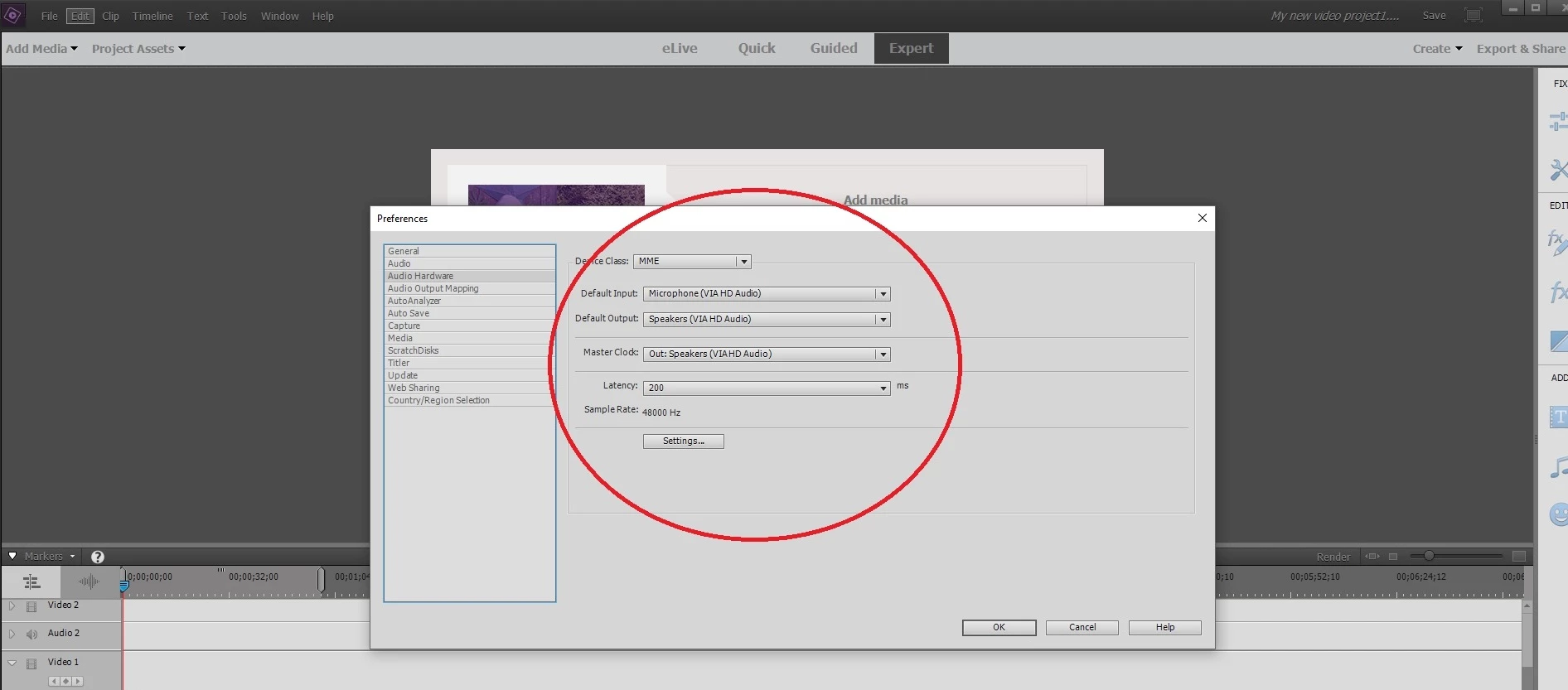
There have been a few posts over several months with the same question.  The fix has been to adjust the settings in the Edit>Preferences>Hardware screen.   The choices appear to vary with different computers and Windows update apparently can either change them or not change them correctly.   Whatever you have, try other choices.  Below is a screen shot for reference. 

3 replies

Participating Frequently
July 6, 2018

Here's what worked for me (I'm on latest Windows 10 build with RealTek HD Audio drivers):

  1. Open Preferences --> Audio Hardware
  2. Set "Default Output" to a different value
  3. Click OK
  4. Go back and reset "Default Output" to the original value
  5. Click OK

Before I did this, I also downloaded and installed the latest RealTek drivers from here, but I don't know if it was required:

Realtek

jessenicholas
Participant
January 13, 2018

This totally worked for me.  I hadn't used the program since the Windows update, so it really threw me when no sound played.  But this suggestion got it working perfectly.  Thanks!

Bill SpragueCommunity ExpertCorrect answer
Community Expert
November 14, 2017

There have been a few posts over several months with the same question.  The fix has been to adjust the settings in the Edit>Preferences>Hardware screen.   The choices appear to vary with different computers and Windows update apparently can either change them or not change them correctly.   Whatever you have, try other choices.  Below is a screen shot for reference. 

Participant
November 17, 2017

Hi whsprague,

I was trying to fix the audio in the audio output section but yours did the trick. Thanks for that!

Community Expert
November 17, 2017

I'm happy you got it fixed!