



Performance Demotion of Premiere Elements 2023 (Windows)
Every year Adobe releases an update of Premiere Elements and I feel there is no improvement in terms of performance. Like many Adobe Products (e.g. Acrobat Pro DC), Premiere Elements' performance also decrease.
This is my machine -
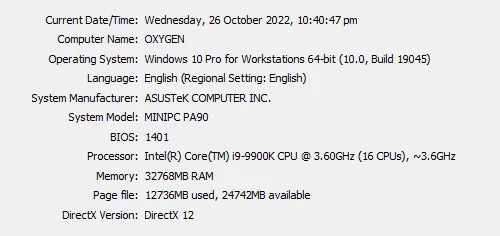
...more bellow
This is a file's property -
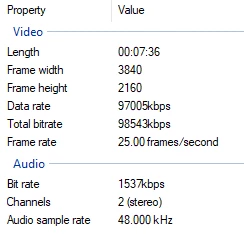
Take a look at this timeline
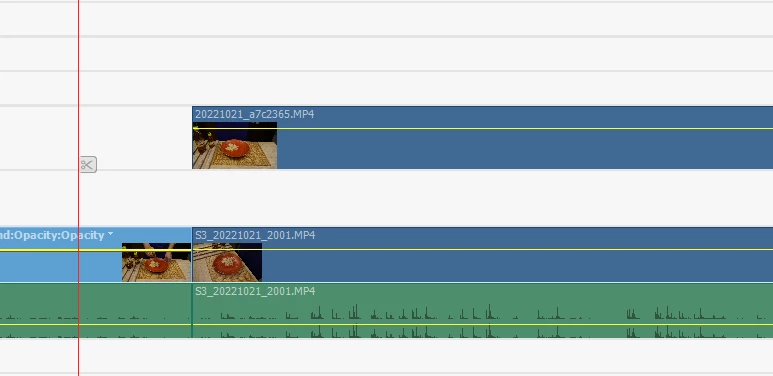
So 2 files like that is on the timeline and I just applied 1 step of exposure to both of them. When I Turn off Video Track 2, it can play the video. But when I turn on Track 2, it barely able to play the video smoothly. To be honest it is really really bad.
Not sure what is wrong with Adobe team, but when other application releases any update, they basically improves performance dramatically. Unfortunately I do not see that here. I paid for removing some effects and basic UI changes! Seriously!!
Is there anyone who reads and take these seriously?
More on my workstation -
------------------
System Information
------------------
      Time of this report: 10/26/2022, 22:51:21
             Machine name:
               Machine Id:
         Operating System: Windows 10 Pro for Workstations 64-bit (10.0, Build 19045) (19041.vb_release.191206-1406)
                 Language: English (Regional Setting: English)
      System Manufacturer: ASUSTeK COMPUTER INC.
             System Model: MINIPC PA90
                     BIOS: 1401 (type: UEFI)
                Processor: Intel(R) Core(TM) i9-9900K CPU @ 3.60GHz (16 CPUs), ~3.6GHz
                   Memory: 32768MB RAM
      Available OS Memory: 32616MB RAM
                Page File: 12890MB used, 24588MB available
              Windows Dir: C:\Windows
          DirectX Version: DirectX 12
      DX Setup Parameters: Not found
         User DPI Setting: 96 DPI (100 percent)
       System DPI Setting: 96 DPI (100 percent)
          DWM DPI Scaling: Disabled
                 Miracast: Available, no HDCP
Microsoft Graphics Hybrid: Not Supported
 DirectX Database Version: 1.0.8
           DxDiag Version: 10.00.19041.2075 64bit Unicode

---------------
Display Devices
---------------
           Card name: NVIDIA Quadro P4000
        Manufacturer: NVIDIA
           Chip type: Quadro P4000
            DAC type: Integrated RAMDAC
         Device Type: Full Device (POST)
      Display Memory: 24396 MB
    Dedicated Memory: 8089 MB
       Shared Memory: 16307 MB
        Current Mode: 2560 x 1440 (32 bit) (59Hz)
         HDR Support: Not Supported
    Display Topology: External
 Display Color Space: DXGI_COLOR_SPACE_RGB_FULL_G22_NONE_P709
     Color Primaries: Red(0.639648,0.330078), Green(0.299805,0.599609), Blue(0.150391,0.059570), White Point(0.313477,0.329102)
   Display Luminance: Min Luminance = 0.500000, Max Luminance = 270.000000, MaxFullFrameLuminance = 270.000000
        Monitor Name: Generic PnP Monitor
       Monitor Model: DELL U2719D
          Monitor Id: DEL415A
         Native Mode: 2560 x 1440(p) (59.951Hz)
         Output Type: Displayport External
Monitor Capabilities: HDR Not Supported
Display Pixel Format: DISPLAYCONFIG_PIXELFORMAT_32BPP
      Advanced Color: Not Supported
 Driver File Version: 30.00.0014.7111 (English)
      Driver Version: 30.0.14.7111
         DDI Version: 12
      Feature Levels: 12_1,12_0,11_1,11_0,10_1,10_0,9_3,9_2,9_1
        Driver Model: WDDM 2.7
 Hardware Scheduling: Supported:True Enabled:False
 Graphics Preemption: Pixel
  Compute Preemption: Dispatch
            Miracast: Not Supported by Graphics driver
      Detachable GPU: No
 Hybrid Graphics GPU: Not Supported
      Power P-states: Not Supported
      Virtualization: Paravirtualization
          Block List: No Blocks
  Catalog Attributes: Universal:False Declarative:True
   Driver Attributes: Final Retail
    Driver Date/Size: 21/6/2021 6:00:00 am, 1054232 bytes
         WHQL Logo'd: Yes
     WHQL Date Stamp: Unknown
        D3D9 Overlay: Supported
             DXVA-HD: Supported
        DDraw Status: Enabled
          D3D Status: Enabled
          AGP Status: Enabled
       MPO MaxPlanes: 1
            MPO Caps: Not Supported
         MPO Stretch: Not Supported
     MPO Media Hints: Not Supported
         MPO Formats: Not Supported
    PanelFitter Caps: Not Supported
 PanelFitter Stretch: Not Supported

           Card name: Intel(R) UHD Graphics 630
        Manufacturer: Intel Corporation
           Chip type: Intel(R) UHD Graphics Family
            DAC type: Internal
         Device Type: n/a
 AdChoices