Participant
August 5, 2017
Question

Premier elements 15 crashes what ever I do

  • August 5, 2017
  • 2 replies
  • 251 views

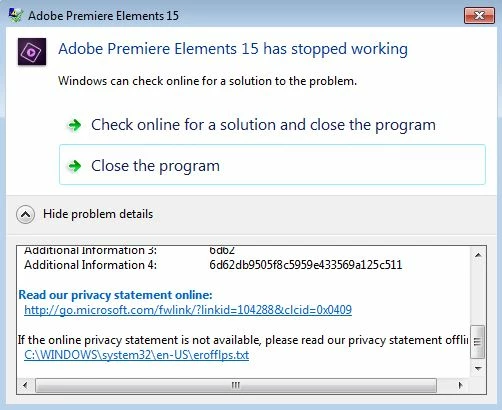
I have just installed Premiere Elements 15, an no matter what I do the program crashes with this information:
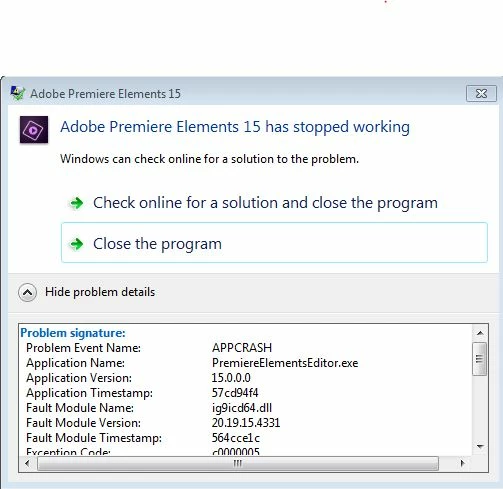
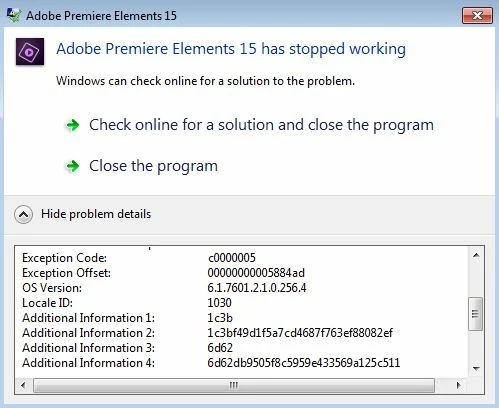
What is wrong?

This topic has been closed for replies.

2 replies

Legend
August 5, 2017

Meantime, switch to Expert view. You won't see the yellow orange line in Quick view.

This definitely sounds like a soft render memory overload issue.

(Though you should definitely also consider Bill's advice, should my line of questioning not pan out.)

Legend
August 5, 2017

What processor does your computer have and how much RAM?

What model of camcorder is your video coming from and what format and resolution is the video?

When you first add a clip of this video to your timeline, do you see a yellow orange "render" line over the clip? This render line indicates that your project settings are not set up to match your video specs -- and that can result in poor performance and a memory overload.

Participant
August 5, 2017

Intel(R) Xeon(R) CPU E3-1505M v5 @ 2,80GHz – 32 GB RAM – Windows 7
Enterprise

GoPro Hero 5, MP4 1920x1080

And there is no orange render line

Community Expert
August 5, 2017

This is a guess, but I think I recall others with Xeon processors doing this. 

In Edit > Preferences > General is a check box labeled "Use Hardware Acceleration".   However you have it set, change it and try editing.