
Participating Frequently
August 11, 2023
Question

Premiere Elements 2023 installation on Windows 11 not working?

  • August 11, 2023
  • 2 replies
  • 892 views

Hi,

Has anyone managed to install Adobe Premiere Elements 2023 on Windows 11? 

After I start the installation I log in to authenticate but after that nothing happens. 
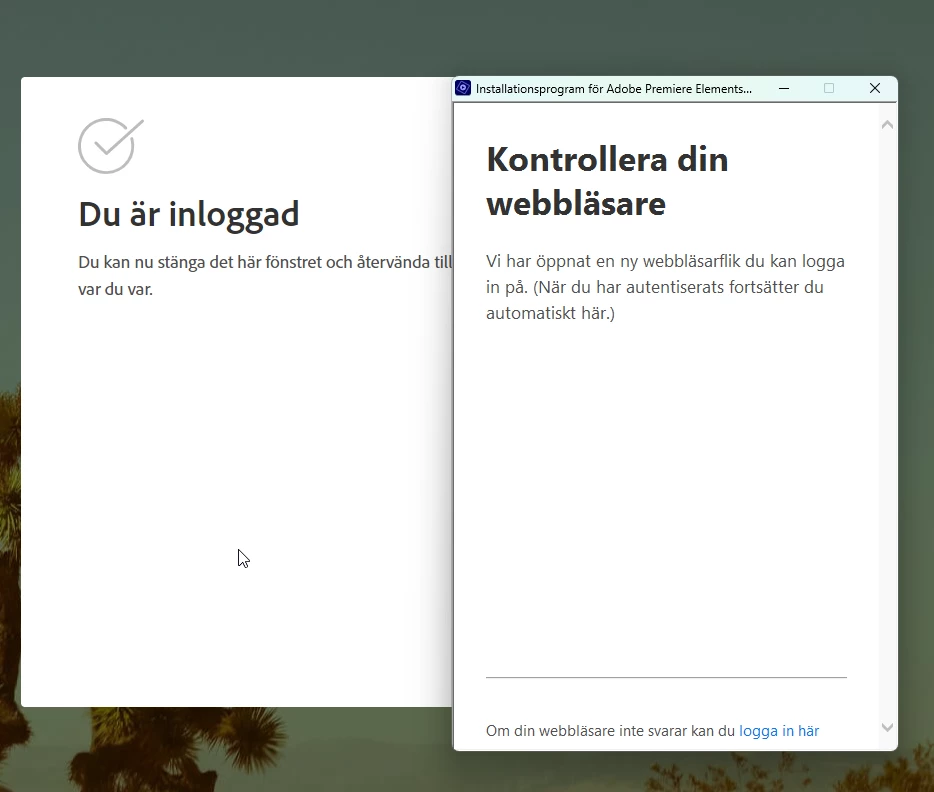
 

[text edited by mod]

This topic has been closed for replies.

2 replies

Participant
August 17, 2023

There seems to be many problems with using Windows 11.  It wants to use a different extension and the VCL..

When the exported video is put in Power Point Windows 11, it turns the video yellow and is barely seen.  Or it may turn it black.  I have not been able to get an Adobe agent to understand this.


Legend
August 11, 2023

Close the program, then right-click on it and select Run as Administrator.

Participating Frequently
August 11, 2023

Hi, I have already tried that but with no success.

Community Expert
August 14, 2023

Yes, the left windows says: 

"You are now logged in. You can close this windows and return."

The right windows says:

"Check your browser. We have opened a new tab where you can log in. (When you are authenticated this will automatically continue".

The problem is, after I have logged in, the installation does not continue.


I was hoping I would recognize the errors and I don't.   If it were me, I would start a session with Adobe support techs.  They can remotely log in to your computer and figure it out.   In the USA the link is:  https://helpx.adobe.com/contact.html?rghtup=autoOpen   In your country it may be different.  Google search for "Adobe Customer Care"