





Answered
Shortcut to set begin-end with the work area bars
I have an hour long video and I want to export a few minutes from "near" the middle to a new file... I've read page 81 in Steve's book, and watched a YT video, so I know how to go to both sides and drag the work area indicators inward to mark the section I want
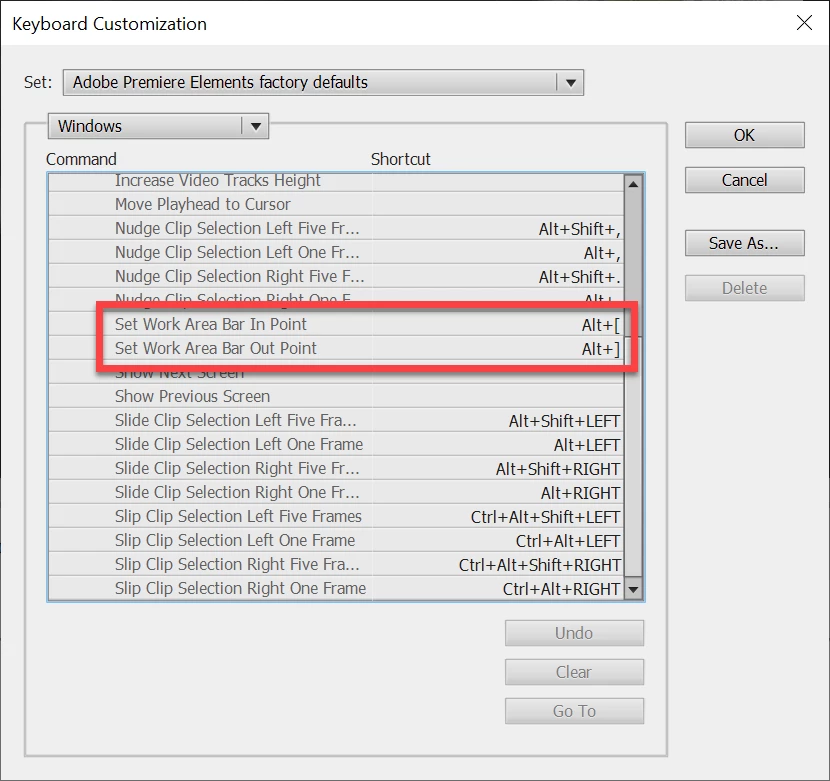
What I am trying to find is a mouse or keyboard shortcut to have the work area bars "snap" to the current location without having to go all the way to the beginning and end of the video to manually grab the bars and drag them into place
Is there a way to make the work area bars jump to the current location?



 AdChoices