Exit
  • Global community
    • Language:
      • Deutsch
      • English
      • Español
      • Français
      • Português
  • 日本語コミュニティ
  • 한국 커뮤니티
0

Synchronization

Community Beginner ,
Feb 24, 2021 Feb 24, 2021

Hi! I have a problem with Premiere Elements 2020. When I create a project sound and picture are not synchronized. After two hours of a video the sound is 7-8 seconds before the picture!


TOPICS
Error or problem
875
Translate
Report
Community guidelines
Be kind and respectful, give credit to the original source of content, and search for duplicates before posting. Learn more
community guidelines
Community Expert ,
Feb 24, 2021 Feb 24, 2021

Exactly what is INSIDE the video you are editing?
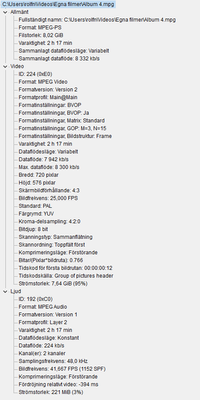
Report back with the codec details of your file, use the program below
Free program to get file information for PC/Mac http://mediaarea.net/en/MediaInfo/Download
- when you analyze your file in MediaInfo and post a screen shot in the forum, do so in TREE view
- post your information IN your message, not as an attachment that someone would have to download


Does your video use a Variable Frame Rate? See https://community.adobe.com/t5/Premiere-Pro/Variable-frame-rate-video-with-Premiere-Pro/td-p/4601935
If yes, use https://handbrake.fr/ open source transcoder/converter to convert to Constant Frame Rate

Translate
Report
Community guidelines
Be kind and respectful, give credit to the original source of content, and search for duplicates before posting. Learn more
community guidelines
Community Beginner ,
Feb 24, 2021 Feb 24, 2021

Rolf5C84_0-1614182104014.png


Translate
Report
Community guidelines
Be kind and respectful, give credit to the original source of content, and search for duplicates before posting. Learn more
community guidelines
Community Expert ,
Feb 24, 2021 Feb 24, 2021

I don't read German... under the time of 2 hours 17 minutes does that say a variable frame rate for the video?


If yes, do what I said in the bottom part of my 1st reply to convert to constant frame rate

Translate
Report
Community guidelines
Be kind and respectful, give credit to the original source of content, and search for duplicates before posting. Learn more
community guidelines
Engaged ,
Feb 24, 2021 Feb 24, 2021

I can read German & thats not a German text!

Translate
Report
Community guidelines
Be kind and respectful, give credit to the original source of content, and search for duplicates before posting. Learn more
community guidelines
Community Beginner ,
Feb 25, 2021 Feb 25, 2021

No it is Swedish - sorry!


Here is the English version:

Rolf5C84_0-1614263595059.png


Translate
Report
Community guidelines
Be kind and respectful, give credit to the original source of content, and search for duplicates before posting. Learn more
community guidelines
Community Beginner ,
Feb 25, 2021 Feb 25, 2021

My last message didn't contain info about the correct file.

Here it is:

Rolf5C84_0-1614269445069.png


Translate
Report
Community guidelines
Be kind and respectful, give credit to the original source of content, and search for duplicates before posting. Learn more
community guidelines
Community Expert ,
Feb 25, 2021 Feb 25, 2021

Yeah we got it. Nothing special about the file but being interlaced.

What is the origin of this file.

Translate
Report
Community guidelines
Be kind and respectful, give credit to the original source of content, and search for duplicates before posting. Learn more
community guidelines
Community Beginner ,
Feb 25, 2021 Feb 25, 2021

It's an old VCR-recording. 

Translate
Report
Community guidelines
Be kind and respectful, give credit to the original source of content, and search for duplicates before posting. Learn more
community guidelines
Community Expert ,
Feb 25, 2021 Feb 25, 2021

Converted to dvd i am guessing as its an mpeg file.

Might want to run in through handbrake.

Translate
Report
Community guidelines
Be kind and respectful, give credit to the original source of content, and search for duplicates before posting. Learn more
community guidelines
Community Beginner ,
Feb 25, 2021 Feb 25, 2021

I have no problem watching it in Windows Photos for some reason.

What can I do with Handbrake? I used it to change Peak Framerate to to Constant Framerate but my problem remains the same. 

Translate
Report
Community guidelines
Be kind and respectful, give credit to the original source of content, and search for duplicates before posting. Learn more
community guidelines
Community Expert ,
Feb 25, 2021 Feb 25, 2021
LATEST

Just to for the record Elements is not a video player its an editing program: big difference.

OK no handbrake.

See if you can convert the audio to wave with Audacity.

Alternative is to separate the audio from the clip . Cut the clip up and move the audio to fit the video.

Translate
Report
Community guidelines
Be kind and respectful, give credit to the original source of content, and search for duplicates before posting. Learn more
community guidelines