

Bull Rhino
Inspiring
September 16, 2019
Answered

Transition timing in Premiere Elements

  • September 16, 2019
  • 3 replies
  • 763 views

It appears that the minimum amount of time for a transition in Premiere Elements is 1 second.  It would be wonderful if Adobe would make it possible to shorten that transition time.  There are just times when being able to have a 1/2 second or maybe even less would really help make for a better video.  Please Adobe ... Please give us the option to go less than 1 full second on the transitions.
 

    This topic has been closed for replies.
    Correct answer 150kw

    こんにちは、Bull Rhinoさん


    トランジションの時間を1秒以下にしたいということですよね。

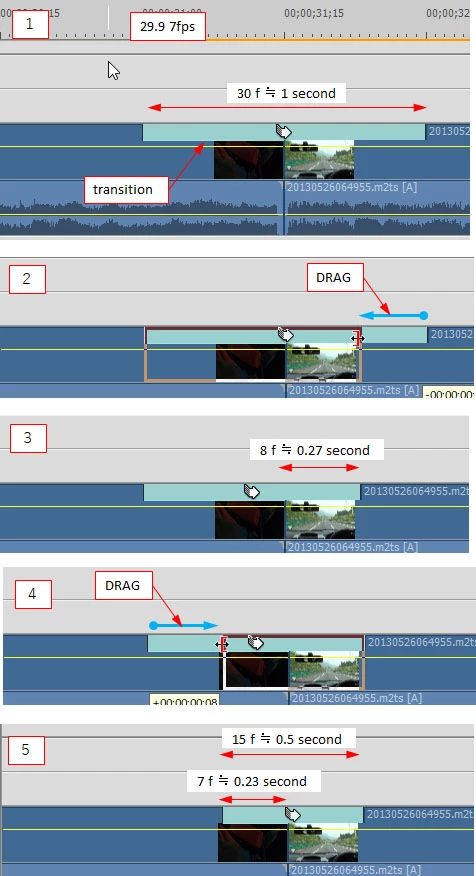
    トランジション表示部の左端と右端をドラッグして詰めると、時間を短くすることができます。

    下図をご覧ください。

    3 replies

    StuMarksez
    Participating Frequently
    September 19, 2019

    My thx to Steve and 150kw for providing the answer. Haven't tried it yet but will later today. And, the screen shots and direction were spot on as far as that goes.


    One wonders why this procedure is not included in any existing tutorial list. And clearly labelled as such. "Want to tweak your transition times?"

    150kw
    Community Expert
    150kwCommunity ExpertCorrect answer
    Community Expert
    September 17, 2019

    こんにちは、Bull Rhinoさん


    トランジションの時間を1秒以下にしたいということですよね。

    トランジション表示部の左端と右端をドラッグして詰めると、時間を短くすることができます。

    下図をご覧ください。

    Bull Rhino
    Inspiring
    September 17, 2019
    Thank you for your help. It worked!
    Legend
    September 17, 2019

    Please note that this is a user to user forum. Most likely Adobe won't see your feature request here.