
Inspiring
November 30, 2016
Answered

Yellow 'sound bar' jumping back up

  • November 30, 2016
  • 1 reply
  • 454 views

Hello

I am trying to pull down the yellow sound bar to the right of the attached image so that it is at the same level as the yellow bar to the left.
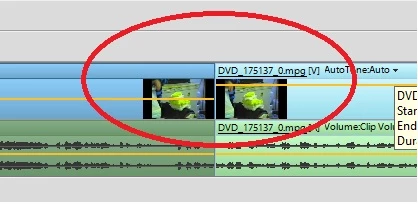
However, every time I pull it down it jumps back up.

What am I doing wrong, please?

Thank you.

Steve

    This topic has been closed for replies.
    Correct answer Peru Bob

    Use negative numbers to decrease volume.  Start with -3db and go from there.

    The yellow bar on the video represents opacity.

    1 reply

    Peru Bob
    Community Expert
    Community Expert
    November 30, 2016

    Will it work if you do it this way?

    • In the Expert view timeline, select the clip. To work with multiple clips, do one of the following:
      • To select non-consecutive clips, Ctrl-click/Cmd-click each clip.
      • To select consecutive clips, click in the Project Assets panel and drag a marquee around the selected clips.
      • To select all the clips, press Ctrl-A/Cmd-A.
    • Select Clip > Audio Options > Audio Gain.

    • Do one of the following:
      • Click the zero value and type gain value (0 dB equals the clip’s original gain).

    from here:

    Mix audio and adjust volume in Adobe Premiere Elements

    SteveH59Author
    Inspiring
    December 1, 2016

    Hello Bob

    Many thanks for your reply.

    I get to here: Select Clip > Audio Options > Audio Gain and can see 0db.

    When you say 'type gain value', do you mean I should type in 1, 2, 3 or whatever? Wouldn't that increase the volume?

    Actually, I have just realised: what does that yellow bar actually do, because in the image I attached, it is running through the video part of the clip - the yellow bar in the audio track beneath it is consistent with the yellow bar in the audio track in the preceding click.

    When I listen to both clips there is no increase in volume.

    Thanks again.

    Peru Bob
    Community Expert
    Peru BobCommunity ExpertCorrect answer
    Community Expert
    December 1, 2016

    Use negative numbers to decrease volume.  Start with -3db and go from there.

    The yellow bar on the video represents opacity.