Inspiring
September 30, 2022
Answered

Zoom file edited and now twice the size

  • September 30, 2022
  • 1 reply
  • 262 views

Hi all


I have been given a zoom file 

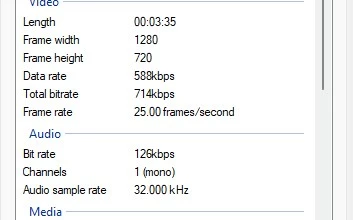
it is only 18Mb but after editing a few bits out and rendering to another file, it usually comes out twice the size even at lowest quality.. i can't seem to find the same input values to my output file.. I tried a few things but only found a smaller frame size.. not the 1280 x 720 of the original.


HELP!


thanks

This topic has been closed for replies.

1 reply

Legend
September 30, 2022

Zoom video is highly compressed. You can control the compression of Premiere Elements by reducing the quality level on the Export & Share panel. It just may not be as small as a Zoom video -- which really isn't meant to be edited. Zoom video is just a quick and dirty delivery format file.

GrazuncleAuthor
Inspiring
September 30, 2022

Thanks..


When all you have been given is a zoom video and no option then you have to work with what you have been given. 🙁


I have seen the export and share section but not expereinced enough yet to find what i want in it. I'll keep looking


GrazuncleAuthorCorrect answer
Inspiring
October 8, 2022