
Driver error and now no webcam preview
Greetings,
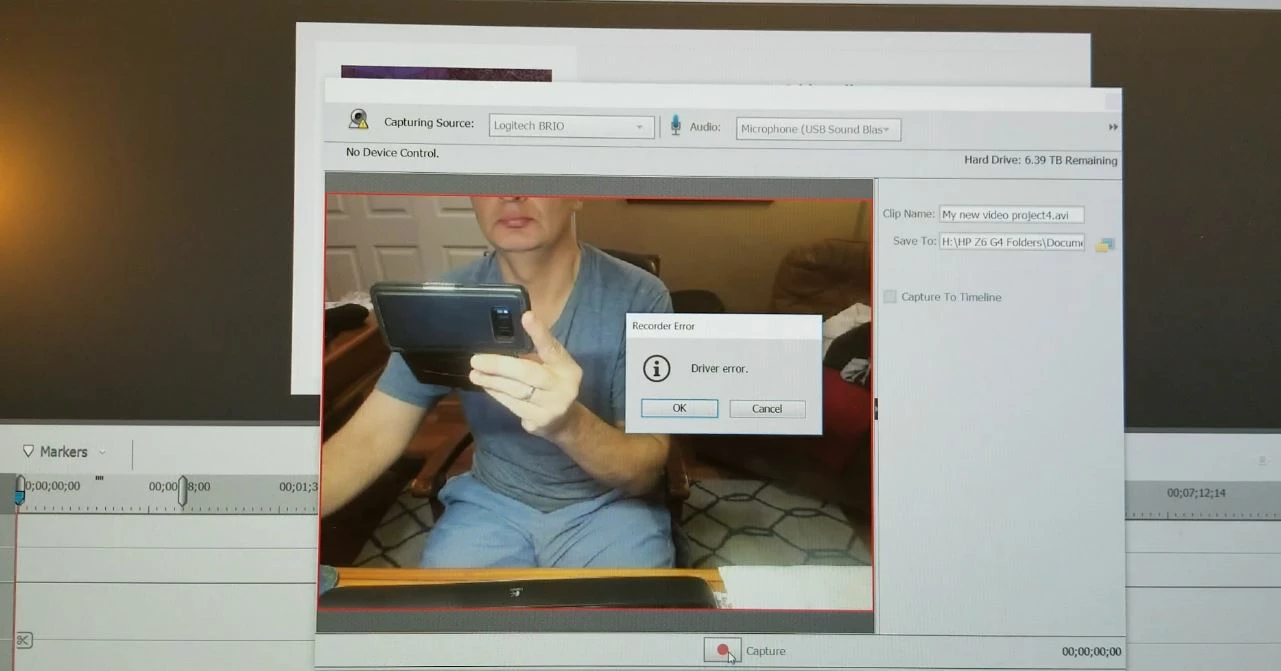
I just bought Adobe Premiere Elements 2019 5 days ago with the intent of recording with my USB webcam. I have the Logitech Brio which works just fine with the Logitech software and OBS. When I would open the webcam for recording I could switch to the Brio and see the preview. When hitting the capture button, I would get a Driver Error (photo included). I installed APE 2019 on my laptop and it works with my built in camera but when I connected the Brio, same problem, Driver Error.
Yesterday (off for Thanksgiving) I participated in a chat with Adobe and the Tech remoted to my computer to look at things. He looked various settings and also my device manager, concentrated more on the sound settings as I believe he thought this was the issue, installed newest video drivers. No luck.
I had a Logitch 910, which I attached and it worked. I was able to record a video but now preview.
Now, my preview does not even work. I cannot even see anything as I did before he tried to help. I have gone backwards.
I tried uninstalling and installing. No luck.
Now I am stuck with:
1) no preview with webcam
2) unable to use the newest Logitech camera (Brio)
3) inability for Adobe to help
Thank you in advance.
Sal
 AdChoices