


Exit
  • Global community
    • Language:
      • Deutsch
      • English
      • Español
      • Français
      • Português
  • 日本語コミュニティ
  • 한국 커뮤니티
0

Exporting Only Finished Timeline Edit

New Here ,
Apr 04, 2017 Apr 04, 2017

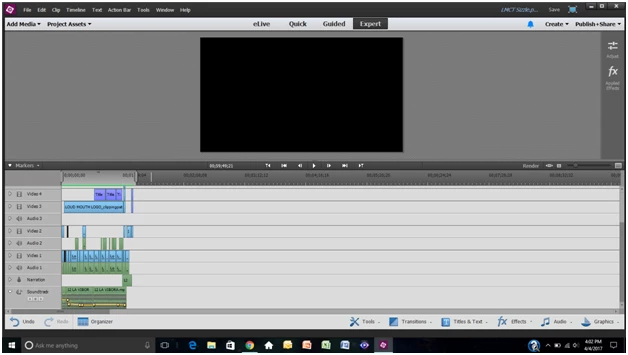
This is my project, final edit is 1 minute and 12 seconds long. However my timeline is almost an hour after using all that space for editing.

Below you can see the timeline only highlights the video, however when I export, its exporting my ENTIRE timeline.
There is probably a very simple and obvious solution, but I'm still a novice.

Please Help!!
636
Translate
Report
Community guidelines
Be kind and respectful, give credit to the original source of content, and search for duplicates before posting. Learn more
community guidelines

correct answers 1 Correct answer

Community Expert , Apr 04, 2017 Apr 04, 2017

I'm not sure how you have a 1 hour timeline for a video that plays for a minute.  That is very confusing to me. 

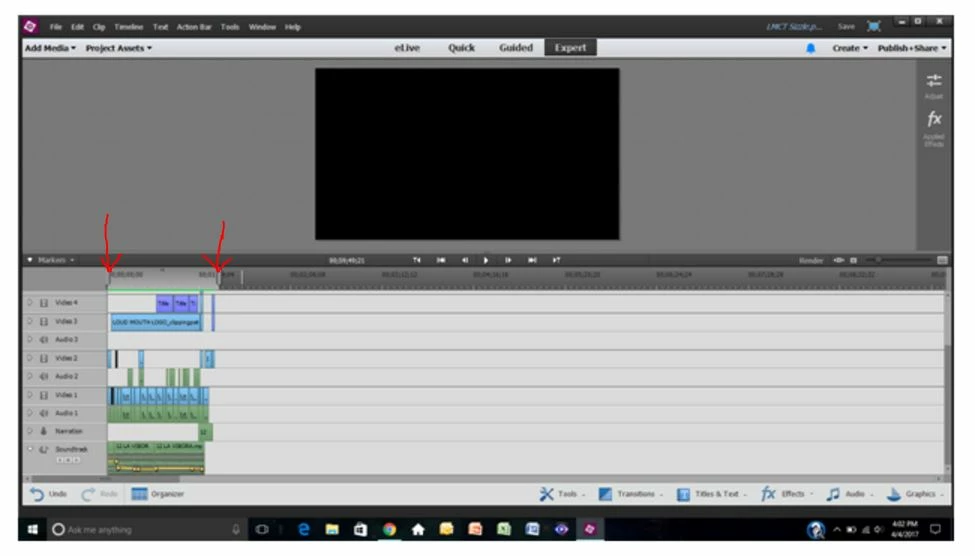
However, if you are trying to export only a section, slide the "work area bars" to the beginning and ending of the section.  In the export dialog there will be a check box that says something like render work area only.

Capture.JPG

Translate
LEGEND ,
Apr 04, 2017 Apr 04, 2017

What Adobe product are you using?

Translate
Report
Community guidelines
Be kind and respectful, give credit to the original source of content, and search for duplicates before posting. Learn more
community guidelines
New Here ,
Apr 04, 2017 Apr 04, 2017

Adobe Premiere Elements 13

Translate
Report
Community guidelines
Be kind and respectful, give credit to the original source of content, and search for duplicates before posting. Learn more
community guidelines
LEGEND ,
Apr 04, 2017 Apr 04, 2017

Thread moved here from Adobe Captivate forum.

Translate
Report
Community guidelines
Be kind and respectful, give credit to the original source of content, and search for duplicates before posting. Learn more
community guidelines
Community Expert ,
Apr 04, 2017 Apr 04, 2017

I'm not sure how you have a 1 hour timeline for a video that plays for a minute.  That is very confusing to me. 

However, if you are trying to export only a section, slide the "work area bars" to the beginning and ending of the section.  In the export dialog there will be a check box that says something like render work area only.

Capture.JPG

Translate
Report
Community guidelines
Be kind and respectful, give credit to the original source of content, and search for duplicates before posting. Learn more
community guidelines
New Here ,
Apr 04, 2017 Apr 04, 2017
LATEST

THANK YOU!!!

Translate
Report
Community guidelines
Be kind and respectful, give credit to the original source of content, and search for duplicates before posting. Learn more
community guidelines