Participant
December 31, 2014
Answered

How Can I Save/Export As WMV, MOV, AVI, MPG or FLV?

  • December 31, 2014
  • 4 replies
  • 21046 views

Hello,

I see and understand the Publish + Share option but I don't see anywhere from it to save/export as WMV, MOV, AVI, MPG, or FLV file formats. I had a much older version of this program and it was no problem to do it. Also, the Export under File is always grayed out and I don't now how to change that in case those options to save it in the above files are there.

Glenn

This topic has been closed for replies.
Correct answer A_T__Romano

Glenn

Please remind me what computer operating system you are using for your Premiere Elements 13?

I do not think that is involved. I suspect it is the thin scroll bar but let us check that out.
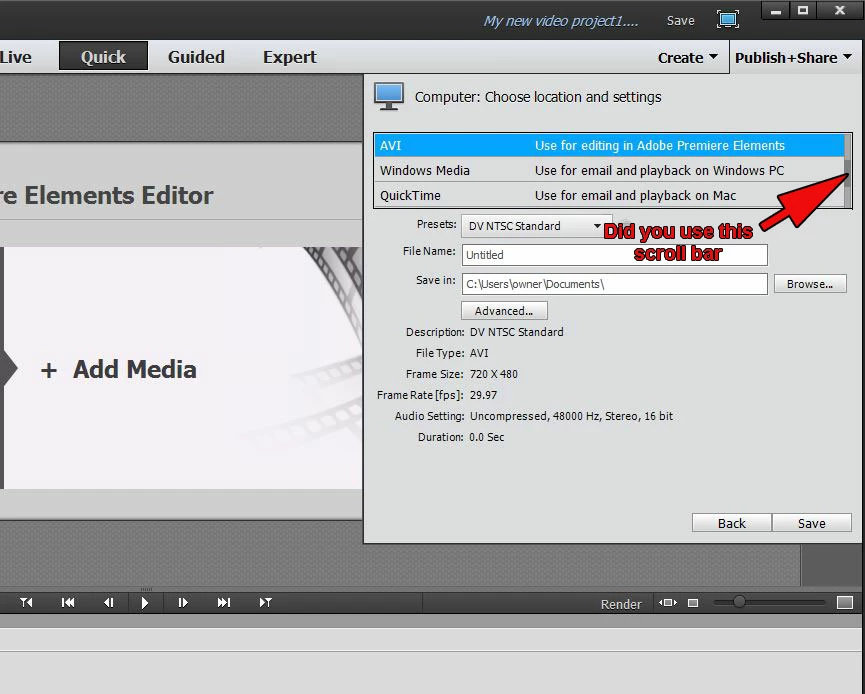
Let us say that you want want to export an .avi file, you use that thin scroll bar to scroll through

MPEG

AVCHD

XAVC-S

AVI

Windows Media

QuickTime

Image

Audio

until you scroll to AVI and then make your choice of preset for AVI. If you decide the AVI default preset is not what

you want, then you press on the Advanced Button for that AVI preset to get at the preset customization area.

As you can see, there is more scrolling to be done to get to Windows Media (wmv) which is further toward

the bottom of the list.

Please consider and let us know the outcome. If those choices are really missing, then we are in major trouble

which may require a program uninstall, ccleaner run through, and reinstall with antivirus and firewall(s) disabled.

We will be watching for your results.

Thanks.

ATR

4 replies

Simpletoncat
Participant
January 22, 2016

Thank you so much! I did not even see that tiny scroll bar.

Inspiring
January 22, 2016

Simpletoncat

Lots of questions about that thin scroll bar in Publish+Share/Computer/and in Share/Computer/ before it. Easy to overlook.

The sharing area of the current version (14/14.1) is dramatically different than the prior versions.

Please do not hesitate to ask if you have any questions or need clarification on your Premiere Elements workflows.

Best wishes

ATR

Participating Frequently
April 17, 2015

Let me more specific;

I can choose quicktime and it does save as mov (tried all the different formats) but it only plays the audio and the video does not show.

Inspiring
April 17, 2015

Lungs

I did not see your reply 7 until after I had posted 8.

What are the specific settings that you are using under Publish+Share/Computer/QuickTime?

Are you using the default settings or customizing the preset under the preset's Advanced Button/Video Tab, Audio Tab? Please detail.

What are the properties of your source media that are represented in this export.

Are you having any video/audio display issues before the export?

Let us start here and then decide what next.

Thanks.

ATR

Participating Frequently
April 17, 2015

Specific Settings;

1. Tried the all the default ones that show.  Only sound no video.  Tried a few custom, same results.

Original files are all mov and they play fine with windows media player and power dvd.

Using win 8.1 pro, premiere elements 13.1

Properties of original file and it does play fine in the PM13 timeline.

Type: MPEGMovie

File size: 432.9 MB

Frame Rate: 23976

Source Audio: 48000 Hz-16bit Stereo

Project Audio Format: 48000 Hz- 32 bit floating point Stereo

Total duration 2.58

Pixel Aspect Ration: 1.0

There are 4 files with text screens in between.  All the other files are the same except in size.

Thank you for trying to help.

JB

Participating Frequently
April 17, 2015

Using PM13 I can not find how to save in MOV format.  Yes I used all the scroll down options.

Please help.  Thank you. JB

Inspiring
April 17, 2015

Lungs

What is PM13? Is that Premiere Elements 13/13.1? And, what computer operating system is involved?

You should be able to go to Publish+Share/Computer/QuickTime and find the QuickTime presets and Advanced Button/Video Tab, Audio Tab, and, if applicable, Multiplexer Tab settings.

What do you find under Publish+Share/Computer/? You should see the following as your scroll through the list..

MPEG

AVCHD

XAVC-S

AVI

Windows Media

QuickTime

Image

Audio

How much of that list do you find?

If you are not getting QuickTime presets, do you have the latest version of QuickTime installed on your computer with Premiere Elements, and are you running the programs as administrator.

Please review and consider and give more details as necessary to explain your situation.

Thank you.

ATR

Inspiring
December 31, 2014

Glenn

There is no longer an Adobe Flash Video export in Premiere Elements 13, but as for the rest, please see

Publish+Share

Computer

and its choices for

MPEG

AVCHD

XAVC-S

AVI

Windows Media

QuickTime

Image

Audio

then set Presets for the choice....you can use the default settings for the preset or customize it under its Advanced Button/Video Tab and Audio Tab

if your preset choice has that opportunity.

There is an opportunity for .mp4 exports also under Publish+Share/Mobile Phones and Players.

The tricky part about Publish+Share/Computer/ is that not all the choices are seen unless you use the thin scroll bar to the right of the choices

to scroll down to the rest of the list.

Once you get beyond version 7, the File Menu/Export is just for saving titles created in the Titler.

ATR

glennmagiAuthor
Participant
December 31, 2014

Hello,

I have PE13, I click Publis+Share/Computer, I look and scroll down all the presets, there is nowhere on any of those that say AVI or WMV. Please explain where those are?

Glenn

A_T__RomanoCorrect answer
Inspiring
January 1, 2015

Glenn

Please remind me what computer operating system you are using for your Premiere Elements 13?

I do not think that is involved. I suspect it is the thin scroll bar but let us check that out.

Let us say that you want want to export an .avi file, you use that thin scroll bar to scroll through

MPEG

AVCHD

XAVC-S

AVI

Windows Media

QuickTime

Image

Audio

until you scroll to AVI and then make your choice of preset for AVI. If you decide the AVI default preset is not what

you want, then you press on the Advanced Button for that AVI preset to get at the preset customization area.

As you can see, there is more scrolling to be done to get to Windows Media (wmv) which is further toward

the bottom of the list.

Please consider and let us know the outcome. If those choices are really missing, then we are in major trouble

which may require a program uninstall, ccleaner run through, and reinstall with antivirus and firewall(s) disabled.

We will be watching for your results.

Thanks.

ATR

