

the_wine_snob
Inspiring
June 25, 2011
Question

WAB - Work Area Bar - What's That?

  • June 25, 2011
  • 5 replies
  • 33169 views

We get a lot of questions on the WAB (the Work Area Bar) in all versions of Premiere. Many of those questions come when someone has accidentally reset the WAB, and cannot find out why parts of their Timeline are not Rendering, or maybe Exporting. Though there are some subtle differences between versions, it basically works the same way.

It can be used for several functions:

  • It can limit the area of a Timeline, that is Rendered
  • It can limit the area of a Timeline, that is Exported, with most Export/Share formats
  • It can act as a ruler to tell you how long, say 4 Clips, plus two partial Clips will be - useful for things like adding music to just part of the Timeline

It has some dynamic features, and Stan Arthur covers many of them in his TUTORIAL on using the WAB. His example is done in PrPro CS 5/5.5, but the functions are almost identical in earlier versions of PrPro and also PrE.

As Stan did not cover using the WAB as a "ruler" I have added an image showing how to access that function - just hover the cursor over the little box in the middle of the WAB and read the info shown. I find this particularly useful, when I need to know exactly what Duration I need for a particular part of the Timeline, when doing a SmartSound music piece.
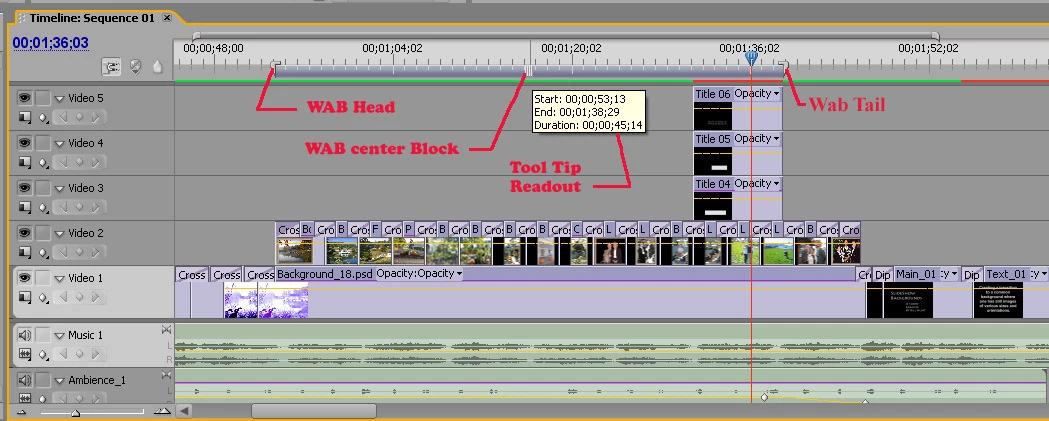
Hope that this helps answer the questions on the WAB.

Hunt

This topic has been closed for replies.

5 replies

the_wine_snob
Inspiring
April 27, 2013

As the elements of the WAB have changed in PrE 11, here is a look at it, with the little center knurled "box" (four black verticle dashes), featured. It is not so easy to see anymore, and one must look closely to see it:

Note: Once the WAB has been manually changed, there is no way to restore the automatic mode. It will always be in manual mode for that Project.

Hunt

jk.jk.photos
Known Participant
August 7, 2016

I was used to mark/select a part of timeline/WAB and play in a loop this selected part of timeline.
Is it possible to do in Premiere?

the_wine_snob
Inspiring
March 22, 2013

Because the GUI has changed a bit in PrE 11, here is a view of the WAB "brackets," and then the setting to Share only the WAB in the Share settings:

Hunt

the_wine_snob
Inspiring
March 1, 2013

When one uses the WAB to Export, or Publish+Share (PrE 11), one needs to check, or select the "Work Area," and not Full Sequence or Timeline (differs in syntax version to version, and also Export setting, depending on the chosen format), to limit that Export. Note: not every possible Export format offers the WAB choice, but the vast majority do.

Hunt

Malata
Participant
November 16, 2011

Thanks Hunt.  I never really understood this bar...  Stan's tutorial is very helpful. 

the_wine_snob
Inspiring
November 16, 2011

The WAB is an oft overlooked feature in Premiere. It can be used to limit Rendering to one part of the Timeline, or can be used to Export/Share just part of a Timeline (most formats), or, it can be used to measure Durations. When placed over several Clips, or even parts of Clips, if one hovers the cursor over the little "box" in the middle, a Duration for just the area included under the WAB, will be displayed. I use the latter very often, when putting music, or SFX, with Clips.

Glad that it helped, and I also liked Stanley Arthur's tutorial too.

Happy editing,

Hunt

the_wine_snob
Inspiring
October 9, 2011

Also, in most versons of Premiere, one can set the CTI/Playhead (Current Time Indicator), to the desired In Point for the WAB, and press Ctrl+[ (open bracket), then move the CTI/Playhead to the Out Point for the WAB, and press Ctrl+] (closed bracket). This keyboard shortcut will do the same as dragging the Head, and Tail of the WAB, unless the keyboard shortcut has been remapped.

Hunt