
Event error msg: Audio and video clock out-of-sync "Adobe player" is testing my sanity
Hi,
This error is driving me insane. PPro Beta crashes or gets extremely laggy when I work with simple files in Source Panel/Monitor. Only solution is a PPro restart. Some video files with 48kHz 4 channel audio or just a small simple preview stock audio at 44.1kHz opened in Source Panel gives the Event Panel work to do:
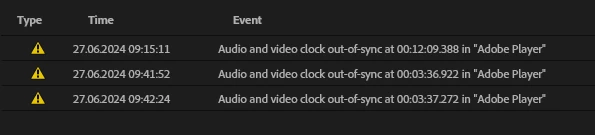
"Audio and video clock out-of-sync at" ... "Adobe Player".
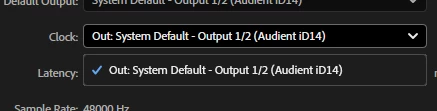
Does the "Clock" relate to this? I have only one option here:
I have never had any issues like this before using this hardware and PPro.
If I play the same file in a sequence and Program Panel it does not create the same problem. Only in Source panel?!
I've tried the following:
- set all audio devices to match 48 kHz : No difference
- Changed audio driver setting (external audio - Audient ID14) default from 48kHz - 24 bit to 16 bit : No difference
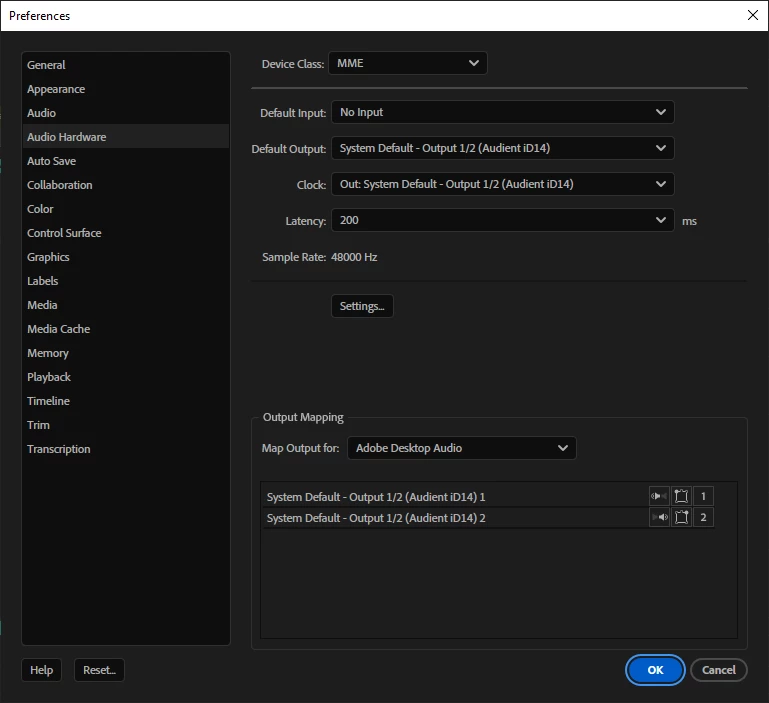
- tried changing device class to MME > ASIO > MME : Made audio work better, but video froze - changed back to MME.
- change latency 200 > 30 > 200 : No difference or maybe worse - changed back to 200
- Default input > No input : No difference
- Updated all relevant drivers : No difference
- Searched endless of community posts : No solution found & REALLY time consuming.
Thanks for any help 🙂
I'm using latest PPro Beta release (currently Beta 24.6.0 b38 ) and Nvidia display studio driver (DCH, v32.0.15.5599).
Desktop OS>SSD, multiple drives (internal and network). Local proxies
Intel(R) Xeon(R) W-2102 CPU @ 2.90GHz 2.90 GHz
64.0 GB (63.6 GB usable)
Windows 10 Enterprise: 64-bit operating system, x64-based processor
RTX 2080TI GeForce
External Audio (Audient ID14 MKI, latest driver 5.2.3.23520)
 AdChoices