
Participant
March 26, 2023

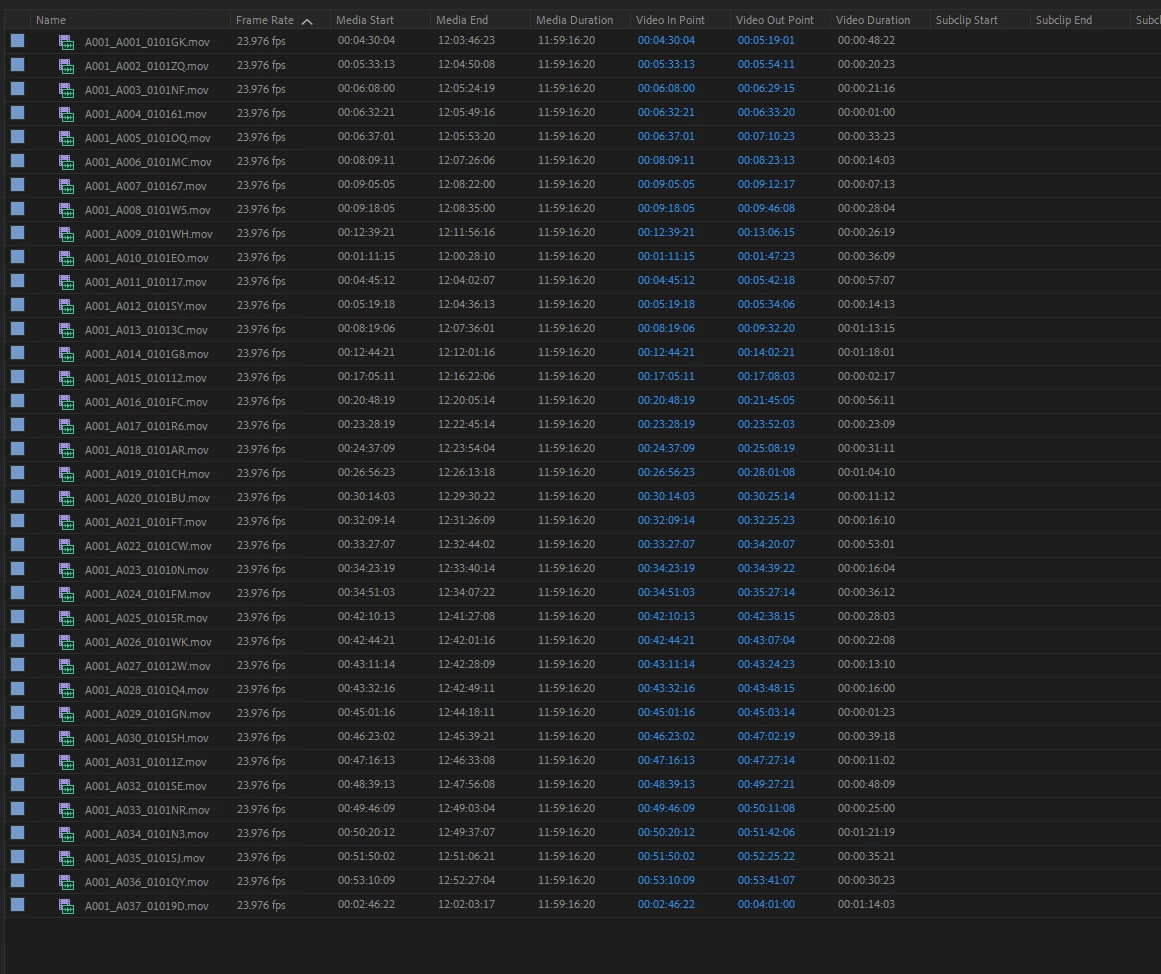
media start / end not recognized properly in 23.4.0.30

  • March 26, 2023
  • 9 replies
  • 638 views

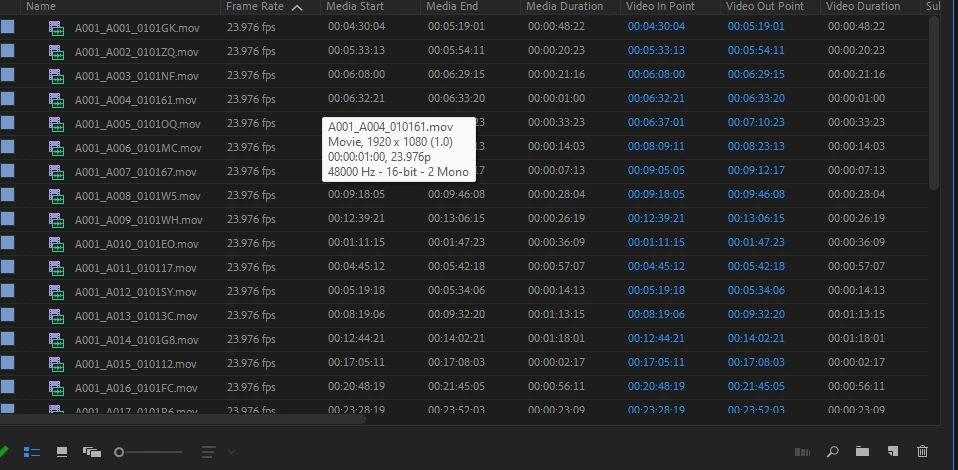
note media start / media end and duration - same clips.

result seems to be affecting timecode sync as well as how source monitor identifies the duration, playback and scrubbing.


In Premiere 23.1.0 (build 86)
 

in premiere 23.4.0.30 beta
 

Windows 11

Intel i9 9900K 

32GB Ram

GYGABYTE Designare rev 1.0


9 replies

Stan Jones
Community Expert
Community Expert
April 11, 2023

scrozier,


I updated to Build 47 and do not see the problem reported here that I had in Build 30. I won't comment in your other thread; I don't have the type footage you do and am not seeing the issue.


I'll note that here, the media start time was okay; the end time added 12 hours, but was wrong; and the duration showed 11:59:16:20 instead of the correct duration. It did not affect all clips/sequences.


Stan


Inspiring
April 11, 2023
Stan Jones
Community Expert
Community Expert
April 1, 2023

I can confirm fixed in Build 37. To test, I did not clear cache, but all was good.


Stan


mattchristensen
Community Manager
Community Manager
March 30, 2023

This issue is fixed in Premiere Pro (Beta) 23.4 build 036 and later. Build 036 won't make it to Creative Cloud today, but please let me know if this issue is fixed for you once you're able to update to a build past 036.


Please clear your Media Cache before trying as the incorrect duration may have been cached in there. You can clear your cache by launching while holding down Shift, and checking "Clear media cache".

mattchristensen
Community Manager
Community Manager
March 27, 2023

Thanks @Elad Tzadok and @Stan Jones, we're looking into this.

Participant
March 27, 2023

@mattchristensen 

please find link below to sample clip:

https://drive.google.com/drive/folders/1G6LJFBMPeF3EVe-qkcom7pGQo_K6-aQ5?usp=share_link


ProResProxy 1080p @23.98 from 6K R3D shot on a RED Komodo.

Proxies were generated through Resolve and should have retained the TC. I might of messed it up somewhere in the transcode process, but regardless doesn't explain the discrepancy.

Thanks!

Elad


Stan Jones
Community Expert
Community Expert
March 27, 2023

@mattchristensen I sent you a link to my 17 second mp4 that shows the problem.


I also saw it with a SEQUENCE created by dragging "Kerstin Interview.mp4" to the new icon. The file itself did not show the problem. That file is from the interviews linked at:

https://shared-assets.adobe.com/link/62ae65e4-998c-4d9d-7a67-ff680bb96c6e


(They were part of the initial tutorials here: https://community.adobe.com/t5/premiere-pro-beta-discussions/text-panel-enhancements-part-2-assemble-rough-cuts-from-transcripts/td-p/13110343)


Stan


mattchristensen
Community Manager
Community Manager
March 27, 2023

@Elad Tzadok Could you share a sample file that is showing this issue? Thank you.

Stan Jones
Community Expert
Community Expert
March 26, 2023

I also see this on Win 10, Beta 22.4.0 Build 30.


But not all clips are affected. The "interviews " from the text based editing tutorials are not affected (mixture of mp4 and move), but a sequence made from one of them is.


A favorite 17 second mp4 test clip is affected.


Stan