
Medconsulting
Participant
January 17, 2025

nesting impossible in PP beta 25.2.0 build 87 and in PP 25.1

  • January 17, 2025
  • 38 replies
  • 6968 views

Nesting is impossible in PP beta 25.2.0 build 87 and in PP 25.1 (both German language) on Mac Mini 2018 with MacOS 15.1.1 (24B91) and external GPU AMD Radeon Pro 580.

The menu item Nest ("Verschachteln") is greyed out.
It does not even work with the official trial file from https://learndownload.adobe.com/pub/learn/premiere/premiere-pro-nesting-sequence-cc.zip
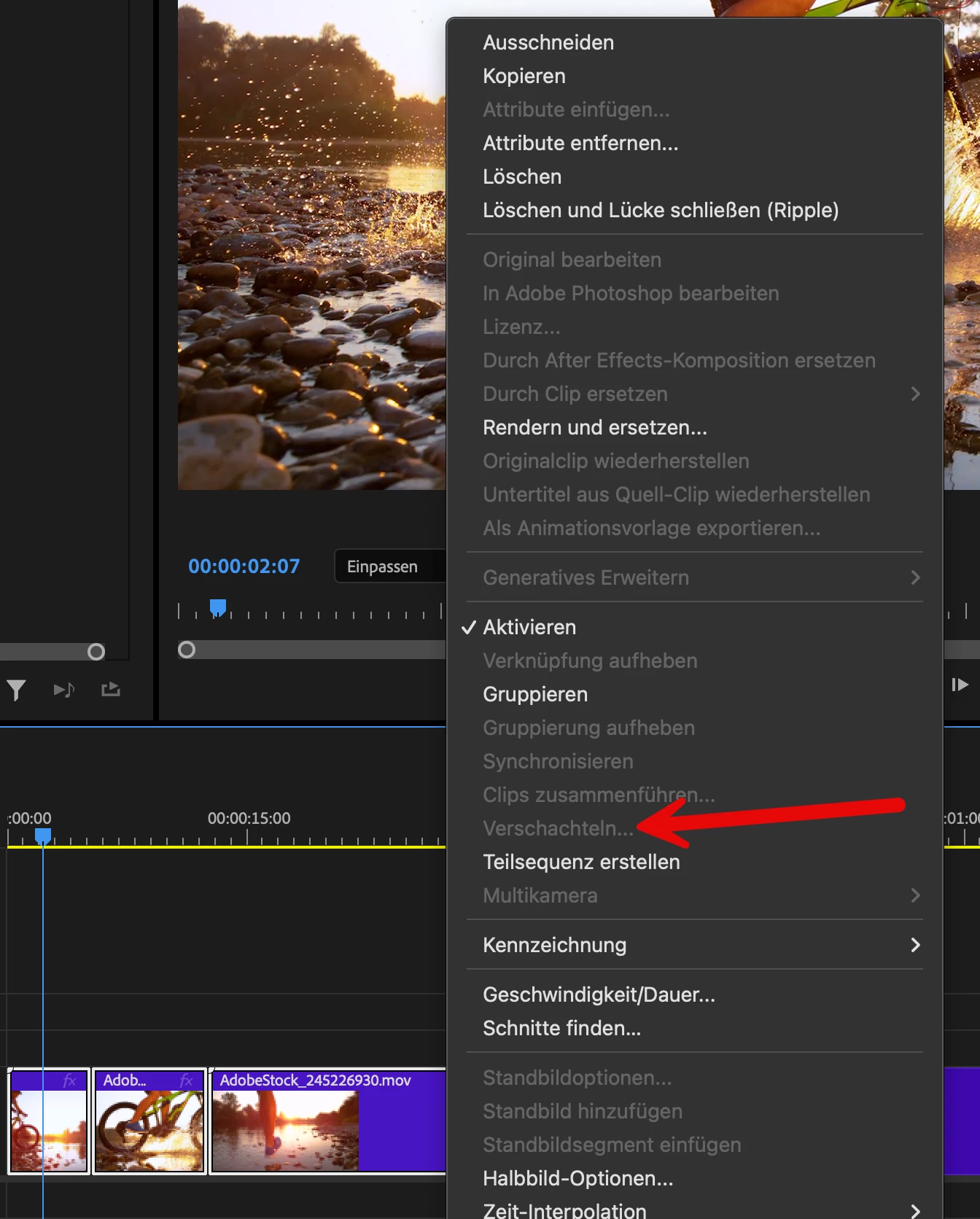
Have I missed a required setting? or is it a bug?

38 replies

Stan Jones
Community Expert
Community Expert
January 25, 2025

@AidanEdits,


Thanks for the update on Build 91.


> view the New Changes, but it's just the same list that's in All Changes.


That's what I conclude when I took a look after your comments.


> ...subsequence workflow... The default placement... default naming....


Thanks for that info. That really affects workflow.


> In your experience, are bad bugs like this common in Beta versions? Or should I consider this a special case? In general, is it safe/recommended work on real projects in Beta, or should I only be using it to test new features?


See my "cautions" in this post:

https://community.adobe.com/t5/premiere-pro-beta-bugs/cannot-install-premiere-pro-beta/idc-p/14848390#M3790

Regarding those periods of time where the Beta project file version is a mismatch to the Release version, be aware that this change may come with no warning.  You update and when you open your project, you are prompted for a project file conversion. If you don't have a clone, it is too late to not install the updated Beta.


I am only using the Beta for testing. Every time I update to a new build, I reset preferences, clear the cache, and create a new project. If I am testing some function and learn of a bug that prevents PR Beta from even opening or from inputting any text, I don't update until someone reports it is fixed. This bug allows you to do everything but nest, so I eventually updated anyway.


Stan


Ann Bens
Community Expert
Community Expert
January 25, 2025

@AidanEdits 

is it safe/recommended work on real projects in Beta, or should I only be using it to test new features? With the workflow impact of this bug it makes me tentative to continue using Beta so would appreciate any input on this. Thanks


Note from the engineers:

As always, we recommend that you do not use a beta version of Premiere Pro for critical production work, but we’re reminding you here just in case.


Gabby16bit
Known Participant
January 25, 2025

@AidanEdits  i have editing in beta for years, and usually are very rare, this is the first ground breaking bug i encounter in 5 years in beta.

Inspiring
January 25, 2025

@TrentHappel Nesting continues to be broken in Beta version 25.2 build 91. Last word from the Adobe team was your response that the team was notified, so just checking to see if there's any news regarding the issue. Tested on both PC and Mac.


@Stan Jones Thanks for the info. I tested on my Mac (also couldn't nest) and was able to view the New Changes, but it's just the same list that's in All Changes. I have opted to continue the edit in 25.1, but made a backup of the 25.2 project incase I come across any issues.  You are correct about the subsequence workflow (creating subsequence then dragging into the timeline). Unfortunately, doing this becomes tedious and is inefficient due to the additional time spent in the project panel. The default placement for the subsequence is the most recently active bin in the project panel and the default naming increments are based on how many subsequences have previously been created in whichever bin the new subsequence will be placed (so "sequencename_sub_01" created into bin A can be entirely different than  "sequencename_sub_01" created into bin B) . Nests use project-based counting and are always placed in the main project bin (side note, it would be nice to automatically place nests in a Nest folder, similar to how AE automatically puts solids in a Solids folder), which ensures they are all uniquely named and easy to locate, even if you forget or wait to organize the nests. It proves true that, even with a simple function like nesting, you never know what you got till it's gone. 


I only started using Beta recently as I had been hoping for improved color management for a while, and had to try it out when it was first released to Beta. Everything worked as expected and I found no issues with any of the features, so I've stuck with Beta ever since. I knew I might encounter some bugs here and there, but most Adobe program bugs I've come across in the past have been relatively minor, and can often be fixed, ignored, or worked around without too much hassle. I never expected a bug being so severe that it would entirely disable such a core function. In your experience, are bad bugs like this common in Beta versions? Or should I consider this a special case? In general, is it safe/recommended work on real projects in Beta, or should I only be using it to test new features? With the workflow impact of this bug it makes me tentative to continue using Beta so would appreciate any input on this. Thanks


Gabby16bit
Known Participant
January 25, 2025

Still dosn't work in latest Beta version, Mac m2 Ultra

serrini
Known Participant
January 24, 2025

Same issue ... is driving me nuts, glad it seems like a bug they can hopefully fix (today;)

Participant
January 23, 2025

I cant nest any file in beta version but in adobe premeire 25 NEST work good on same project, but in Beta it's option is not active.

All updates installed. work on macbook pro m3

MyerPj
Community Expert
Community Expert
January 23, 2025

I think this is right, I ran into this last night. I thought it was just me.

Win11 23H2, PP 25.2.0 b89

Stan Jones
Community Expert
Community Expert
January 23, 2025

@AidanEdits,


My experience has been that bad bugs like this get fixed very quickly. But it has already been a few cycles, so that's frustrating. So far this morning (US east coast), Build 89 is still the last available.


The use of Create Subsequence is clever. I assume you're bringing it back in as clips so it is again a dependent sequence.


I am also frustrated by the what's new in Beta info. It is the changes that don't appear at all that are most problematic. But I am sure it is time-consuming to keep that truly up to date, and I want the engineers to be creating and fixing. I assumed the "all changes" should bring back the same info as in the "new since last opened in x version changes." I'll watch that more closely.


Stan


Inspiring
January 23, 2025

Wondering if there is any timeline on when this bug might be resolved? I understand that using 25.1 is the only current workaround (other than using Make Subsequence), but I have a project edited in 25.2 using the new color management options, and opening this project in 25.1 gives me a warning about some features not being available. The problem is, I have no idea which features this warning is actually referring to, and there doesn't seem to be any documentation that I can find that details exactly which features are native to 25.2. The only time this information seems to be available is upon first opening an updated Beta version, where the "What's New in Beta" windowlists the most up-to-date changes in the New Changes tab. However, you can only view this update list once, as for some reason the list is emptied immediately upon switching out of the New Changes tab, and there is no way to find that information again (even after downgrading to a previous version then upgrading back to the latest version, the New Changes remains empty if it has previously been viewed). In the All Changes tab, the only information about the latest Color Management changes is:


"New Color Management.
Normalizes raw and log-encoded media to the color space of your choice, determined by six new presets in Sequence Settings and Lumetri Settings. View more
• Normalized raw and log-encoded media to the user chosen color space, determined by six new presets in Sequence Settings and Lumetri  Settings. (v25.1.0.56)"
 
This only adds to my confusion as these two sentences are the exact same and appear to be referencing changes in 25.1, without specifying any changes in 25.2. I would simply like some certainty about which Color Management features I will be forfeitting by reverting to 25.1, so that I can make an informed decision before continuing to work on this project in 25.1, or if my color management setup requires me to continue with 25.2. To continue on this project I am going to need to Nest clips, and I need to decide if I should use 25.1 for the ability to nest, or if I need to stick in 25.2 and use the far less efficient "Make Subsequence" option so that I am not losing some important Color Management settings. So if there is any timeline on this please let me know, and if there is any documentation that details specific changes between Beta releases I would greatly appreciate it if someone could share it with me. 
Stan Jones
Community Expert
Community Expert
January 23, 2025

Just a reminder that the "current build" in PR Beta lasts usually one day. Always report the build number.


Today's build is 89, and I can confirm that, as reported by @gened78432486, it is still broken.


Stan