


Participant
December 14, 2025

P: Transcribe Tool Not Working

  • December 14, 2025
  • 50 replies
  • 3720 views

Transcribing is currently not working on Beta. Just stops and doesn't give any error codes or anything
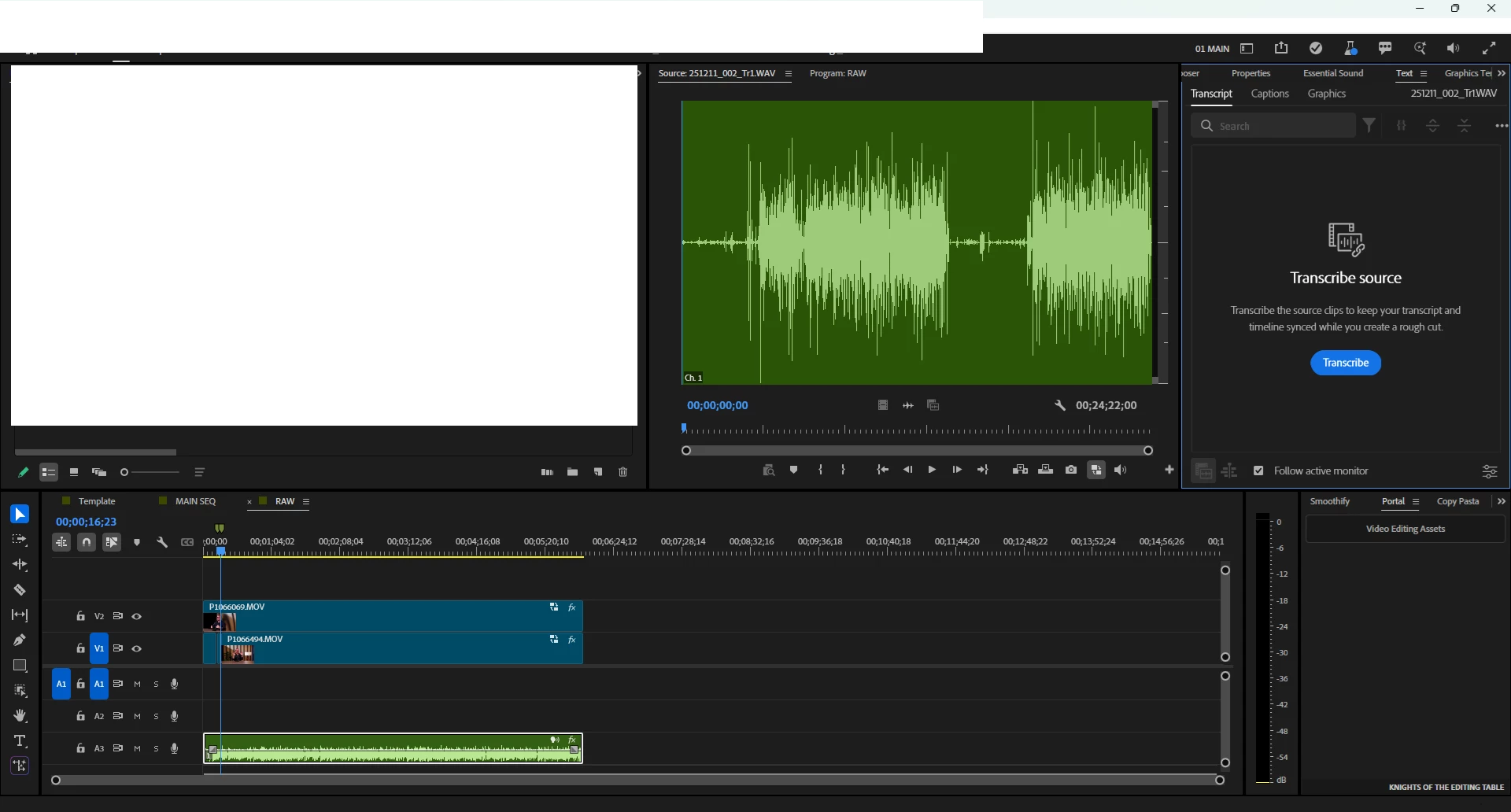
  image.png
 
System info
    Application: Premiere Pro (Beta) v26.1.0.12
    OS: Windows v10.0.26200, RAM: 63.93 GB GB, CPUs (logical): 16

    50 replies

    Cochran FIlms
    Participant
    May 28, 2026

    I am on an M5 Mac running Premiere 26.0.0 (perhaps I need to update)

    Stan Jones
    Community Expert
    Community Expert
    May 28, 2026

    @Cochran FIlms,


    I would try the update to 26.2.0. You can reinstall 26.0.0 if you need to.


    There is a transcription issue for some users mostly at 26.2.0. It starts, and seems to finish (or stop), and there is no transcription with “No dialogue found.” But most users (including me) are not affected.


    But since there are some issues, I’d use my aggressive reset on the update. First, make a backup of your preferences folder. See this and other help pages on the left:

    https://helpx.adobe.com/in/premiere/desktop/troubleshooting/preferences-and-settings-issues/reset-preferences-using-the-preferences-folder.html


    Hold shift down on first launch, and reset preferences, media cache and plugins. And create a new project and  test transcription on a single clip.


    Stan


    Stan Jones
    Community Expert
    Community Expert
    May 28, 2026

    @Cochran FIlms,


    We need to know what version you are running. A problem like this introduced in 26.0.1 (on Mac M5’s I think) was fixed in version 26.2.0.


    Stan


    Cochran FIlms
    Participant
    May 27, 2026

    Hello Adobe Support,

    I am experiencing a serious issue with the transcription and captioning feature. The transcribe tool is no longer accurately detecting clear spoken audio and is leaving out large portions of dialogue when generating captions.

    The audio in my videos is clear and understandable, but the transcription is either completely skipping words and sentences or replacing clearly spoken words with incorrect words. This is happening across multiple videos, so it does not appear to be an issue with one specific file.

    Previously, the captioning feature was extremely accurate and would catch almost everything that was said. Now, the accuracy has dropped significantly. I would estimate that the captions are currently less than 50% accurate, even when the speech is clear and easy to hear.

    The main issues I am seeing are:

    1. Clear spoken words are being ignored completely.
    2. Full phrases and sentences are missing from the captions.
    3. Words that are detected are often being replaced with incorrect words.
    4. The caption results are inconsistent across multiple different videos.
    5. The feature used to work much better, so this feels like a recent downgrade, bug, or processing issue.

    I have already tested this with multiple videos and I am getting the same poor results each time. The captions are not usable in their current state, and this is affecting my editing workflow because I rely on accurate transcription for caption creation.

    Please investigate whether there is a known issue with the transcription or captioning system, especially if there was a recent update that may have affected caption accuracy. I would also like to know if there are any recommended settings, fixes, or troubleshooting steps to restore the transcription accuracy to the level it was performing at before.

    Thank you.

    DAG82
    Participant
    January 14, 2026

    This issue was happening again as of yesterday(Tuesday 13th Jan 2026) in the latest version of Beta along with constant crashing. It ended up being unusable. The solution was to use the standard version of the software after a chat with the Adobe team and giving them access to my machine remotely.

    Participant
    December 19, 2025

    perfect, now I can see the update, this morning it wasn't available. Thank you!

    jamieclarke
    Community Manager
    Community Manager
    December 19, 2025

    Hi @benny_8355 @Filippo_D_Errico Please navigate to the creative cloud desktop app select the apps tab in the left hand sidebar then click view updates on the right and select "Check for updates" in the top right hand corner.  This will download the latest version currently 26.1.1 build 5

    DAG82
    Participant
    December 19, 2025

    I just reverted to the previous Beta version(26.0), opened up my project again and it worked fine. 

    Stan Jones
    Community Expert
    Community Expert
    December 19, 2025

    @benny_8355,


    See my post here:

    https://community.adobe.com/t5/premiere-pro-beta-bugs/p-transcribe-tool-not-working/idc-p/15638505#M7365


    That's a good workaround. See workaround 2 here, that uses the .prmi files from media analysis:

    https://community.adobe.com/t5/premiere-pro-beta-bugs/p-transcribe-tool-not-working/idc-p/15634972#M7305


    Depending on how many files you have, it might be an advantage. But the file must be imported to the Beta project after the prmi file exists.


    Stan

    Stan Jones
    Community Expert
    Community Expert
    December 19, 2025

    @Tex Jenkins,


    Thanks for posting.


    > Still not working, on Mac. Tried deleting cache.


    What build are you on? 


    Clearing the cache is a good idea. Every time I install a Beta update, I do the full shift-on-startup reset dialogue (preferences, cache, and plugin) AND create a new project. I'm Win11 and can't test Mac. What Mac OS version are you on?


    Stan


    December 19, 2025

    On a macbook M1, premier pro beta does not seem to transcribe audio, I'm switching between the new beta to use the new mask features and the previous full version to transcribe the footage