sp4ceMan
Participant
March 2, 2020
Question

Adobe Première Rush Crash & Don't start

  • March 2, 2020
  • 3 replies
  • 1244 views

Hello,


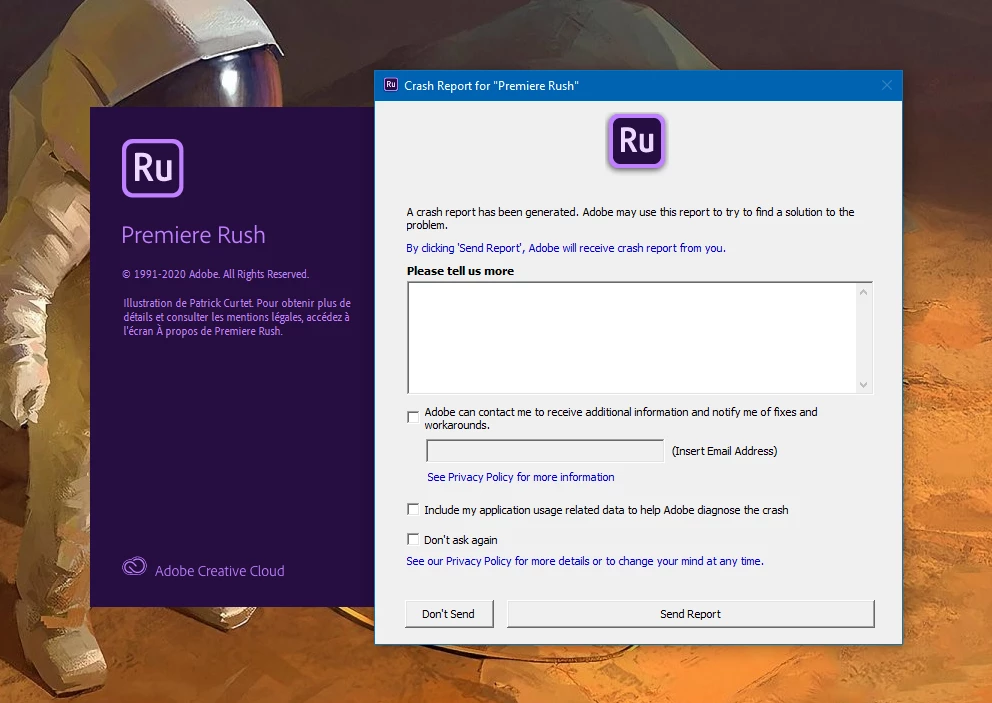
I can't launch Adobe Premiere Rush, I have an error (version 1.5.2).

I try to uninstall and install but I have the same problem.


Thanks to help me !


Bye !

This topic has been closed for replies.

3 replies

petergaraway
Adobe Employee
Adobe Employee
March 4, 2020

That's interesting that it's crashing before loading. There's a few things we can try here

1. Update to the latest NVIDIA driver - https://www.geforce.co.uk/drivers

2. Run as Administrator 

  1. Locate the Rush application (Windows C:>Program Files > Adobe, right-click it and select Properties.
  2. Once in the properties window, navigate to the compatibility tab and select Run this program as an administrator


Hope this helps! Let us know either way.


Peter


sp4ceMan
sp4ceManAuthor
Participant
March 5, 2020

Hi,

I have the latest version NVIDIA driver.

I try to run as Administrator, but I have the same problem.

Thanks.

Participant
July 27, 2020

1. Uninstall all versions of Premiere Rush you're obtaining (even if it's old or newer)

2. Restart your computer

3. Reinstall Premiere Rush to the latest version


Thank you

petergaraway
Adobe Employee
Adobe Employee
March 4, 2020

Hi HughzyBABY,


Sorry Rush is crashing on startup. One of the first things I would try is clearing your prefs and cache. Here's how
When launching Rush, hold down the Shift + Alt key until the splash screen appears and a dialog prompts. 

Let us know the results. 


Best, 

Peter

sp4ceMan
sp4ceManAuthor
Participant
March 4, 2020

Hi,

I can't, the application doesn't load components !

I try to hold down the Shift + Alt, but nothing.


Thanks.

Adobe Employee
March 5, 2020

Hello!


Can you please mention the language you installed Premiere Rush in?

Also, when you see the Crash Reporter window, please mention the link of this forum question "https://community.adobe.com/t5/premiere-rush/adobe-premi%C3%A8re-rush-crash-amp-don-t-start/td-p/10958666?page=1"


It will help us isolate the issue at our end.


Thanks in advance!

Kartika Rawat
Community Manager
Community Manager
March 4, 2020

Hi there!

We're so sorry about it. Could you share more info with us to troubleshoot further?

  • Which device are you using (OS, CPU, RAM, GPU)?
  • Are you trying to launch Rush with a specific project?

Let us know, happy to help.

Kartika

sp4ceMan
sp4ceManAuthor
Participant
March 4, 2020

Hi,

I am using Windows 10 Pro 64 bits, Intel i7-6700, 16Go RAM, NVIDIA GTX 1060.

I have trying to laucnh a specific project but he doesn't work.

I have installed an other version 2.1.12, and this version work.

But the lasted version don't work.

Thanks.