
Participating Frequently
February 27, 2019
Answered

Bespoke captions

  • February 27, 2019
  • 2 replies
  • 432 views

Hi...very new to Rush and just feeling my way about. I have worked out how to edit captions (go me!)....but what I can't work out is how do I keep the same style of caption for elsewhere in the video. At the moment I am manually editing each one - which is a massive pain in the derriere. There must be a way to save one you made earlier?

Thank you
This topic has been closed for replies.
Correct answer Meg The Dog

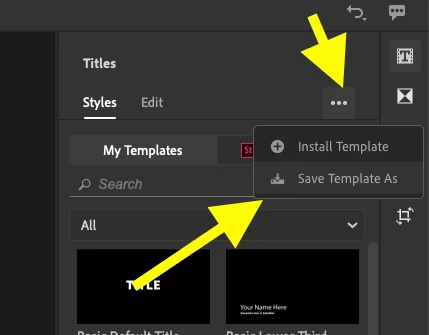
After you modify the title to your liking, with that title selected in the timeline,  go to the Titles Panel, you will see three dots next to the Styles/Edit Tabs. Click on those dots to reveal a drop down menu, choose Save Template As:

This will let you name a store the title you have created.

Next time you want to use that crated title, just drag the stored template to the timeline and modify it as you wish.

MtD

2 replies

Participating Frequently
February 27, 2019

Thank you so much!

Meg The DogCorrect answer
Inspiring
February 27, 2019

After you modify the title to your liking, with that title selected in the timeline,  go to the Titles Panel, you will see three dots next to the Styles/Edit Tabs. Click on those dots to reveal a drop down menu, choose Save Template As:

This will let you name a store the title you have created.

Next time you want to use that crated title, just drag the stored template to the timeline and modify it as you wish.

MtD