Participant
February 3, 2021
Answered

Can‘t seperate audiotrack from video

  • February 3, 2021
  • 1 reply
  • 3113 views

Thats my problem


I'm using Premiere Rush on my iPad Pro 4th Gen. - iPadOS 14.3

Premiere Rush Version: 1.5.48


When I'm holding my finger on the videopart I am seeing this:
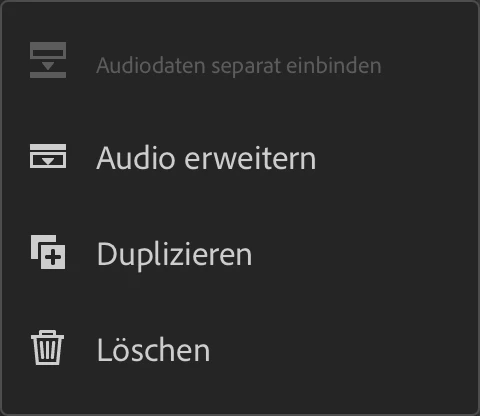
 

I do not know why it is greyed out.

Normally I am recording with two different audiotracks and when I'm importing the video in Pro I also have two - but in Rush only one, where both tracks are connected. Maybe the connection of the tracks is the problem?

Sorry for my bad english - I hope you guys can help me solving this problem
This topic has been closed for replies.
Correct answer petergaraway

Yes

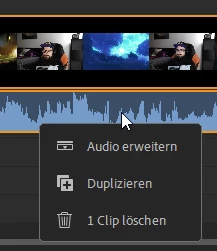
I tried it on my PC with Win 10. Same issue but on my PC there is no area which says something like "seperate audio"...I have just these options:


On my iPad Pro I can see the following:


So I have two videos, one with 1 audiotrack und the other one with 2 audiotracks and no one can be seperated. Neither on my PC, nor on my iPad. When I'm using Premiere Pro on my PC I have no issues. Both videos are .mp4 files. 


Let me know if you need more information. 🙂


Hi Gabrial,


Sorry for the confusion. I'm assuming this is happening because your clips have multi-channel audio. Rush only supports separating mono and stereo audio. 


Can you confirm that's the case?

Thanks! 


Peter 

1 reply

anissa_thompson
Community Expert
Community Expert
February 4, 2021

Hi there...  The only things I can think of are:

  1. Are you sure you've selected the media you want to split? (It's easy to accidentally tap on a nearby track and lose the focused/intended selection.)
  2. Are you sure the media you selected is a VIDEO track that has audio? The clip will automatically be greyed out if it is actually an image and not a video...


Hope this helps!

Hope this helps! Make sure to press "✔ Correct Answer" on this post if this answers your question. Happy Creating!Anissa • @anissat
Participant
February 4, 2021

Hey, thanks gir the respons 🙂


Yes, Im sure I selected the right media. The only one I imported was the Video.

Maybe some issues with .mp4 files? I tried a video with just one audiotrack - same result. Cant split it 😕😕

petergaraway
Adobe Employee
Adobe Employee
February 5, 2021

Hi Peter,


"Channel" was my missing word. xD

One of my Video have just one Audio-Channel and didnt work as well. 😕😕


If you're able, can you send me that file so I can test it? I'm not able to reproduce the issues with my one audio channel clip. 


Cheers!


Peter