

Photography Format
Participant
November 4, 2021
Answered

Creative Cloud User Interface Perpetual Prompt

  • November 4, 2021
  • 1 reply
  • 196 views

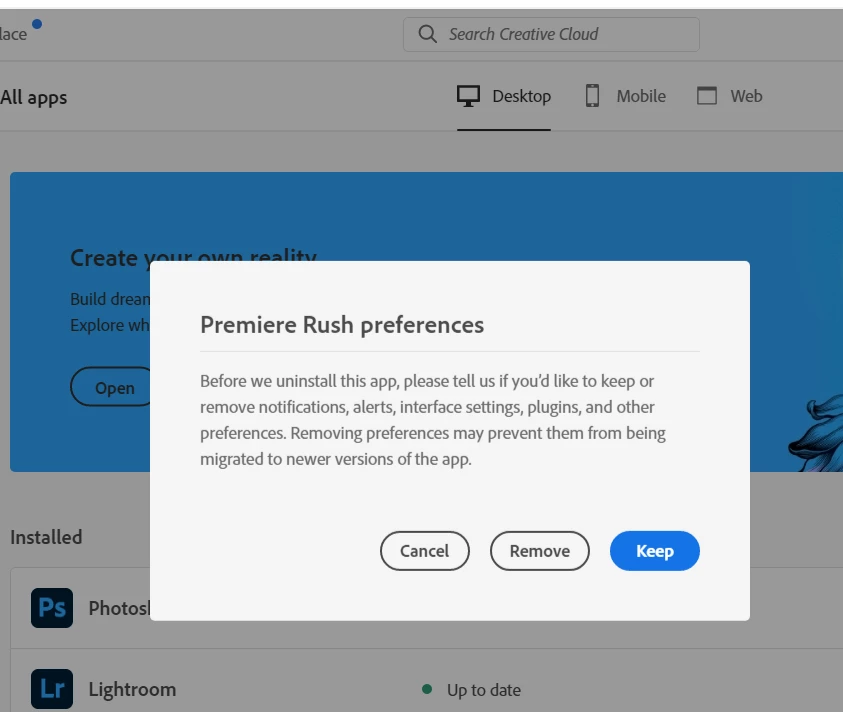
I had Rush installed on my Windows 10 PC for a while and never used it. I removed it from Windows a week ago and now everytime I open a video file to view, the Creative Cloud userface keeps opening up with the Premier Rush Preferences - Cancel | Remove | Keep


This prompt pops up every single time I open and close a video file regardless of what option I choose, which is mostly "Remove". This is becoming a real nuisance. Any help would be gratefully appreciated.

Cheers,
Paul Thomas
This topic has been closed for replies.
Correct answer Kartika Rawat

Hi Paul!

Sorry about that. Could you check if you removed Premiere Rush following these steps? https://helpx.adobe.com/creative-cloud/help/uninstall-remove-app.html


Let us know.

Thanks, 

Kartika

1 reply

Kartika Rawat
Community Manager
Kartika RawatCommunity ManagerCorrect answer
Community Manager
November 8, 2021

Hi Paul!

Sorry about that. Could you check if you removed Premiere Rush following these steps? https://helpx.adobe.com/creative-cloud/help/uninstall-remove-app.html


Let us know.

Thanks, 

Kartika

Photography Format
Participant
November 11, 2021

Hi Kartika,

Thank you for your reply. Actually I wasn't aware that the uninstall process had to be carried out through Creative Cloud. I uninstalled from Windows Control Panel. Hence the perpetual Rush popup. The problem has been resolved now.


Sincere thanks,

Paul

Kartika Rawat
Community Manager
Community Manager
November 11, 2021

That's so awesome to hear. Give us a shout if you need anything else.


Thanks,

Kartika