 Adobe Community

- Home
- Premiere Rush
- Discussions
- Re: Error after error rendering while exporting
- Re: Error after error rendering while exporting
Error after error rendering while exporting

Copy link to clipboard
Copied
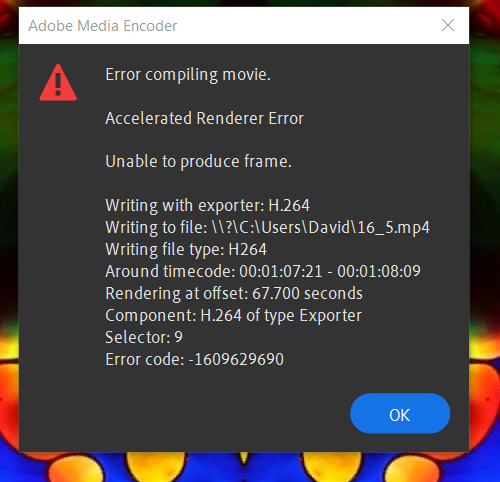
After nearly 15 hours trying to export with the error message of can not compile frame..... the research I have found on this tells me this has been an issue for awhile. Hopefully turning off my GPU (which was bought just for this issue) and letting this render for the 5 hours seems to be the only solution as I have been trying all other suggerstions with no luck. Is this going be fixed??? or should I look for other capiable software??


 8
Replies
8
8
Replies
8




Copy link to clipboard
Copied
Hi david21212038dv0n!
Sorry about the error. Can you share the screenshot of the error message? Also, let us know your system details (OS, CPU, RAM, GPU)?
Let us know.
Thanks,
Kartika
Copy link to clipboard
Copied
I am running Windows 10 on a 10th gen i9 with 64gb ram and and rtx 2070 GPU.

Copy link to clipboard
Copied
Hi David,
So sorry about this frustrating behavior. Right on export too. That stinks. OK, I think you probably have a conflict with the GPU, so I would focus my efforts there.
- Perform a clean installation of the most current video drivers. You have an Nvidia GPU, right? Go directly to this site to search for the proper studio drivers (studio drivers are under download type, don't use the default game ready ones).
- If that is not working, try disabling hardware accelerated encoding and decoding in Rush's Preferences panel. Note that this step requires a restart.
I see a lot of people using Premiere Pro having the same problem, so I will continue to search for a solution for you. Sorry again for the inconvenience.
Thank You,
Kevin
Copy link to clipboard
Copied
Tried all of these solutions and issue is still there. Only thing I got to work was diabling my Nvidia GPU and using my generic window driver. This was slow and painstaking as it left my pc usless during render but did get the job done.
Copy link to clipboard
Copied
Sorry, David. Another thing I would try is updating your Intel drivers for the iGPU. Almost forgot about that. Hope that works.
Thanks,
Kevin
Copy link to clipboard
Copied
No new or udated drivers solved the issue.
Copy link to clipboard
Copied
So sorry that did not work, David. Say, what's going on at 1:07:21 in your timeline? Do you have a graphic or effect on the clip there? You might try removing it. Does it work then? Please let the community know.
Thanks,
Kevin
Copy link to clipboard
Copied
No graphics. This is nothing but a slideshowwith transitions and pan and zoom. When it first crashed I deleted the frames at that time stamp. Then again at a different time stamp and again until it was apperant this just dosent work either. at this point I am reseaching new software as a solution as this is too time consuming for my currently workflow. Thank you for trying to help fix and solve this issue.


 AdChoices