
Participant
July 12, 2020
Question

Green and Black Stripes in Rush
  • July 12, 2020
  • 2 replies
  • 709 views

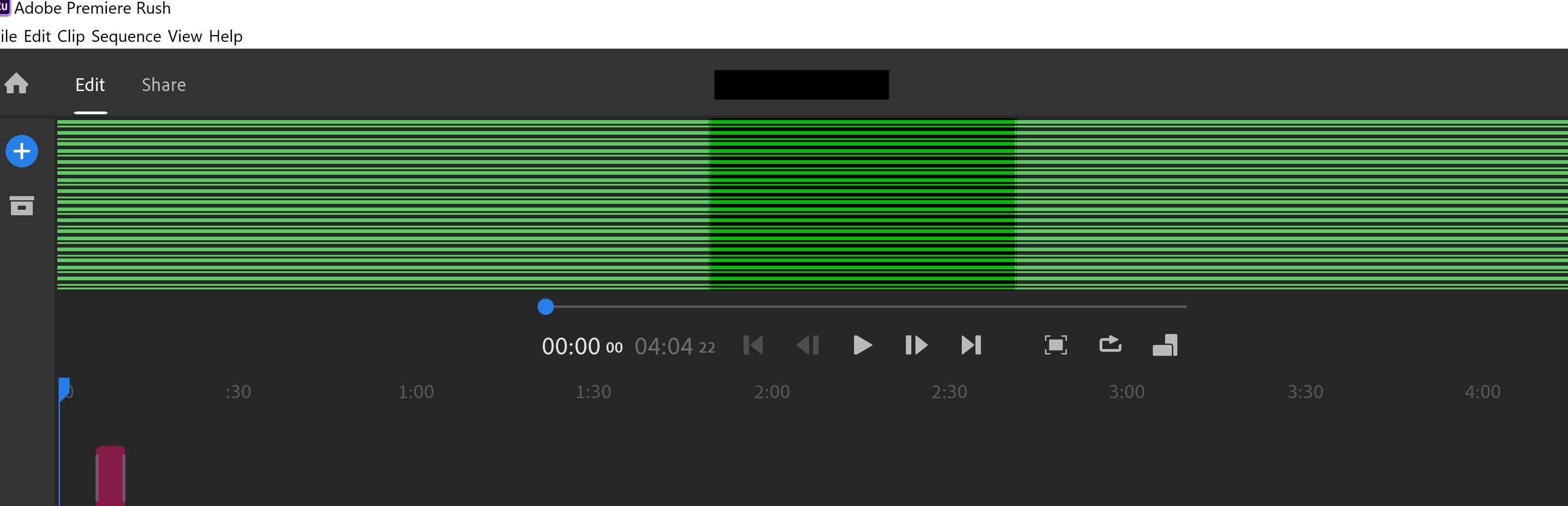
I have been using Premiere Rush for around 4 months now, and it has been working well. However, today when I opened it, I keep getting these green and black stripes on the screen (See attachment). It's a problem that is affecting not just my latest video, but even those which I have edited in the past.


I am using v1.5.16 (latest version) now. I tried restarting the computer, and reinstalling, which didn't work. I also tried uninstalling and installing v1.5.12 instead, which also didn't solve the problem.


Anyone facing the same issue and know how to fix it? Thank you!

This topic has been closed for replies.

2 replies

Participant
November 11, 2020

Did you ever get an answer to this? Mine now looks just like this.

Participant
November 11, 2020
I didnt.... What i did to rectify it was to revert to one of the older
versions. After a few months it happened again once more and i just did the
same thing. Now I don't ever update to the latest version. Would be great
if adobe can fix this issue!!
Participant
November 12, 2020
I contacted support and these are the directions I was given for my
specific computer.
He said keeping it on the Microsoft Display Adapter will make it work for
me.

1)Open Device Manager
2)Expand Display Adapter
3)Right Click on the Graphics Card and Click on Update
4)It will ask ‘How do you want to search for Driver?’
5)Choose ‘Browse my Computer for Browser Software’
6)Choose ‘Let me pick from available drivers on my computer’
7)Select Standard VGA or Microsoft Display Adapter.

I would like to inform you that the driver which you are using is not
compatible with the application. So kindly go through the below link for
the recommended graphic card of the application:

https://helpx.adobe.com/in/premiere-pro/user-guide.html/in/premiere-pro/system-requirements.ug.html
Just Shoot Me
Legend
July 12, 2020

I moved your post over from the poorly named Community Help forum, which is for getting help using this forum system, to a better forum, Premiere Rush


So people don't have to download the image you have attached to your post please Edit your post to remove the Attached screen shot and Include it in the body of the text of your post.

You do that by Clicking the "More..." link at the bottom of your post, Selecting "Edit Message" and then use the "Insert Photos" icon in the tool bar at the top of the Post/Reply/Edit dialog box like this.


Thank you.

I hope this helps. Best of luck to you.